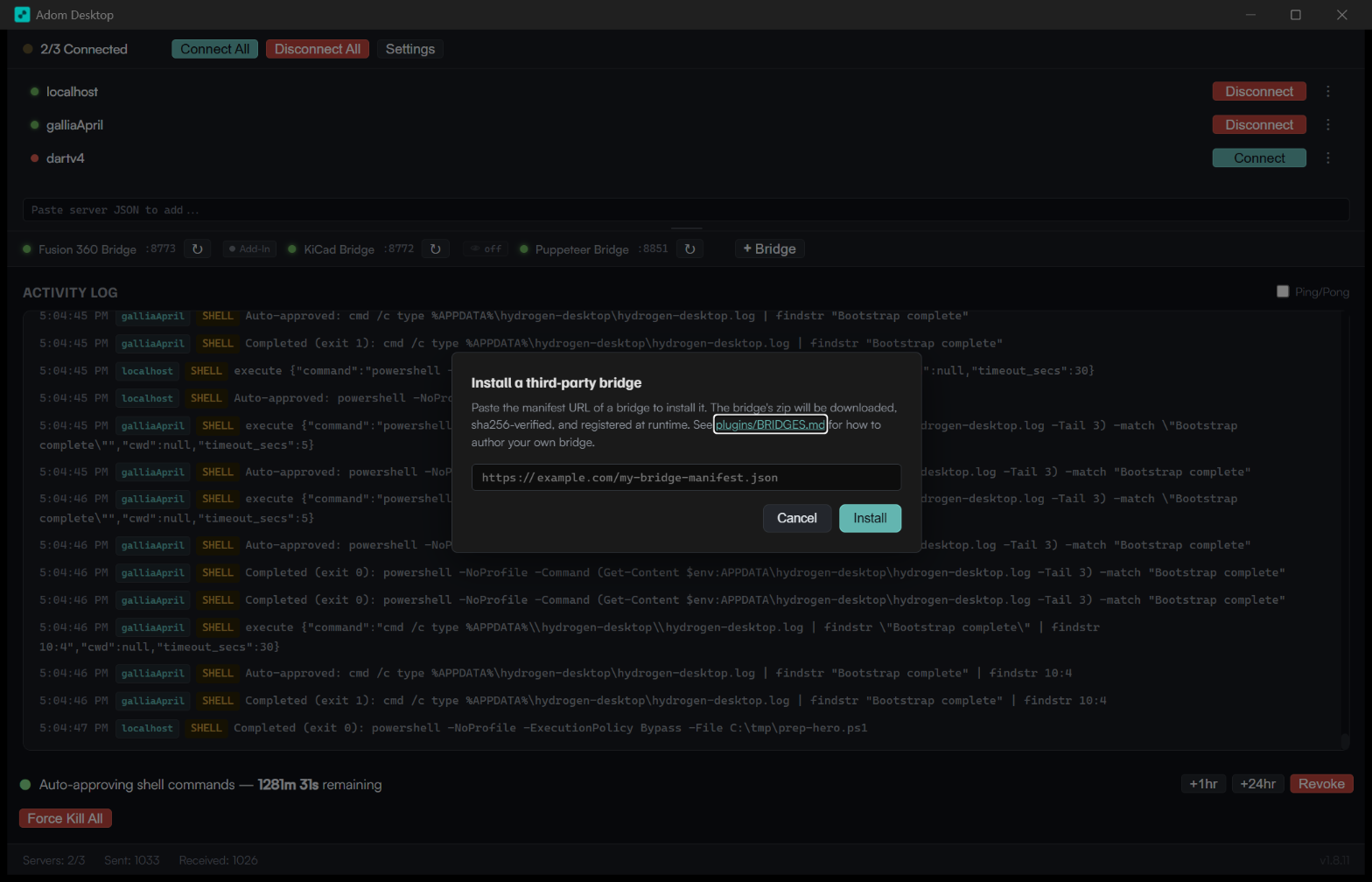
Writing a third-party Adom Desktop bridge
Public version of this guide:
apps/adom-desktop-bridgeson the Adom Wiki. The wiki page is the canonical user-facing copy and is what the GUI's "+ Bridge" install modal links to (the adom-inc GitHub repo is private). When you update this file with breaking schema changes or new lifecycle commands, also republish the wiki page viaadom-wiki page edit apps/adom-desktop-bridges --field content --body-md <this file>.
v1.8.0+ supports dynamic bridges: any zip with a bridge.json at its root can be installed via adom-desktop bridge_install --manifestUrl <wiki-or-github-url>. This lets community authors ship bridges for Altium, MATLAB, Rohde & Schwarz oscilloscopes, Keysight, OrCAD, anything — without coordinating with the Adom Desktop release cycle.
Try it now — the hello-python and hello-rust sample bridges
Two parallel reference bridges are hosted on the Adom Wiki, one per language. Both expose the same two verbs (*_ping / *_echo) under different prefixes (hellopy_ / hellors_), so they can be installed simultaneously for a side-by-side demo. Both use port: 0 (dynamic OS-assigned ports — v1.8.31+) so no collision is possible.
| Flavor | Manifest URL | Verb prefix | Port | When to fork |
|---|---|---|---|---|
| Python (stdlib only, ~80 lines) | …/hello-python-bridge-manifest.json | hellopy_ | 8890 | Vendor has Python bindings, fast dev iter, I/O-bound work |
Rust (tiny_http + serde, single static binary, ~120 lines) | …/hello-rust-bridge-manifest.json | hellors_ | 8891 | No Python runtime on user's machine, CPU-bound, type safety |
Both manifest URLs are under https://wiki-ufypy5dpx93o.adom.cloud/static/apps/adom-desktop/.
Install from the GUI
- Click + Bridge in Adom Desktop's bridge bar
- Paste one (or both) of the manifest URLs into the dialog, click Install
- New chips appear ~2 seconds later with a small ✦ marker (third-party indicator)
Install both from the CLI
# Install the Python flavor
adom-desktop bridge_install '{"manifestUrl":"https://wiki-ufypy5dpx93o.adom.cloud/static/apps/adom-desktop/hello-python-bridge-manifest.json"}'
adom-desktop hellopy_ping
# → {"success":true,"output":"Hello from the Python sample bridge v1.1.0!","language":"python",...}

# Install the Rust flavor (can coexist with hello-python)
adom-desktop bridge_install '{"manifestUrl":"https://wiki-ufypy5dpx93o.adom.cloud/static/apps/adom-desktop/hello-rust-bridge-manifest.json"}'
adom-desktop hellors_ping
# → {"success":true,"output":"Hello from the Rust sample bridge v1.1.0!","language":"rust",...}

# Echo through both
adom-desktop hellopy_echo '{"message":"world"}'
# → {"success":true,"output":"echo (python): world",...}
adom-desktop hellors_echo '{"message":"world"}'
# → {"success":true,"output":"echo (rust): world",...}

# Both appear in bridge_list
adom-desktop bridge_list
# → bundled three + "hello-python" + "hello-rust"
Uninstall
adom-desktop bridge_uninstall '{"name":"hello-python"}'
adom-desktop bridge_uninstall '{"name":"hello-rust"}'
Each bridge's cache dir + registry entry are removed; the chips disappear from the bar.
The sources live at:
scripts/sample-bridges/hello-python/—bridge.json+server.py(~120 lines ofhttp.server.BaseHTTPRequestHandler)scripts/sample-bridges/hello-rust/—bridge.json+Cargo.toml+src/main.rs(~140 lines oftiny_http) + pre-builthello-rust.exe(~300 KB)
Fork whichever flavor matches your target's natural ecosystem.
Directory layout
my-bridge/
├── bridge.json         ← REQUIRED — schema below
├── BRIDGE_VERSION      ← optional, semver line (kept in sync with bridge.json's version field)
├── server.py           ← or server.js, or my-bridge.exe — your bridge's entrypoint
├── handlers/           ← your code
│   ├── ...
└── README.md           ← optional, recommended
bridge.json schema
{
  "manifest_version": 1,
  "name": "altium",
  "displayName": "Altium Designer",
  "version": "1.0.0",
  "description": "One-line description shown in bridge_list output.",
  "homepage": "https://github.com/your-org/adom-bridge-altium",
  "author": "Your Org",
  "license": "MIT",
  "spawn": {
    "kind": "python",
    "entrypoint": "server.py",
    "port": 0,
    "healthEndpoint": "/status",
    "stopMethod": "kill",
    "killImageName": "python.exe"
  },
  "verbPrefixes": ["altium_"],
  "verbs": [
    "altium_open_project",
    "altium_export_step",
    "altium_run_drc"
  ],
  "dependencies": {
    "python": ">=3.11",
    "altium-designer": ">=24"
  },
  "category": "EDA",
  "tags": ["pcb", "altium", "commercial"]
}
Field reference
name(required, lowercase, no spaces). The directory name + cache key. Must be unique across the registry.displayName— human-friendly shown inbridge_list+ future GUI bridge panel.version(required, semver). Each ship bumps this.spawn.kind—python|node|exe. Determines how Adom Desktop launches the bridge.python→ Adom Desktop finds Python in PATH and runspython <entrypoint> --port <port>. Good when the vendor's SDK has Python bindings.node→ Adom Desktop finds Node in PATH and runsnode <entrypoint> --port <port>. Good for ecosystem reuse (Puppeteer, Playwright, etc.).exe→ Adom Desktop runs<entrypoint> --port <port>directly. The entrypoint must be a pre-built executable in the zip. Good for Rust, Go, .NET single-file builds, etc. — no runtime install required on the user's machine.
spawn.entrypoint— relative path inside the bridge dir (e.g.server.py,server.js,my-bridge.exe).spawn.port— set to0(v1.8.31+ recommended). Adom Desktop picks an OS-assigned ephemeral port at spawn time and passes it to your--portarg. No collision possible between bridges. Hardcoded ports still work for back-compat but are deprecated — anything you pick will eventually collide with someone (Hydrogen Desktop's bridges already used 8772/8773/8851; static-port collisions are the #1 source of bridge "won't start" bugs). Bridge ports are internal plumbing — callers always route throughadom-desktop <prefix>_<verb>, never reach a bridge directly.spawn.healthEndpoint— path Adom Desktop polls to confirm the bridge is alive (e.g./status,/health). v1.8.31+ accepts a path-only fragment (recommended) and constructs the URL using the runtime port. Legacy full URLs (http://127.0.0.1:8881/status) still parse — the host+port get replaced at runtime.spawn.stopMethod—kill(process-handle Child::kill, NOTtaskkill /im— that would nuke ALL Pythons on the box),sigterm(graceful), orgraceful_endpoint(POST to an endpoint).spawn.killImageName— legacy field, only used if Adom Desktop falls back to image-name kill. With v1.8.31's dynamic ports + process-handle kill this is rarely needed. Set to your process name for safety (python.exe/node.exe/ your binary name).verbPrefixes— list of CLI verb prefixes this bridge owns (e.g.["altium_"]). Allaltium_*verbs route here.verbs— explicit verb list. Used inbridge_listto advertise capabilities; doesn't affect routing.
Packaging + shipping
Use the same scripts/release-bridge.sh flow Adom Desktop uses for its own bridges. Adapted for third parties:
# In your bridge repo:
python3 -c "
import zipfile, os, fnmatch
EXCLUDE = ['*/__pycache__/*', '*.pyc', '.history/*', '*/node_modules/*']
with zipfile.ZipFile('my-bridge-v1.0.0.zip', 'w', zipfile.ZIP_DEFLATED) as zf:
    for root, dirs, files in os.walk('.'):
        for f in files:
            rel = os.path.relpath(os.path.join(root, f), '.')
            if any(fnmatch.fnmatch(rel.replace(os.sep, '/'), g) for g in EXCLUDE):
                continue
            zf.write(os.path.join(root, f), rel)
"

# Compute SHA256 of the zip
sha256sum my-bridge-v1.0.0.zip

# Write the manifest the GUI polls
cat > my-bridge-manifest.json <<EOF
{
  "manifest_version": 1,
  "version": "1.0.0",
  "url": "https://your-host/my-bridge-v1.0.0.zip",
  "sha256": "<sha256 from above>",
  "size": <bytes>,
  "released_at": "$(date -u +%Y-%m-%dT%H:%M:%SZ)"
}
EOF
Host both files anywhere reachable by HTTPS — GitHub Pages, your own CDN, the Adom Wiki if you contribute to the official registry.
Installing
Users install your bridge with one command:
adom-desktop bridge_install '{"manifestUrl":"https://your-host/my-bridge-manifest.json"}'
The GUI:
- Fetches
my-bridge-manifest.json - Downloads the referenced zip
- SHA256-verifies against the manifest
- Extracts to
%LOCALAPPDATA%\Adom Desktop\bridges-cache\<name>\(thenamecomes from yourbridge.json) - Rescans the runtime registry — your bridge is now discoverable via
bridge_list
The next CLI call to one of your verbPrefixes auto-spawns the bridge process.
Updating
Bump bridge.json's version + BRIDGE_VERSION, rebuild the zip, re-upload, update the manifest. Users:
adom-desktop refresh_bridges # picks up new versions from manifest URLs they previously installed from
(Currently refresh_bridges only polls the three core wiki manifests. The follow-up work — tracking third-party manifest URLs in user state so they auto-refresh — lands in v1.8.x.)
Lifecycle controls (from cloud Docker, or local GUI)
adom-desktop bridge_list                              # see everything
adom-desktop bridge_pause '{"name":"altium"}'         # stop routing verbs
adom-desktop bridge_resume '{"name":"altium"}'
adom-desktop bridge_uninstall '{"name":"altium"}'     # remove from cache
Trust + security
For v1.8.0 the trust model is SHA256-verification of the wiki-hosted zip against the manifest. Bridges run with the user's privileges; install from sources you trust.
Future work (v1.9.0+):
- Optional Ed25519 signing of bridge zips with the Adom-Inc public key for "verified" status
- Per-bridge sandboxing (limited filesystem / network access declared in manifest
permissionsfield) - Community submission flow on the wiki so contributors don't need a GitHub account
Reference implementations
Every bridge below has its own dedicated wiki page with hero, install/uninstall recipes, and a "fork this" walkthrough. The bridges registry is the canonical directory — both humans browse it and the GUI's Browse tab parses it.
Hello-world starter templates — fork these for a 5-minute "does this thing work?" loop:
- hello-python:
scripts/sample-bridges/hello-python/— ~80 lines, stdlib only,kind:python - hello-rust:
scripts/sample-bridges/hello-rust/— ~140 lines,tiny_http+ serde,kind:exe, single 300-KB static binary
Adom-shipped bridges — canonical full-complexity examples; fork their layout for a real vendor integration:
- kicad:
plugins/kicad/— Python, complex, multi-instance (one bridge per KiCad GUI exe) - puppeteer:
plugins/puppeteer/— Node, single-instance, recording-capable - fusion360:
plugins/fusion360/— Python, simpler, command-passthrough to Fusion add-in
Get listed
Once your bridge is stable, add it to the bridges registry — that's the canonical machine-readable directory the GUI's Browse tab parses to discover what's installable. Two paths:
- PR-based (preferred): open a PR against
adom-inc/adom-desktopadding your row to the "Community bridges" table in this file (plugins/BRIDGES.md). A maintainer mirrors it to the wiki on the next sync. See the registry page's submission section for the row format + review criteria. - Direct wiki edit: if you have an Adom account,
adom-wiki page edit apps/adom-desktop-bridges-registry --field content --body-md <patch>. Maintainers review and either keep or revert.