APP

Adom Desktop

Laptop bridge: screenshots, file transfer, notifications, KiCad + Fusion 360 control, real-Chrome (pup) automation. One install gives Claude the main + pup + kicad + fusion skills.

Ubuntu install demo with voiceover โ€” Claude Code installs Adom Desktop on Ubuntu, connects to cloud container, and verifies the bridge

๐Ÿ’ฌ Sample prompts Paste any of these into Claude Code to use this app
Install Install adom-desktop on this container
Screenshot laptop Take a screenshot of my Windows desktop
Open KiCad Open this schematic in KiCad on my laptop
Open Fusion Open this design in Fusion 360
Pup debug Open this URL in real Chrome on my laptop and screenshot it for visual debugging
Send file Copy this file to my laptop desktop
โšก Install this skill

Paste this into Claude Code (VS Code panel, Adom editor, or terminal) to install:

Fetch the Adom Wiki app "Adom Desktop" (slug: adom-desktop) at https://wiki-ufypy5dpx93o.adom.cloud/wiki/apps/adom-desktop. This is a knowledge-only app โ€” no binary. Call GET https://wiki-ufypy5dpx93o.adom.cloud/api/v1/pages/adom-desktop, extract the .page.skill_source field, and save it to ~/.claude/skills/adom-desktop/SKILL.md (create the directory). Then confirm by showing the first 10 lines of the saved file.

Adom Desktop

Bridge between Claude (running in an Adom Docker container) and the user's desktop applications. One install gives Claude every desktop verb it needs โ€” KiCad, Fusion 360, Chrome, file transfer, screenshots, shell, notifications, screen recording โ€” over a single CLI binary that auto-updates from this wiki.

v1.8.31 highlights:

  • Direct API with port resilience โ€” fallback chain 8770โ†’8779, discovery file at ~/.adom/direct-api-port, per-verb command timeouts, graceful shutdown on app exit. Docker connects in <100ms even after laptop sleep/wake.
  • Dynamic bridge ports โ€” every bridge binds to an OS-assigned ephemeral port. No more collisions with Hydrogen Desktop's 8772/8773/8851. Third-party bridges no longer need to pick a number.
  • Bridge ecosystem v1.8.0+ โ€” three official bridges (KiCad, Fusion 360, Puppeteer) + two sample templates (Python, Rust) + a community-curated bridges registry. Install any bridge with adom-desktop bridge_install '{"manifestUrl":"โ€ฆ"}'.
  • Auto-update from the wiki (v1.3.39+) โ€” polls version.json every 4h. Settings โ†’ Updates lets users pick prompt / auto / off.
  • Single-instance enforcement โ€” tauri-plugin-single-instance ensures only one GUI runs even if autostart + manual launch overlap.

What it is

Adom Desktop is a small Tauri 2 (Rust + WebView2/WebKit) desktop application that runs on the user's machine and acts as a WebSocket relay between Docker Claude and local applications. The architecture has three layers:

[ Docker container ]                [ User's machine ]
                                          โ”‚
  adom-desktop CLI  โ—„โ”€โ”€โ”€โ”€ HTTP/WS โ”€โ”€โ”€โ”€โ–บ  Adom Desktop (Tauri GUI)
       (Linux)                            โ”‚
                                          โ”œโ”€โ”€ KiCad bridge        (port-assigned at spawn)
                                          โ”œโ”€โ”€ Fusion 360 bridge   (port-assigned at spawn)
                                          โ”œโ”€โ”€ Puppeteer bridge    (port-assigned at spawn)
                                          โ”œโ”€โ”€ 3rd-party bridges   (port-assigned at spawn)
                                          โ”œโ”€โ”€ Direct API endpoint (8770โ†’8779 fallback)
                                          โ””โ”€โ”€ File / shell / notify primitives

Every desktop integration is implemented as a bridge โ€” an independently-versioned process Adom Desktop spawns on demand, with a bridge.json manifest declaring verb prefixes (kicad_*, fusion_*, browser_*, etc.). Adom Desktop allocates an ephemeral port at spawn time, passes it as --port <N>, and polls /status until ready.

Same install gives Claude:

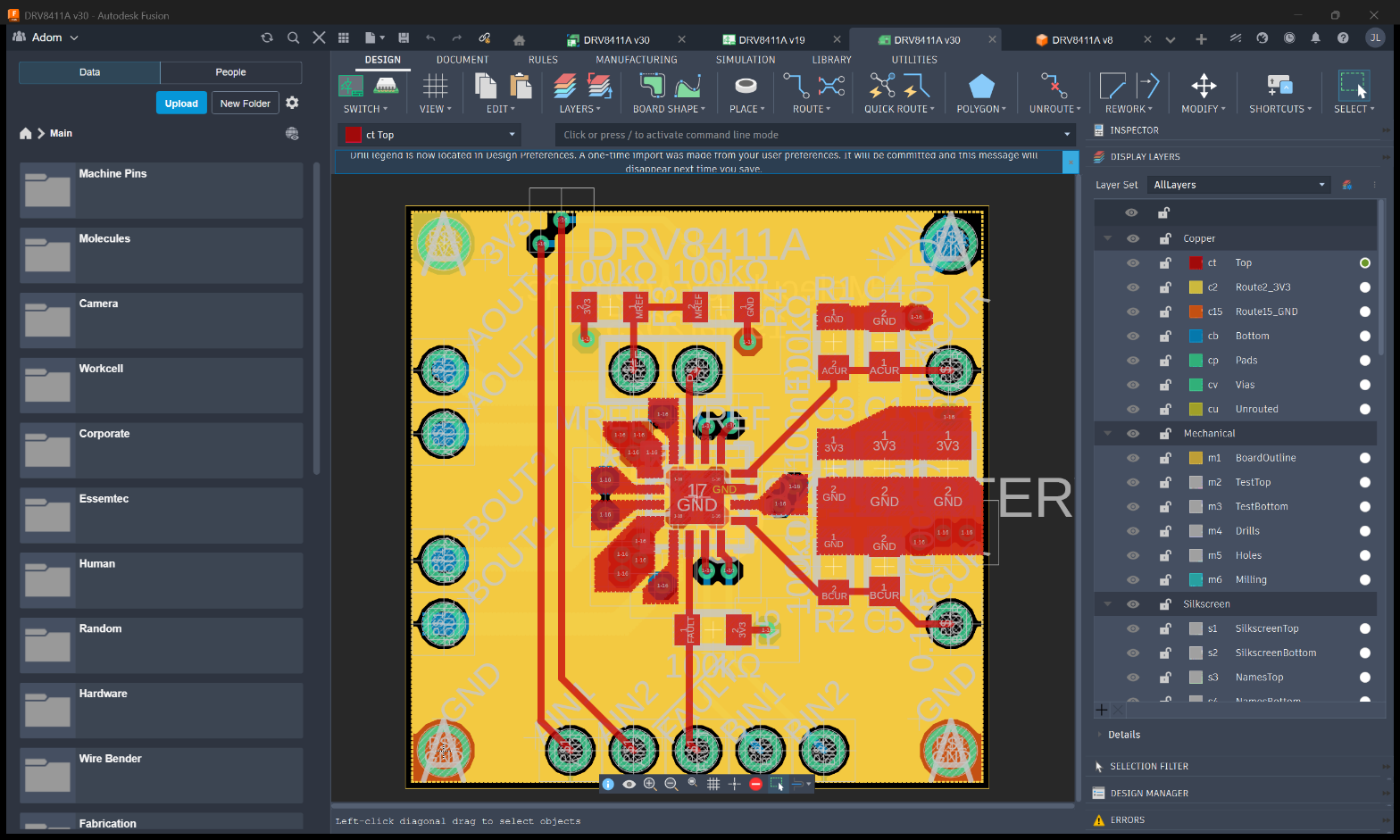
  • KiCad (via adom-bridge-kicad) โ€” open boards/schematics, install symbols/footprints, DRC, screenshot editor windows, watch projects for changes
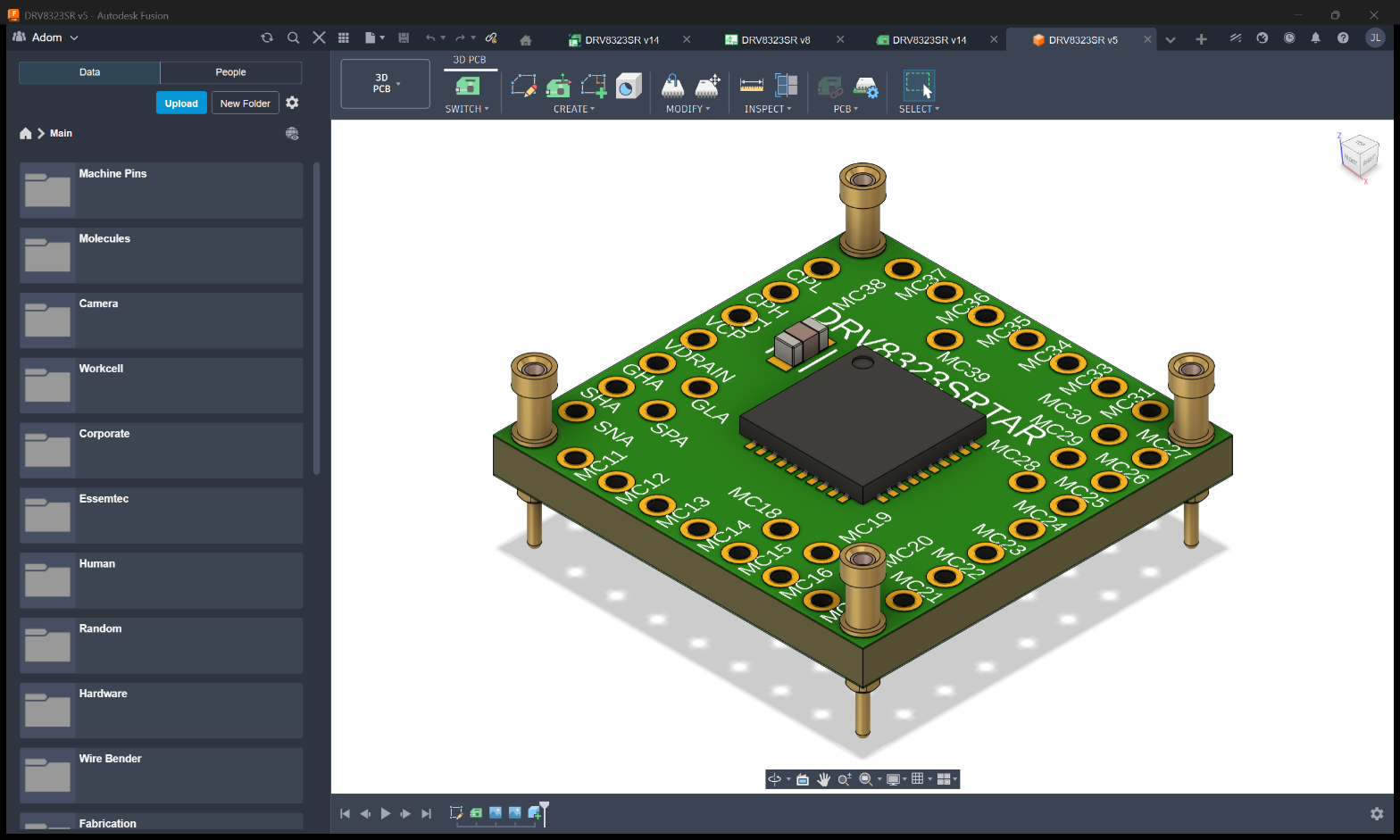
  • Fusion 360 (via adom-bridge-fusion) โ€” launch Fusion, export STEP/IGES/STL/3MF/USDZ/OBJ/DXF/DWG/Gerbers, search cloud files, run EAGLE library commands
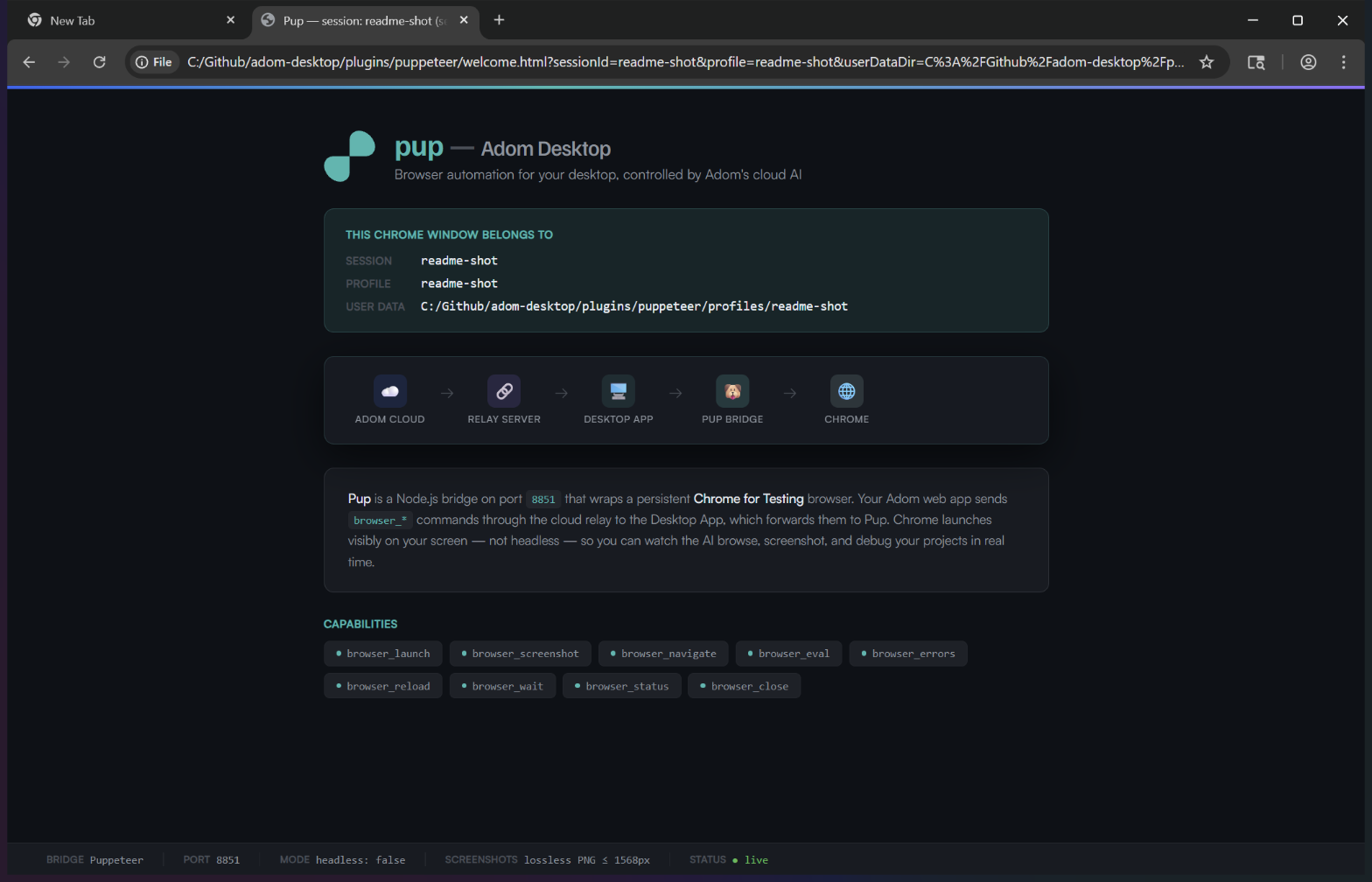
  • Browser (via adom-bridge-puppeteer) โ€” Chrome for Testing on the desktop, multi-tab + multi-session, screencast recording, full-desktop screen recording with HUD
  • File transfer โ€” push_file / pull_file for moving artifacts between Docker and the desktop
  • Shell โ€” shell_execute runs commands on the user's machine with their identity
  • Notifications โ€” native OS toasts with optional action buttons
  • Screenshots โ€” desktop_list_windows, desktop_screenshot_window, desktop_screenshot_screen

Plus a bridge SDK so the community can ship bridges for Altium, MATLAB, instrument SDKs, anything else โ€” without coordinating with the Adom Desktop release cycle.


Install (per platform)

Docker side (Linux CLI)

# v1.4.x+: get the latest CLI binary from the wiki (single static file)
adom-wiki asset get apps/adom-desktop docker_binary -o /usr/local/bin/adom-desktop
chmod +x /usr/local/bin/adom-desktop
adom-desktop --version   # adom-desktop 1.8.31 (<sha>, built <ts>)
adom-desktop install     # deploys the skill, starts the relay on :8765/:8766

The CLI auto-detects the user's desktop via the direct API (~/.adom/direct-api-port, fallback range 8770-8779) and falls back to the WebSocket relay when not in direct mode.

Windows

Download the latest installer (Adom Desktop_<version>_x64-setup.exe). NSIS installer with POSTINSTALL auto-launch. v1.3.39+ auto-updates from the wiki on every launch + every 4h.

macOS

Download the .dmg from the wiki or GitHub Releases. Mount โ†’ drag to Applications โ†’ strip Gatekeeper quarantine on first launch:

xattr -cr "/Applications/Adom Desktop.app"

Linux (Ubuntu / Debian)

Either the .deb package or the standalone binary from the wiki:

sudo dpkg -i Adom-Desktop_<version>_amd64.deb
# OR standalone:
chmod +x adom-desktop-ubuntu-<version> && ./adom-desktop-ubuntu-<version>
# Optional runtime deps for full feature parity:
sudo apt install wmctrl xdotool imagemagick scrot libnotify-bin

Auto-start the relay on every Docker session

The relay is NOT started automatically when the Docker container boots. Every time this skill is invoked, run this idempotent block at the top of the session before any other adom-desktop subcommand:

if ! curl -sf http://127.0.0.1:8766/health >/dev/null 2>&1; then
  nohup adom-desktop serve > /tmp/adom-desktop-relay.log 2>&1 &
  disown
  for _ in 1 2 3 4 5 6; do
    sleep 0.5
    curl -sf http://127.0.0.1:8766/health >/dev/null 2>&1 && break
  done
fi
adom-desktop ping

nohup ... & disown (NOT plain &) is critical. Without nohup + disown the relay dies as soon as the tool call that started it ends, and the next adom-desktop command fails with Cannot reach relay server (port 8766).

If ping succeeds โ†’ desktop is connected, proceed. If it returns No desktop client connected โ†’ run adom-desktop setup_desktop and ask the user to verify the desktop app is running.


Bridge ecosystem

BridgeStatusVerbsWiki page
KiCadOfficial, bundledkicad_* (board/schematic open + DRC + symbol/footprint install + watch + screenshot)adom-desktop-kicad-bridge
Fusion 360Official, bundledfusion_* (open + export STEP/IGES/STL/3MF/USDZ/OBJ/DXF/DWG/Gerbers + cloud search + EAGLE)adom-desktop-fusion-bridge
PuppeteerOfficial, bundledbrowser_* + desktop_* (browser automation + screen recording + multi-tab)adom-desktop-puppeteer-bridge
hello-pythonSamplehellopy_* (ping + echo, ~80 lines stdlib)adom-desktop-hello-python-bridge
hello-rustSamplehellors_* (ping + echo, ~140 lines, single static binary)adom-desktop-hello-rust-bridge

Browse the full bridges registry for everything installable + the submission flow for community bridges. Read the bridge SDK guide for the bridge.json schema, packaging, and lifecycle.

# Install any bridge from a manifest URL
adom-desktop bridge_install '{"manifestUrl":"https://wiki-ufypy5dpx93o.adom.cloud/static/apps/adom-desktop/hello-python-bridge-manifest.json"}'

# Lifecycle controls
adom-desktop bridge_list
adom-desktop bridge_pause '{"name":"hello-python"}'
adom-desktop bridge_resume '{"name":"hello-python"}'
adom-desktop bridge_uninstall '{"name":"hello-python"}'

# Refresh any bridges with newer wiki manifests
adom-desktop refresh_bridges

Direct API (v1.8.31+)

When the Docker container and the user's machine can talk directly (cloud workspace + local laptop), the CLI prefers the direct API over the WebSocket relay:

  • Discovery file at ~/.adom/direct-api-port (host:port format) โ€” written by Adom Desktop on every successful bind
  • Fallback port range 8770โ†’8779 โ€” if 8770 is held by a zombie socket from a previous session, Adom Desktop walks the range with SO_REUSEADDR until it finds a free port
  • Per-verb command timeouts โ€” search / walk verbs get 620s; exports get 320s; everything else 120s
  • Graceful shutdown โ€” Tauri's RunEvent::Exit triggers direct_api::shutdown() which cleans the discovery file
  • Live-owner probe before walking โ€” 1s timeout (HD's Python bridges' slow /health works inside that window)

Override the bind address via ADOM_DIRECT_LISTEN_ADDR (default 127.0.0.1).


Screen recording (v1.3.30+)

Two recording surfaces:

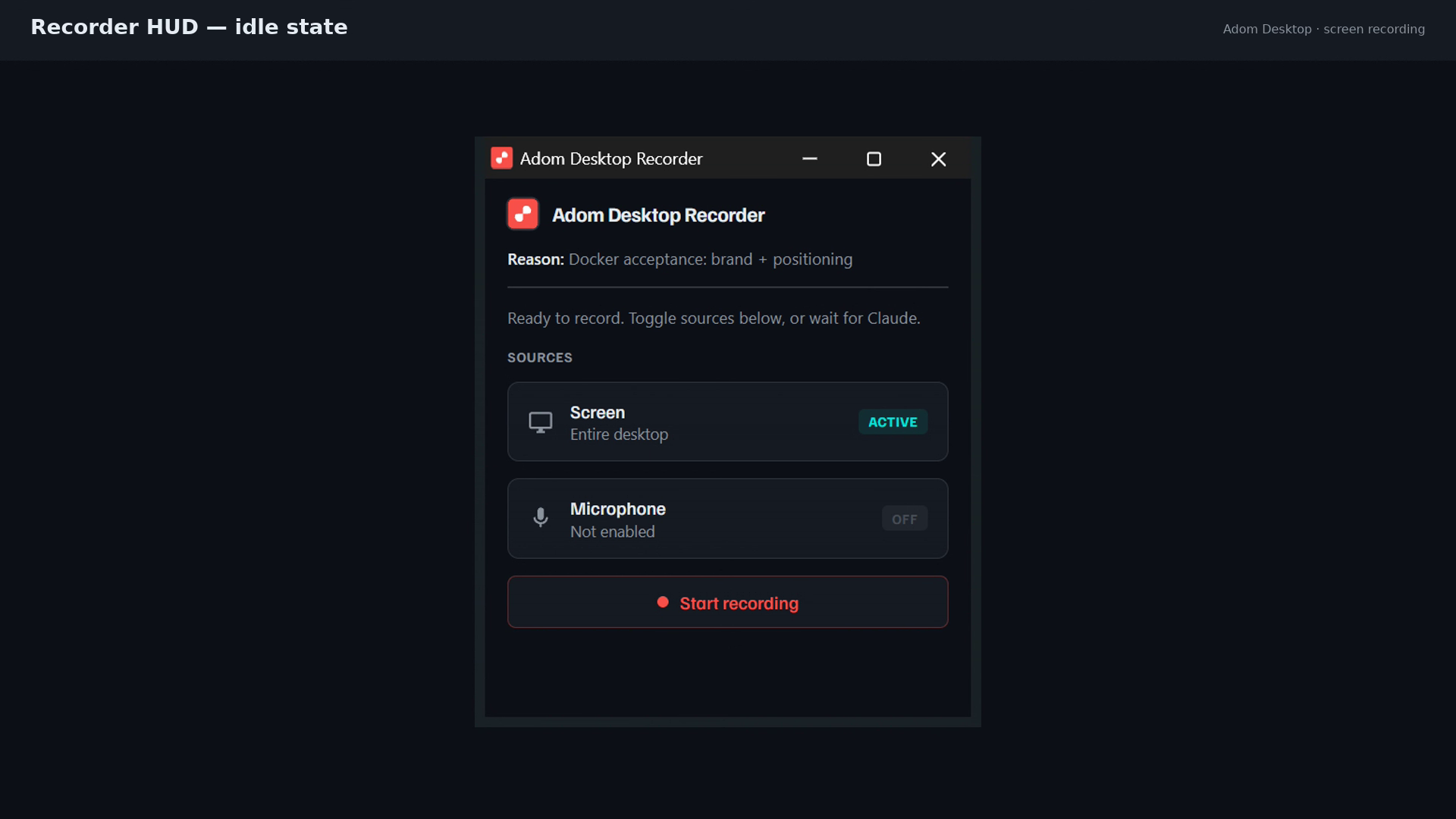
  • Full desktop via Chrome getDisplayMedia + MediaRecorder in a small always-on-top HUD window. Reason is required and shown in the HUD. WebM output, audio optional. Single recorder window stays open across multiple clips in a session.
  • Per-tab via CDP Page.startScreencast โ€” JPEG frames + concat manifest, muxed to WebM via ffmpeg. Concurrent recordings across multiple pup tabs are fine; no HUD.
# Desktop recording (HUD-visible)
adom-desktop desktop_record_start '{"reason":"Demo of pin-1 sign-off","monitor":"primary","fps":30}'
# ... drive activity ...
adom-desktop desktop_record_stop
adom-desktop desktop_recorder_close

# Per-tab recording (headless, concurrent OK)
adom-desktop browser_record_start '{"sessionId":"align","tabId":"tab-1"}'
adom-desktop browser_record_stop  '{"sessionId":"align","recordingId":"โ€ฆ"}'

Architecture notes for contributors

  • Two binaries: the CLI (~5 MB, cli/target/release/adom-desktop.exe, has serve command) vs. the Tauri GUI (~16 MB, src-tauri/target/release/adom-desktop.exe, connects to relay as client). Never copy one over the other.
  • Build matrix in CLAUDE.md documents which changes need which rebuilds. Plugin-only edits don't require a Tauri rebuild โ€” sync to src-tauri/target/release/plugins/ + kill python.exe / node.exe so the next CLI call respawns the bridge from the new code.
  • Version bumps via python scripts/bump-version.py patch โ€” propagates to VERSION + cli/Cargo.toml + src-tauri/tauri.conf.json together.
  • Releases are two artifacts on one tag: Windows installer built locally + Linux CLI built on Docker (scripts/release-publish.sh handles both).
  • Single source of truth for Docker Claude's knowledge of the CLI is cli/src/commands.rs's help map. Every new verb / arg / behavior change must update it before shipping.

Full contributor docs: CLAUDE.md in the repo.


Repo + license

The three official bridges live in their own repos:

(Private as of this version, going public after a review pass. Source is mirrored on each bridge's wiki page as a tarball + git bundle โ€” no GitHub account required to fork.)
EXE
Adom Desktop_1.8.47_x64-setup.exe yesterday
Windows-x64-installer-v1.8.47
v1.8.47 Windows installer: matches latest CLI features (streaming pull_file, anti-throttle Chrome flags, multi-version KiCad)John Lauer ยท yesterday
4.6 MB
JSON
version.json yesterday
auto-update manifest v1.8.47
v1.8.47 auto-update manifest: SHA256 checksums for verifying installer authenticity at install-timeJohn Lauer ยท yesterday
526 B
ADOM
adom-desktop-linux yesterday
Linux-x86_64-CLI-binary-v1.8.47
v1.8.47 Linux x86_64 CLI: streaming pull_file binary frames + dedup connection checkJohn Lauer ยท yesterday
7.4 MB
MD
fusion-SKILL.md 2 days ago
fusion-SKILL skill (v1.8.45)
v1.8.45 fusion-SKILL: refreshed skill markdown for new commands and behaviorsJohn Lauer ยท 2 days ago
8.9 KB
MD
direct-api-SKILL.md 2 days ago
direct-api-SKILL skill (v1.8.45)
v1.8.45 direct-api-SKILL: refreshed skill markdown for new commands and behaviorsJohn Lauer ยท 2 days ago
20.5 KB
MD
installer-SKILL.md 2 days ago
installer-SKILL skill (v1.8.45)
v1.8.45 installer-SKILL: refreshed skill markdown for new commands and behaviorsJohn Lauer ยท 2 days ago
10.2 KB
MD
discovery-SKILL.md 2 days ago
discovery-SKILL skill (v1.8.45)
v1.8.45 discovery-SKILL: refreshed skill markdown for new commands and behaviorsJohn Lauer ยท 2 days ago
4.7 KB
MD
main-SKILL.md 2 days ago
main-SKILL skill (v1.8.45)
v1.8.45 main-SKILL: refreshed skill markdown for new commands and behaviorsJohn Lauer ยท 2 days ago
151.6 KB
MD
pup-SKILL.md 2 days ago
pup-SKILL skill (v1.8.45)
v1.8.45 pup-SKILL: refreshed skill markdown for new commands and behaviorsJohn Lauer ยท 2 days ago
10.7 KB
MD
kicad-SKILL.md 2 days ago
kicad-SKILL skill (v1.8.45)
v1.8.45 kicad-SKILL: refreshed skill markdown for new commands and behaviorsJohn Lauer ยท 2 days ago
7.0 KB
EXE
Adom Desktop_1.8.45_x64-setup.exe 2 days ago
Windows-x64-installer-v1.8.45
v1.8.45 Windows installer: matches latest CLI features (streaming pull_file, anti-throttle Chrome flags, multi-version KiCad)John Lauer ยท 2 days ago
4.6 MB
EXE
Adom Desktop_1.8.44_x64-setup.exe 2 days ago
Windows-x64-installer-v1.8.44
4.6 MB
JSON
puppeteer-bridge-manifest.json 4 days ago
puppeteer-bridge manifest v1.0.4
293 B
ZIP
puppeteer-bridge-v1.0.4.zip 4 days ago
puppeteer-bridge v1.0.4
23.9 MB
ZIP
puppeteer-bridge-v1.0.3.zip 4 days ago
puppeteer-bridge v1.0.3
23.9 MB
JSON
hello-rust-bridge-manifest.json 5 days ago
hello-rust-bridge manifest v1.2.0
292 B
ZIP
hello-rust-bridge-v1.2.0.zip 5 days ago
hello-rust-bridge v1.2.0
173.1 KB
ZIP
hello-python-bridge-v1.2.0.zip 5 days ago
hello-python-bridge v1.2.0
4.6 KB
JSON
hello-python-bridge-manifest.json 5 days ago
hello-python-bridge manifest v1.2.0
292 B
ZIP
puppeteer-bridge-v1.0.2.zip 5 days ago
puppeteer-bridge v1.0.2
23.9 MB
ZIP
fusion360-bridge-v1.0.2.zip 5 days ago
fusion360-bridge v1.0.2
134.5 KB
JSON
fusion360-bridge-manifest.json 5 days ago
fusion360-bridge manifest v1.0.2
291 B
ZIP
kicad-bridge-v0.8.4.zip 5 days ago
kicad-bridge v0.8.4
180.7 KB
JSON
kicad-bridge-manifest.json 5 days ago
kicad-bridge manifest v0.8.4
287 B
EXE
Adom Desktop_1.8.30_x64-setup.exe 7 days ago
Windows-x64-installer-v1.8.30
4.4 MB
EXE
Adom Desktop_1.8.27_x64-setup.exe 8 days ago
Windows-x64-installer-v1.8.27
4.0 MB
SH
hd-bootstrap.sh 8 days ago
HD bootstrap script
11.4 KB
MD
DIRECT_API.md 9 days ago
direct-api-SKILL skill (v1.8.26 doc fix โ€” per-namespace prefix rules)
13.6 KB
EXE
Adom Desktop_1.8.26_x64-setup.exe 9 days ago
Windows-x64-installer-v1.8.26
4.4 MB
EXE
Adom Desktop_1.8.25_x64-setup.exe 9 days ago
Windows-x64-installer-v1.8.25
4.4 MB
EXE
Adom Desktop_1.8.24_x64-setup.exe 9 days ago
Windows-x64-installer-v1.8.24
4.2 MB
EXE
Adom Desktop_1.8.23_x64-setup.exe 9 days ago
Windows-x64-installer-v1.8.23
4.2 MB
EXE
Adom Desktop_1.8.22_x64-setup.exe 9 days ago
Windows-x64-installer-v1.8.22
4.2 MB
ZIP
hello-rust-bridge-v1.1.0.zip 9 days ago
hello-rust-bridge v1.1.0
173.1 KB
ZIP
hello-python-bridge-v1.1.0.zip 9 days ago
hello-python-bridge v1.1.0
4.6 KB
EXE
Adom Desktop_1.8.21_x64-setup.exe 9 days ago
Windows-x64-installer-v1.8.21
4.2 MB
ZIP
puppeteer-bridge-v1.0.1.zip 10 days ago
puppeteer-bridge v1.0.1
23.9 MB
ZIP
fusion360-bridge-v1.0.1.zip 10 days ago
fusion360-bridge v1.0.1
128.1 KB
ZIP
kicad-bridge-v0.8.3.zip 10 days ago
kicad-bridge v0.8.3
180.1 KB
SH
hd-unbootstrap.sh 10 days ago
HD un-bootstrap script
4.3 KB
EXE
Adom Desktop_1.8.2_x64-setup.exe 10 days ago
Windows-x64-installer-v1.8.2
4.1 MB
EXE
Adom Desktop_1.8.1_x64-setup.exe 10 days ago
Windows-x64-installer-v1.8.1
4.1 MB
ZIP
kicad-bridge-v0.8.1.zip 10 days ago
kicad-bridge v0.8.1
179.7 KB
ZIP
kicad-bridge-v0.8.10.zip 10 days ago
kicad-bridge v0.8.10
179.8 KB
ZIP
kicad-bridge-v0.8.9.zip 10 days ago
kicad-bridge v0.8.9
179.8 KB
ZIP
kicad-bridge-v0.8.8.zip 10 days ago
kicad-bridge v0.8.8
179.8 KB
ZIP
kicad-bridge-v0.8.7.zip 10 days ago
kicad-bridge v0.8.7
179.8 KB
ZIP
kicad-bridge-v0.8.6.zip 10 days ago
kicad-bridge v0.8.6
179.8 KB
ZIP
kicad-bridge-v0.8.5.zip 10 days ago
kicad-bridge v0.8.5
179.8 KB
ZIP
kicad-bridge-v0.8.2.zip 10 days ago
kicad-bridge v0.8.2
179.8 KB
EXE
Adom Desktop_1.8.0_x64-setup.exe 10 days ago
Windows-x64-installer-v1.8.0
4.1 MB
ZIP
fusion360-bridge-v1.0.0.zip 10 days ago
fusion360-bridge v1.0.0
127.9 KB
ZIP
puppeteer-bridge-v1.0.0.zip 10 days ago
puppeteer-bridge v1.0.0
23.9 MB
EXE
Adom Desktop_1.7.19_x64-setup.exe 10 days ago
Windows-x64-installer-v1.7.19
4.0 MB
ZIP
kicad-bridge-v0.8.0.zip 10 days ago
kicad-bridge v0.8.0
179.1 KB
EXE
Adom Desktop_1.7.18_x64-setup.exe 10 days ago
Windows-x64-installer-v1.7.18
4.0 MB
EXE
Adom Desktop_1.7.17_x64-setup.exe 10 days ago
Windows-x64-installer-v1.7.17
4.0 MB
EXE
Adom Desktop_1.7.16_x64-setup.exe 10 days ago
Windows-x64-installer-v1.7.17
4.0 MB
EXE
Adom_Desktop_1.7.15_x64-setup.exe 10 days ago
Windows-x64-installer-v1.7.15
4.0 MB
EXE
Adom_Desktop_1.7.14_x64-setup.exe 10 days ago
Windows-x64-installer-v1.7.14
4.0 MB
EXE
Adom_Desktop_1.7.13_x64-setup.exe 10 days ago
Windows-x64-installer-v1.7.13
3.9 MB
EXE
Adom_Desktop_1.7.12_x64-setup.exe 10 days ago
Windows-x64-installer-v1.7.12
3.9 MB
EXE
Adom_Desktop_1.7.11_x64-setup.exe 10 days ago
Windows-x64-installer-v1.7.11
3.9 MB
EXE
Adom_Desktop_1.7.10_x64-setup.exe 10 days ago
Windows-x64-installer-v1.7.10
3.9 MB
EXE
Adom_Desktop_1.7.9_x64-setup.exe 10 days ago
Windows-x64-installer-v1.7.9
3.9 MB
EXE
Adom_Desktop_1.7.8_x64-setup.exe 11 days ago
Windows-x64-installer-v1.7.8
3.9 MB
EXE
Adom_Desktop_1.7.7_x64-setup.exe 11 days ago
Windows-x64-installer-v1.7.7
3.9 MB
EXE
Adom_Desktop_1.7.6_x64-setup.exe 11 days ago
Windows-x64-installer-v1.7.6
3.9 MB
EXE
Adom_Desktop_1.7.5_x64-setup.exe 11 days ago
Windows-x64-installer-v1.7.5
3.9 MB
EXE
adom-desktop-1.7.3-setup.exe 11 days ago
Windows-x64-installer-v1.7.3
3.9 MB
EXE
adom-desktop-1.7.2-setup.exe 12 days ago
Windows-x64-installer-v1.7.2
3.9 MB
1
adom-desktop-ubuntu-1.7.1 12 days ago
Ubuntu x86_64 Tauri desktop binary v1.7.1 (standalone, no installer) โ€” includes Linux KiCad detection
19.9 MB
DEB
adom-desktop_1.7.1_amd64.deb 12 days ago
Ubuntu/Debian x86_64 installer v1.7.1 โ€” includes Linux KiCad detection
6.9 MB
MD
SKILL.md 13 days ago
main-SKILL skill (v1.7.1) โ€” updated: macOS + Linux support
117.2 KB
EXE
adom-desktop-1.7.1-setup.exe 18 days ago
Windows-x64-installer-v1.7.1
3.9 MB
EXE
adom-desktop-1.7.0-setup.exe 18 days ago
Windows-x64-installer-v1.7.0
3.9 MB
EXE
adom-desktop-1.6.3-setup.exe 19 days ago
Windows-x64-installer-v1.6.3
3.9 MB
EXE
adom-desktop-1.6.2-setup.exe 20 days ago
Windows-x64-installer-v1.6.2
3.9 MB
EXE
adom-desktop-1.6.1-setup.exe 20 days ago
Windows-x64-installer-v1.6.1
3.9 MB
EXE
adom-desktop-1.6.0-setup.exe 22 days ago
Windows-x64-installer-v1.6.0
3.9 MB
EXE
adom-desktop-1.5.1-setup.exe 22 days ago
Windows-x64-installer-v1.5.1
3.8 MB
EXE
adom-desktop-1.5.0-setup.exe 23 days ago
Windows-x64-installer-v1.5.0
3.8 MB
EXE
adom-desktop-1.4.12-setup.exe 25 days ago
Windows-x64-installer-v1.4.12
3.8 MB
EXE
adom-desktop-1.4.11-setup.exe 25 days ago
Windows-x64-installer-v1.4.11
3.8 MB
EXE
adom-desktop-1.4.10-setup.exe 25 days ago
Windows-x64-installer-v1.4.10
3.8 MB
EXE
adom-desktop-1.4.9-setup.exe 25 days ago
Windows-x64-installer-v1.4.9
3.8 MB
EXE
adom-desktop-1.4.8-setup.exe 25 days ago
Windows-x64-installer-v1.4.8
3.8 MB
EXE
adom-desktop-1.4.7-setup.exe 25 days ago
Windows-x64-installer-v1.4.7
3.7 MB
EXE
adom-desktop-1.4.6-setup.exe 25 days ago
Windows-x64-installer-v1.4.6
3.8 MB
EXE
adom-desktop-1.4.5-setup.exe 26 days ago
Windows-x64-installer-v1.4.5
3.8 MB
EXE
adom-desktop-1.4.4-setup.exe 26 days ago
Windows-x64-installer-v1.4.4
3.8 MB
EXE
adom-desktop-1.4.3-setup.exe 26 days ago
Windows-x64-installer-v1.4.3
3.8 MB
EXE
adom-desktop-1.4.2-setup.exe 26 days ago
Windows-x64-installer-v1.4.2
3.8 MB
EXE
adom-desktop-1.4.1-setup.exe 26 days ago
Windows-x64-installer-v1.4.1
3.8 MB
EXE
adom-desktop-1.3.38-setup.exe 28 days ago
Windows-x64-installer-v1.3.38
3.7 MB
DMG
Adom.Desktop_1.3.37_aarch64.dmg 29 days ago
macOS-aarch64-installer-v1.3.37
5.6 MB
EXE
adom-desktop-1.3.37-setup.exe 1 month ago
Windows-x64-installer-v1.3.37
3.7 MB
EXE
adom-desktop-1.3.36-setup.exe 1 month ago
Windows-x64-installer-v1.3.36
3.7 MB
EXE
adom-desktop-1.3.35-setup.exe 1 month ago
Windows-x64-installer-v1.3.35
3.7 MB
EXE
adom-desktop-1.3.34-setup.exe 1 month ago
Windows-x64-installer-v1.3.34
3.7 MB
EXE
AdomDesktop_1.3.31_x64-setup.exe 1 month ago
Windows-x64-installer-v1.3.31
3.7 MB
EXE
AdomDesktop_1.3.30_x64-setup.exe 1 month ago
no description โ€” ask the uploader to set one
3.7 MB
EXE
Adom.Desktop_1.3.0_x64-setup.exe 1 month ago
no description โ€” ask the uploader to set one
3.6 MB

Screenshots

Videos

Adom Desktop for macOS โ€” narrated screen recording of the full workflow: Claude Code connects to a MacBook Pro, opens Chrome via pup, searches Mouser for USB-C connectors, captures screenshots, sends a desktop notification, and returns results to Hydrogen.

v1.3.30 demo: screen recording feature โ€” desktop HUD states + tab CDP recording

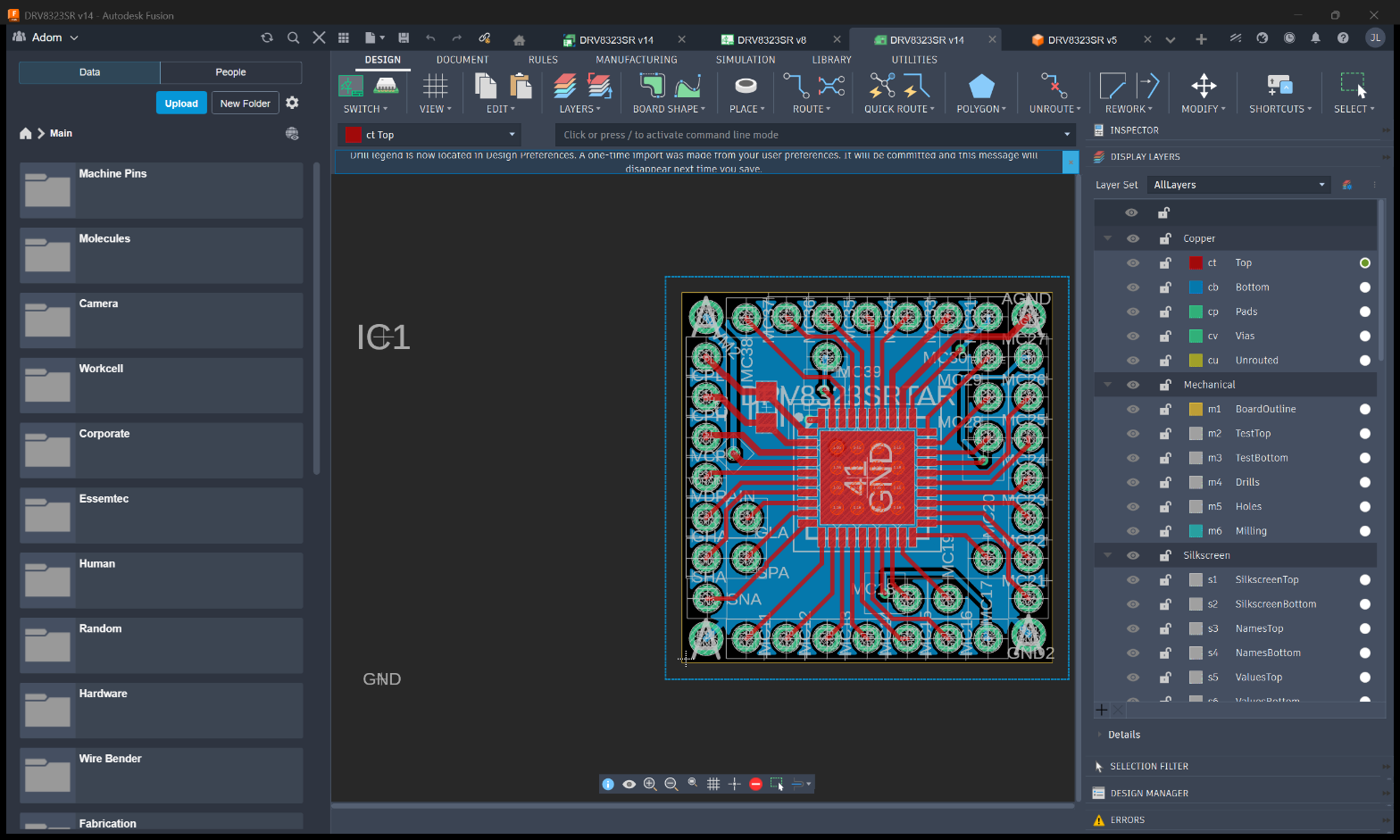
Fusion 360 demo โ€” STEP import, cloud save/export, electronics, design rules, manufacturing

KiCad demo โ€” symbol install, schematic/PCB/3D editing, window grids, dialog recovery

Pup demo โ€” Chrome automation, robot remote UI, ralph loop button sweep

Main demo โ€” notifications, screenshots, pup, KiCad, Fusion 360, file transfer

AI Skill โ€” how Claude uses this app

Edit AI Skill

name: adom-desktop description: Use when the user wants to send files to their desktop, control KiCad or Fusion 360, send desktop notifications, or troubleshoot the desktop connection. Provides CLI tools for bridging the Docker container to the user's local machine.

Adom Desktop

Bridge between Claude Code (running in an Adom Docker container) and the user's desktop applications via WebSocket.

First-time setup? If the user hasn't installed the desktop app yet, see the Setup section below to walk them through downloading, installing, and connecting the app.

Quick check if desktop is connected:

adom-desktop ping

How It Works

Claude Code -> adom-desktop <command> -> Relay Server (HTTP :8766) -> WebSocket :8765 -> Adom Desktop App -> KiCad / Fusion 360 / Browser / Shell

The adom-desktop binary is a single Rust CLI that does everything:

  • adom-desktop serve -- Start the relay server (WebSocket :8765 + HTTP API :8766)
  • adom-desktop <command> '<json>' -- Send commands to the desktop app via the running relay

The relay server runs in the Docker container. The Adom Desktop app runs on the user's PC and connects via WebSocket.

Starting the Relay Server

The relay must be running before the desktop app can connect:

adom-desktop serve &

This starts:

  • WebSocket server on 0.0.0.0:8765 (desktop app connects here)
  • HTTP API on 127.0.0.1:8766 (CLI commands go here)

Check if it's running:

curl -sf http://127.0.0.1:8766/health

First-Time Setup (Install & Connect)

You are running on a Docker container. You have NO access to the user's desktop. Guide them step-by-step, ask questions, wait for answers, and verify each step.

Step 1: Check if already connected

adom-desktop ping

If this returns { "status": "connected" }, the desktop is already set up -- skip to "Verify the connection" below. If it errors, continue.

Step 2: Ensure the relay is running

curl -sf http://127.0.0.1:8766/health

If not running: adom-desktop serve &

Step 3: Ask what OS they use

Ask the user: "What operating system is your desktop/laptop? (Windows, Mac, or Linux)"

  • Windows 10/11 -- proceed
  • macOS / Linux -- "Support is coming soon. The desktop app currently only runs on Windows."

Step 4: Install & connect

Run adom-desktop setup_desktop to get the installer_url and server_config fields. Then present both options to the user โ€” the Claude Code prompt (fastest) and the manual steps (if they don't have Claude Code/Desktop):


Option A: Automatic setup via Claude Code (recommended)

If you have Claude Code or Claude Desktop on your laptop, paste this prompt:

Install Adom Desktop and connect it to my cloud container. Download the installer from <installer_url>, run it silently, then write this JSON to %USERPROFILE%\.adom\config.json:

{"servers":[<server_config JSON>]}

Then launch "Adom Desktop" from the Start Menu.

(Replace <installer_url> and <server_config JSON> with the actual values from setup_desktop.)

Option B: Manual setup

  1. Download the installer:
  2. Run it and follow the prompts โ€” the app installs to the Start Menu as "Adom Desktop"
  3. Open Adom Desktop from the Start Menu
  4. Paste this JSON into the text field that says "Paste server JSON to add ..." and press Enter:
    <server_config JSON>
    
  5. The server will appear and auto-connect

Wait for the user to confirm they see a green dot next to the server name before proceeding.

Important: Each container has its own relay server. New containers need a new entry -- old entries from previous containers won't work.

Step 6: Verify the connection

adom-desktop ping
# Expected: { "echo": "pong", "roundTripMs": ..., "status": "connected" }

adom-desktop status
# Expected: one client with the user's hostname and capabilities

adom-desktop notify_user '{"title":"Hello from Docker!","body":"Your desktop is connected."}'

Tell the user what you see. If ping succeeds:

"Your desktop is connected! I can now send files to your machine, open browser windows for visual debugging, control KiCad and Fusion 360, take screenshots of your desktop, and send you notifications."

Step 7: Offer the demo

After a successful first-time setup, offer the interactive demo:

"Want to see a quick demo of everything I can do? It takes about 2 minutes and shows off notifications, screenshots, browser automation, and more โ€” all live in a webview right here."

If yes โ†’ trigger the adom-desktop-demo skill.

Step 8: Optional -- Node.js for browser features

Ask: "Would you like to use the visual browser debugging feature? This opens Chrome windows on your desktop that I can control."

  • Yes + Node.js installed -- "Great, the browser bridge auto-installs deps on first use."
  • Yes + no Node.js -- "Download Node.js from https://nodejs.org (LTS), install it, then restart Adom Desktop."
  • No -- skip, they can enable it later

Common connection issues

SymptomFix
ping returns "No desktop client connected"User hasn't added this container in the desktop app yet
Desktop app shows "disconnected"Check the URL uses wss:// (not ws:// or https://), port is 8765
Relay server not runningadom-desktop serve &
Multiple stale connectionsadom-desktop kick_all -- app auto-reconnects within seconds
Desktop app not installedDownload from github.com/adom-inc/adom-desktop/releases

CLI Tool

adom-desktop <command> '<json-args>'

Examples:

adom-desktop ping
adom-desktop status
adom-desktop browser_open_window '{"sessionId":"dart2","url":"https://example.com"}'
adom-desktop browser_eval '{"sessionId":"dart2","expr":"document.title"}'
adom-desktop browser_screenshot '{"sessionId":"dart2"}'
adom-desktop browser_list_windows
adom-desktop browser_close_window '{"sessionId":"dart2"}'
adom-desktop notify_user '{"title":"Hello","body":"From Docker"}'
adom-desktop shell_execute '{"command":"echo hello"}'
adom-desktop pull_file '{"filePaths":["C:\\Users\\john\\Downloads\\image.png"],"saveTo":"/tmp"}'

Output: JSON to stdout. Screenshots save to /tmp/conduit-screenshots/ and return the file path.

Config location: The desktop app stores server config at ~/.adom/config.json (%USERPROFILE%\.adom\config.json). This is separate from the binary โ€” config survives updates and reinstalls.

Available Commands

Connection Management

  • ping -- 5s round-trip test. Use BEFORE browser/shell commands to verify the desktop connection is alive.
  • status -- Check who's connected, their capabilities, desktop paths, and app installation status. The desktop.apps object shows:
    • kicad.installed / kicad.version / kicad.bridgeRunning
    • fusion360.installed / fusion360.running / fusion360.bridgeRunning / fusion360.addinInstalled / fusion360.addinConnected
    • browser.bridgeRunning
  • kick_all -- Force-disconnect all WebSocket clients. Active Adom Desktop apps auto-reconnect within seconds.

File Transfer

  • send_files -- Send files from the Docker container to the desktop. Files are base64-encoded in transit.

    • filePaths: array of absolute paths on the server
    • targetApp: "kicad", "fusion360", or "general"
    • destinationFolder: relative subfolder only (e.g. "kicad/symbols", "fusion"). The desktop app controls the base directory. Absolute paths are rejected.
    • Returns destinationPaths[] with the absolute path of every saved file.
  • pull_file -- Pull files from the desktop to the container.

    • filePaths: array of absolute Windows paths on the desktop
    • saveTo: directory on the container to save files (default: /tmp)

Desktop Notifications

  • notify_user -- Send a desktop notification with optional action buttons.
    • title, body, level (info/warning/error/emergency), actions (array of button labels)

KiCad Tools

  • kicad_install_symbol -- Send a .kicad_sym file and install it as a library
  • kicad_install_library -- Install a symbol, footprint, or 3D model library
  • kicad_open_board -- Open a .kicad_pcb file
  • kicad_open_schematic -- Open a .kicad_sch file
  • kicad_open_symbol_editor -- Open the Symbol Editor
  • kicad_open_footprint_editor -- Open the Footprint Editor
  • kicad_open_3d_viewer -- Open the 3D Viewer
  • kicad_run_drc -- Run Design Rule Check on a board
  • kicad_close -- Close all KiCad windows

Fusion 360 Tools

Fusion 360 uses a two-tier architecture:

  • External bridge (port 8773, auto-started): handles launch, detection, file opening

  • AdomBridge add-in (port 8774, runs inside Fusion): required for export, design queries, Electronics/EAGLE commands

  • fusion_launch -- Launch Fusion 360 and wait for it + AdomBridge add-in to be ready (~15-30s). Call this before any other Fusion command if status shows fusion360.running: false. Returns addinConnected: true when ready.

  • fusion_import_step -- Import a STEP/STL/IGES file into Fusion 360

  • fusion_open_lbr -- Open an EAGLE .lbr library file

  • fusion_open_electronics -- Check if the Electronics workspace is active

  • fusion_electron_run -- Execute any EAGLE command via Electron.run

  • fusion_execute_text_command -- Low-level app.executeTextCommand() access

  • fusion_export_lbr -- Export the open Electronics library as an EAGLE .scr script

  • fusion_save_lbr -- Save the open Electronics library as a .flbr file

  • fusion_close -- Close Fusion 360. Always call this when done with Fusion 360 commands to clean up.

Desktop Screenshots

Take screenshots of the user's desktop or individual windows. All screenshots use lossless PNG.

Always save screenshots to project-content/screenshots/.

Naming convention: desktop-<descriptive-name>-YYYY-MM-DD-HhMMam/pm.png

Workflow: Call desktop_list_windows first to get HWNDs, then desktop_screenshot_window with the HWND.

  • desktop_list_windows -- List all visible windows (returns HWND, title, class name, position/size)
  • desktop_screenshot_window -- Capture a specific window by HWND
  • desktop_screenshot_screen -- Capture the entire desktop (all monitors)

Browser Automation (Puppeteer)

Multi-session Puppeteer -- each session gets its own Chrome window. Auto-starts on first command. Always pass sessionId on every command.

  • browser_open_window -- Open a Chrome window. Args: sessionId (required), url (required), freshProfile (optional)
  • browser_close_window -- Close a session's Chrome window. Args: sessionId
  • browser_list_windows -- List all open sessions with URL, title, active status
  • browser_navigate -- Navigate to a new URL. Args: sessionId, url
  • browser_screenshot -- Capture screenshot, auto-resized to <=1568px. Args: sessionId, maxWidth, fullPage
  • browser_eval -- Evaluate JS in the page context. Args: sessionId, expr
  • browser_errors -- Collected console/page errors. Args: sessionId, clear (default true)
  • browser_reload -- Reload the page. Args: sessionId
  • browser_status -- All sessions with URLs and error counts
  • browser_close -- Close ALL sessions
  • browser_wait -- Wait for content to settle. Args: ms
  • browser_alert_window -- Flash the Windows taskbar orange. Always call after updating a pup window. Args: sessionId
  • browser_focus_window -- Bring a session's window to foreground. Args: sessionId

Shell

  • shell_execute -- Run a shell command on the desktop. Returns {pending: true, requestId} when the approval dialog shows. Poll with get_deferred_result for the output after the user approves.
  • shell_kill_all -- Kill all running shell commands and deny pending approvals.

Use where python / C:\Python3xx\python.exe for Python -- avoid python which may not be on PATH.

Detecting App Installation

After connecting, always run adom-desktop status to check what's installed. The desktop.apps object tells you exactly what the user has:

adom-desktop status
# Look at the desktop.apps field in the response

Handling "not installed" errors

When a command returns errorCode: "kicad_not_installed" or errorCode: "fusion_not_installed", guide the user through installation:

KiCad not installed:

KiCad isn't installed on your desktop. Would you like to install it? Download from: https://www.kicad.org/download/ It's free and open source. Install the latest stable version (9.x recommended). Let me know when the install is done and I'll verify the connection.

After install, have them restart Adom Desktop (so the KiCad bridge re-detects).

Fusion 360 not installed:

Fusion 360 isn't installed on your desktop. Would you like to install it? Download from: https://www.autodesk.com/products/fusion-360 It's free for personal/hobby use (requires an Autodesk account). Let me know when the install is done and I'll verify the connection.

After install, have them restart Adom Desktop, then run adom-desktop status to verify.

Handling "not running" errors

When errorCode: "fusion_not_running", launch it programmatically:

adom-desktop fusion_launch
# Waits ~15-30s for Fusion to start + add-in to connect
# Returns {"success": true, "addinConnected": true}

KiCad doesn't need to be running for most commands (the bridge launches it on demand).

Handling "add-in not installed" errors

When Fusion is running but addinInstalled: false or addinConnected: false:

The AdomBridge add-in needs to be installed in Fusion 360. I can install it for you โ€” this lets me control Fusion remotely.

The add-in auto-installs when the Fusion bridge starts and Fusion is detected.

Troubleshooting

Check connection status

Use status to see connected clients. A healthy connection shows one client from the user's hostname with a recent lastPong timestamp.

Stale connections causing timeouts

Use kick_all to reset -- active Adom Desktop apps reconnect within seconds.

No desktop client connected

  1. Confirm the Adom Desktop app is running on the user's PC
  2. Confirm it's pointed at the correct WebSocket URL
  3. Check if port 8765 is exposed and reachable

Relay not running

curl -sf http://127.0.0.1:8766/health
# If fails: adom-desktop serve &

Shell commands on Windows

shell_execute runs in cmd.exe. Prefer writing scripts via send_files then executing them. Use the full Python path.

Building from Source

cd cli && cargo build --release
# Binary at: cli/target/release/adom-desktop

Repo

github.com/adom-inc/adom-desktop

Sub-Skills
?
What are Sub-Skills?

Sub-skills are community-contributed AI skill extensions for this component. They teach AI assistants about specific tools, configurators, or workflows.

Examples:

  • A manufacturer’s configuration tool for a motor controller
  • A community-written design guide for an amplifier circuit
  • An automated test/validation script for a sensor module

How to add one: Click Add Sub-Skill, provide the URL to your skill and a brief description. Submissions are reviewed by the Adom team before going live.

No sub-skills yet. Be the first to contribute one!

๐Ÿ”Ž How Claude finds this page (discovery snippet)

This page opts into Adom Wiki auto-discovery. When a user working in Claude Code mentions any of the trigger phrases below, Claude can proactively suggest this page. The pitch is exactly what Claude will say.

Pitch
"The bridge from this container to your Windows, Mac, or Ubuntu/Linux desktop. Screenshots (full desktop / specific window), file transfer, desktop notifications, launching + driving KiCad 9 and Fusion 360, running real-Chrome (pup/puppeteer) for visual debugging, and the relay server the CLI talks to. One install gives Claude four skills: main (file + screenshots + notifications), pup (browser), kicad-bridge, fusion-bridge."
Triggers
"fusion 360", "kicad", "desktop screenshot", "send file to desktop", "windows app", "bridge to my pc", "export step", "export glb", "export lbr", "kicad symbol editor", "kicad footprint editor", "kicad 3d viewer", "fusion electronics", "fusion pcb", "fusion api", "screenshot my pc", "screenshot my laptop", "screenshot my desktop", "screenshot fusion", "screenshot kicad", "screen grab", "send to laptop", "copy to my pc", "file transfer to desktop", "desktop notification", "toast notification", "notify on windows", "list windows", "which apps are open", "bring window to front", "focus window", "launch kicad", "open in kicad", "open schematic", "open board", "open symbol", "open footprint", "run drc", "install kicad library", "sym-lib-table", "fp-lib-table", "launch fusion", "open in fusion", "open design", "f3d", "f3z", "open cloud file", "dismiss recovery", "kicad_send_key", "kicad_click", "kicad_window_info", "kicad_screenshot_all", "pup", "puppeteer", "browser automation", "headless browser", "chrome from docker", "debug in real browser", "visual debug", "browser screenshot", "browser_open_window", "browser_screenshot", "browser_eval", "browser_reload", "browser_navigate", "browser_errors", "browser_alert_window", "flash taskbar", "open url on desktop", "ralph loop", "multi-session chrome", "adom-desktop", "adom-desktop install", "adom-desktop serve", "adom-desktop release", "relay server", "zombie app", "ubuntu desktop", "linux desktop", "ubuntu install", "linux app", "deb package", "dpkg install"

Recent activity

25 commits