skill-pilot
Stops Claude Code from missing skills. Two halves working together: a lint that audits every SKILL.md for description quality, and a router hook that nudges Claude on every prompt by name-matching the prompt against your skill index.
The problem this solves
Claude Code surfaces every installed skill to the model via its description frontmatter — capped at 1,536 characters per skill, with a global ~8,000-char budget across all skills. With 100+ skills, two things go wrong:
- Buried trigger phrases. A description that puts keywords past the first 200 characters effectively hides them. Claude never sees "use this for Mouser searches" if the prose only mentions Mouser at the end.
- Soft signal. Even when Claude does see a relevant description, picking it from 100+ candidates is fuzzy. A skill that should fire ~always (like
tool-publisherfor any "publish" prompt) often gets passed over.
skill-pilot fixes both.
How the router works
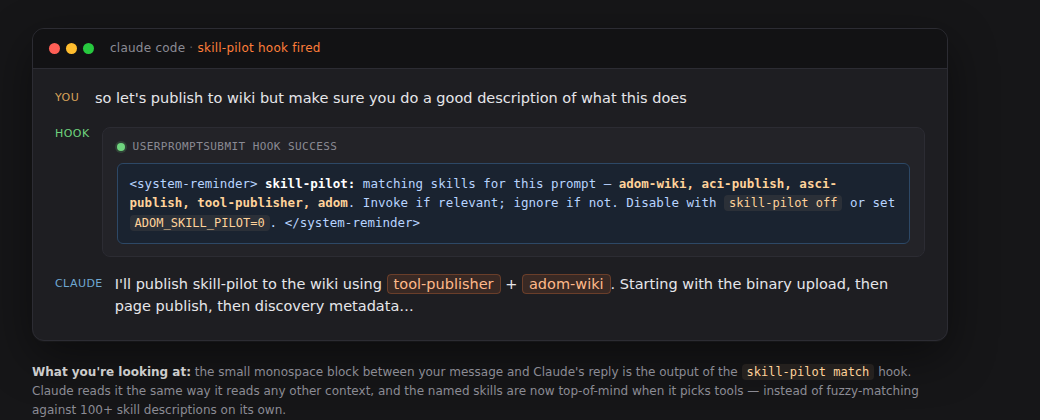
skill-pilot on registers a UserPromptSubmit hook in ~/.claude/settings.json. Every time you hit Enter, the hook runs skill-pilot match with your prompt as stdin. The matcher:
Loads (or builds + caches for 5 min) an in-memory keyword index from every
SKILL.mdin~/.claude/skills/and~/project/gallia/skills/. Triggers come fromTrigger words:blocks, comma-separated noun phrases in the description, and proper-noun-ish words likeMouser/KiCad/JLCPCB.Word-boundary matches the prompt against the index. Single-word triggers require word boundaries (so
mousermatchesmouser, nevermouserate); multi-word phrases use substring match.Emits one short
<system-reminder>listing the top-5 matching skill names, e.g.:<system-reminder>skill-pilot: matching skills for this prompt — adom-mouser, adom-parts-search, electrical-engineering. Invoke if relevant; ignore if not.</system-reminder>Logs to
~/.adom/skill-pilot/matches.log(timestamp, skills, prompt prefix) so you can audit precision/recall.
Claude sees the reminder by name — much louder signal than ambient description matching against 100+ skills.
How the lint works
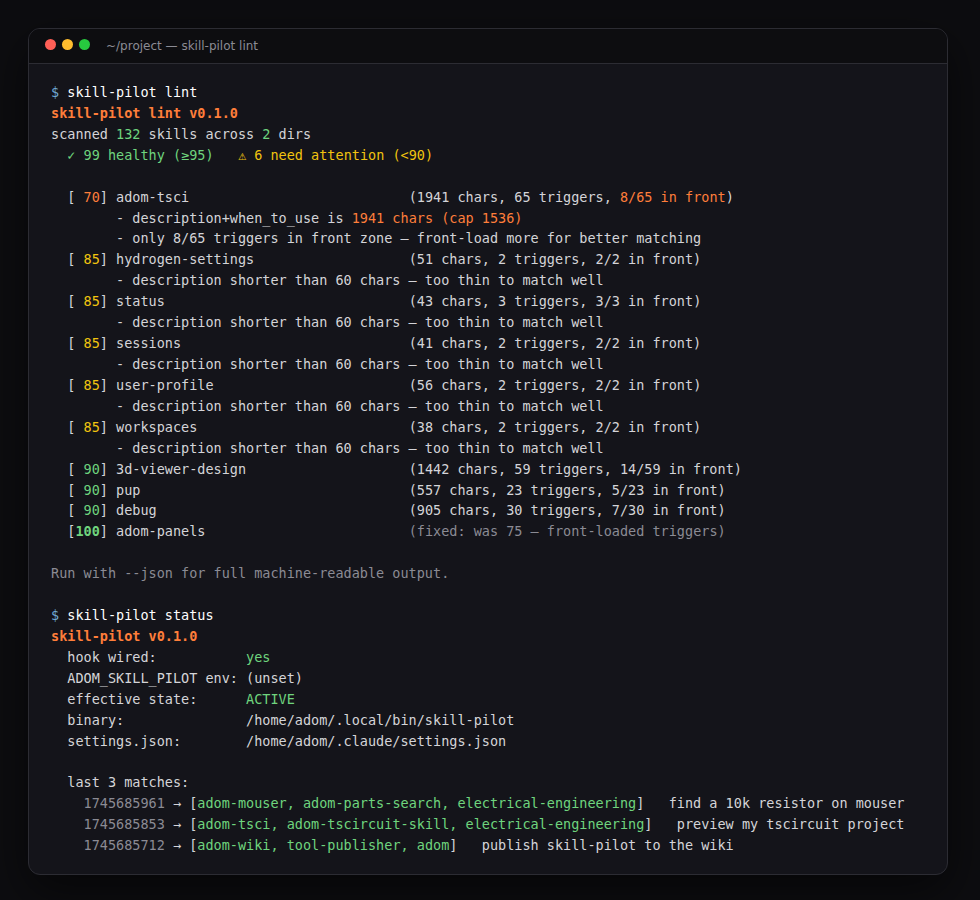
skill-pilot lint scans every SKILL.md and scores 0–100 with deductions for:
| Issue | Penalty |
|---|---|
Missing name / description | −30 / −50 |
description + when_to_use over 1,536 chars (gets truncated) | −20 |
| No detectable trigger phrases | −30 |
| Triggers exist but none in first 200 chars | −25 |
| Description shorter than 60 chars | −15 |
Output is human-readable by default, --json for machine consumption. Use it before skill-pilot on to find skills the matcher won't be able to see, then front-load their trigger words.
Install (Tier A — auto-installed)
skill-pilot is Tier A: every Adom container gets it automatically when gallia/install.mjs runs (which happens on every gallia auto-update, ~30 min cadence). The router hook is enabled by default during install. New containers will see a one-time notice in the install output explaining what was just turned on.
If you need to (re)install manually:
curl -fsSL https://wiki-ufypy5dpx93o.adom.cloud/static/apps/skill-pilot/skill-pilot \
  -o /tmp/skill-pilot && chmod +x /tmp/skill-pilot \
  && sudo install -m 0755 /tmp/skill-pilot /usr/local/bin/skill-pilot \
  && skill-pilot install \
  && skill-pilot on
Gallia's 30-min wiki-refresh hook keeps the installed binary in sync with the wiki's pub_version.
Don't want it?
skill-pilot off                   # remove hook from settings.json
export ADOM_SKILL_PILOT=0         # or pause per-shell, no settings change
Both off-switches survive future gallia updates — install.mjs runs skill-pilot on only on the initial install (on is idempotent and won't re-enable a hook you've explicitly removed).
CLI
# Lint (do this BEFORE turning the router on)
skill-pilot lint                    # human-readable report
skill-pilot lint --json             # machine output
skill-pilot lint --dir <path>       # custom skill dirs

# Router hook
skill-pilot on                      # register UserPromptSubmit hook
skill-pilot off                     # remove hook
skill-pilot status                  # wired? env-var state? last 10 matches

# Dry-run / debug
skill-pilot match --prompt "find a 10k resistor on mouser"
skill-pilot match --prompt "..." --no-log

# Historical analysis
skill-pilot analyze                 # top-firing skills, false-positive
                                    #   candidates, co-occurrence, zero-matches
skill-pilot analyze --json          # machine output
skill-pilot analyze --log <path>    # custom log path
Auditing the router with skill-pilot analyze
Every prompt that flows through the hook is appended to
~/.adom/skill-pilot/matches.log — including prompts that matched
zero skills (so you can see what the router is missing, not just
what it found). Format is one line per prompt:
<unix_timestamp>\t<comma_separated_skills>\t<first_120_chars_of_prompt>
skill-pilot analyze reads this log and surfaces:
| Section | What it tells you |
|---|---|
| Activity | Total prompts logged, time buckets (1h / 24h / 7d), zero-match %, avg matches per matched prompt |
| Top firing skills | Top-25 skills by count + percent of all prompts. ⚠ flags skills firing on ≥30% (false-positive candidates). · flags skills firing on <2% (rare or niche) |
| False-positive candidates | Skills that fire on ≥30% of prompts — almost certainly matching too aggressively. Narrow their triggers |
| Top co-occurring pairs | Skills that always fire together. Often a sign that one matcher is dragging others along (shared trigger or noise like <task-notification> blobs) |
| Recent zero-match prompts | Recent prompts the router didn't route at all — gaps where you might want to widen a skill's triggers, or accept that no skill should fire there |
How to read the output:
- Avg matches per matched prompt > 3.5 — too liberal. Either narrow triggers, or lower the per-prompt cap (currently 5).
- Any skill firing on >30% of prompts — almost always a false positive on a common word. Edit its description's trigger phrases to be more specific.
- A pair of skills with co-occurrence equal to each individual count — they're firing as a block (either correctly because they're always relevant together, or incorrectly because they share a common trigger). Investigate the prompts that fired both.
- Zero-match prompts that look obviously routable — an opportunity to add a missing trigger phrase to a skill, or write a new skill.
Privacy: the log only stores the first 120 characters of each prompt. Tabs and newlines are flattened. The log lives at ~/.adom/skill-pilot/matches.log — local to your container, never uploaded.
Recommended cadence: run skill-pilot analyze after a week of real use. The first few hours of a fresh log are dominated by whatever conversational topic happens to be active and won't reflect steady-state behavior.
Recommended rollout
- Lint first.
skill-pilot linton a fresh box almost always surfaces 5–15 skills with buried triggers. Front-load them. (Score-100 skills tend to have aTrigger words: a, b, c, ...line in the first 200 chars of the description.) - Then enable. Run
skill-pilot on. Active from the very next prompt — no Claude Code restart needed. Every session on the same container picks it up on its next message. - Verify in the log, not the UI. The Claude Code VS Code extension renders hook output inconsistently — sometimes as a collapsible
▶ UserPromptSubmit hook successdisclosure above your message, sometimes not visible at all. The hook itself fires reliably regardless. Trust these instead:skill-pilot status— last 10 matches inlinetail -f ~/.adom/skill-pilot/matches.log— streams every match in real time
- Audit weekly. Watch the log for skills firing on >30% of prompts — those are false-positive candidates whose triggers need narrowing.
Three off-switches
The router is opt-in and easy to kill. In order of scope:
| Layer | Command | Effect |
|---|---|---|
| Per-shell | export ADOM_SKILL_PILOT=0 | matcher exits silently for that shell |
| Per-machine | skill-pilot off | removes hook entry from ~/.claude/settings.json (backup at .skill-pilot.bak) |
| Manual | edit ~/.claude/settings.json | restore from .skill-pilot.bak if anything went sideways |
Plus the hook fails closed: if the binary errors or panics, it emits nothing and exits 0. Claude Code is never blocked by skill-pilot.
Performance
- Hook overhead: ~5–15 ms per prompt (read cached index, word-boundary scan, write log line).
- Injection: capped at 5 skills, ~200 chars total — invisible against the prompt itself.
- Index cache:
~/.adom/skill-pilot/index.json, rebuilt every 5 minutes.
Source
Source lives in the gallia monorepo at gallia/skill-pilot/ (adom-inc/gallia, private). Build with cargo build --release from that directory. The compiled binary is published to this wiki page as a docker_binary asset; users install via the install_hint above (Tier B — on-demand fetch from the wiki, no GitHub credentials needed).
Related
skill-creator— Anthropic's official skill-authoring skill; use it to write new skills, then runskill-pilot lintto verify discoverability before shipping.tool-publisher— for publishing CLIs and skills to the wiki (this very page).adom-wiki— wiki search / publish CLI.skill-pilot-build— sibling skill for cutting new releases.