name: chip-thumbnailer
description: "Render symbol / footprint / 3D thumbnails for chip-fetcher library entries — Adom-themed SVGs (symbol via gallia/symbol-creator/svg-theme + footprint via FpView dark canvas + PCB grid) and OCCT-direct PNGs in three sizes (sm/md/lg) via service-step2glb /thumbnail. Writes a self-describing -thumbs.json manifest per chip listing every file + the canonical Adom palette + which app to launch for full-fidelity inspection. Use when the user wants thumbnails for chips, wants to populate wiki chip pages, batch-renders the chip-fetcher library, or asks 'render thumbnails / make thumbnails / chip thumbs / preview a chip / generate symbol+footprint+3d previews'. Triggers: chip thumbnail, chip thumbs, render chip, generate chip preview, symbol thumbnail, footprint thumbnail, 3d thumbnail, preview chip in library, batch render chips, .thumb-pending, chip-thumbs.json, chip wiki hero, library card, chip-thumbnailer."
chip-thumbnailer
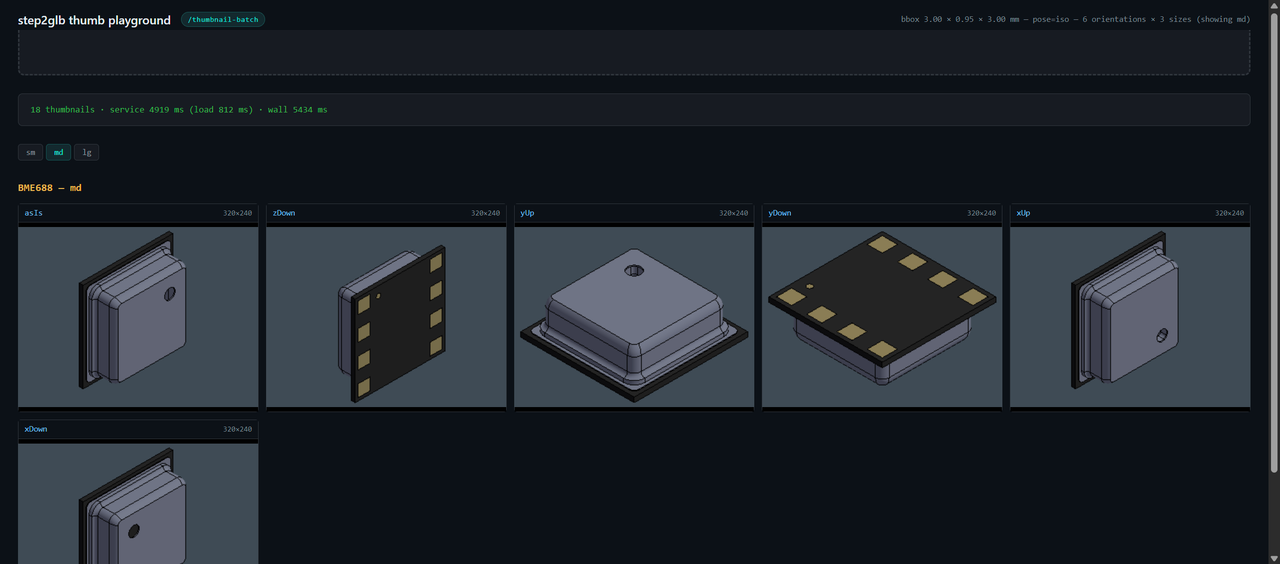
Renders three thumbnail kinds per chip in the chip-fetcher library and drops them next to the source files, plus a manifest:
library/<MPN>/<MPN>-symbol.svg        Adom-dark-themed KiCad symbol
library/<MPN>/<MPN>-footprint.svg     FpView-styled footprint
library/<MPN>/<MPN>-3d-iso-sm.png     160 × 120 — icon / list view
library/<MPN>/<MPN>-3d-iso.png        320 × 240 — card / index (canonical, back-compat)
library/<MPN>/<MPN>-3d-iso-lg.png     800 × 600 — wiki hero / detail page
library/<MPN>/<MPN>-thumbs.json       self-describing manifest (READ THIS)
Always read <MPN>-thumbs.json before consuming thumbnails. It
declares which files actually exist for this chip (sources may be
incomplete), the exact palette colors used (so you can match your
container UI), and which Adom app to launch when the user clicks
through for full-fidelity inspection.
Sizes (3D PNG)
| Suffix | Dimensions | Typical use | Approx file size |
|---|---|---|---|
-sm.png | 160 × 120 | icon, list-view, inline preview | 1–4 KB |
.png (no suffix) | 320 × 240 | card / library-index thumbnail (canonical) | 4–12 KB |
-lg.png | 800 × 600 | wiki hero, detail page, fallback hero | 12–35 KB |
Symbol + footprint are SVG — vectors scale infinitely, one file each.
Palette (canonical, baked into every output)
Sourced from gallia/symbol-creator/lib/svg-theme.js THEME_COLORS +
gallia/viewer/adom-theme.js THEME + gallia/viewer/kicad-footprint-viewer.js.
| Token | Hex | Purpose |
|---|---|---|
canvas_bg | #0d1117 | dark page background, behind everything |
body_fill | #1a2332 | symbol body fill (top of vertical gradient) |
body_fill_grad | #141c27 | symbol body fill (bottom of gradient) |
body_stroke | #30363d | symbol body outline |
pin_wire | #4a5568 | symbol pin wires + outline strokes |
pin_name | #ffffff | symbol pin name labels |
pin_number | #8b949e | symbol pin number labels (muted gray) |
group_label | #E6B450 | symbol pin-group section label (warm amber) |
group_label_hover | #FFD180 | group label on hover (lighter amber) |
accent_teal | #00b8b0 | Adom brand teal — link / accent |
accent_teal_bright | #00e6dc | hover / focus highlight |
pad_fill | #C83434 | footprint pad fill (KiCad F.Cu red) |
pad_stroke | #ef5350 | footprint pad outline |
pad_number | #ffffff | pad number label inside the pad |
courtyard | #FF26E2 | footprint courtyard (magenta dashed) |
silkscreen | #00cccc | footprint silkscreen (cyan) |
fab_outline | #6e7681 | footprint F.Fab outline (subtle gray) |
grid_line | rgba(255,255,255,0.025) | 2.54 mm PCB-style grid behind the symbol/footprint |
glow | rgba(0,184,176,0.06) | radial teal atmosphere centered on the chip |
The dark canvas + PCB grid + radial teal glow are baked into every
themed SVG so the thumbnail looks correct standalone. If your host
container (e.g. SymView) already provides these via CSS, the SVG's
own atmosphere will simply layer on top — usually fine, occasionally
double up. In that case, strip the <defs> adom-canvas-* IDs from
the SVG.
Manifest schema (<MPN>-thumbs.json)
{
  "mpn": "VL53L8CX",
  "generated_by": "chip-thumbnailer",
  "generated_by_version": "0.4.1",
  "generated_at_iso": "2026-05-05T16:57:00Z",

  "palette": { /* every color above as { token: hex } */ },

  "thumbnails": {
    "symbol": {
      "format": "svg",
      "path": "VL53L8CX-symbol.svg",
      "size_bytes": 84023,
      "full_fidelity": {
        "tool": "symbol-creator (SymView)",
        "command": "POST http://127.0.0.1:8781/sym/create … or open <MPN>-viewer.html",
        "description": "Interactive SymView — pin tooltips, group highlights, click-to-pin info, datasheet link, zoom/fit."
      }
    },
    "footprint": {
      "format": "svg",
      "path": "VL53L8CX-footprint.svg",
      "size_bytes": 11852,
      "full_fidelity": {
        "tool": "FpView (gallia/viewer/kicad-footprint-viewer.js)",
        "command": "generateFootprintViewer(<MPN>.kicad_mod) → <MPN>-fpview.html",
        "description": "Interactive FpView — pad tooltips with signal + dimensions, layer toggle, measure tool, solder-blob jet preview."
      }
    },
    "threeD": {
      "format": "png",
      "pose": "iso",
      "iso": {
        "sm": { "path": "VL53L8CX-3d-iso-sm.png", "width": 160, "height": 120, "sizeBytes": 1835 },
        "md": { "path": "VL53L8CX-3d-iso.png",    "width": 320, "height": 240, "sizeBytes": 4091 },
        "lg": { "path": "VL53L8CX-3d-iso-lg.png", "width": 800, "height": 600, "sizeBytes": 12637 }
      },
      "orientations": {
        "asIs": {
          "label": "As-is (Z-up — STEP canonical)",
          "description": "File rendered exactly as authored. STEP is Z-up canonically (ISO 10303-21 / KiCad / Solidworks / FreeCAD / AutoCAD), so this is the right answer for ~99% of chips.",
          "sizes": { "sm": { /* … */ }, "md": { /* … */ }, "lg": { /* … */ } }
        },
        "yUp": {
          "label": "Force Y-up source (fallback)",
          "description": "Source pre-rotated -90° about X. Use only when as-is renders the chip tipped on its side — happens with rare third-party exports authored Y-up (Maya / Blender / three.js convention).",
          "sizes": { "sm": { /* … */ }, "md": { /* … */ }, "lg": { /* … */ } }
        }
      },
      "inferredSourceUpAxis": "z",
      "bboxMm": [[-3.2, 3.2], [0.0, 1.13], [-3.25, 3.25]],
      "bboxMils": [[-126.0, 126.0], [0.0, 44.49], [-127.95, 127.95]],
      "full_fidelity": {
        "tool": "adom-step",
        "command": "adom-step view library/<MPN>/<MPN>.step",
        "description": "Interactive STEP viewer with measure tool, scene-graph navigation, geometric pin/pad detection."
      }
    }
  },

  "hints": [ "…" ]
}
Any kind whose source file (.kicad_sym / .kicad_mod / .step)
isn't in the chip dir at render time will be null in the manifest.
3D orientation: as-is is canonical Z-up
STEP is Z-up by convention (ISO 10303-21 / KiCad / Solidworks /
FreeCAD / AutoCAD all author Z-up), so the as-is render IS
already Z-up in our pipeline — that's the right answer for ~99% of
chips. Use library/<MPN>/<MPN>-3d-iso.png (the unsuffixed file)
in every default surface.
The Y-up fallback (<MPN>-3d-iso-yup.png) exists for the
genuine subset of manufacturer STEPs that author Y-up (Bosch BME688
/ BMI270, TI INA226, Nordic nRF52840-CKAA, Espressif ESP32-S3-WROOM
modules — verified in chip-fetcher's library). The fallback applies
R_x(+π/2) server-side (canonical glTF / three.js / Blender / Adom
convention) so the chip lands upright.
The manifest's inferredSourceUpAxis field is a bbox-aspect heuristic
("z" / "y" / "unknown"); use it as a hint when building an
orientation picker UI, but the user always wins.
For anyone implementing or modifying a Y-up ↔ Z-up transform
elsewhere in the Adom stack, read
gallia/skills/up-axis-conventions/SKILL.md
first. It captures the correct rotation sign (R_x(+π/2), always
positive), reference implementations across Babylon.js / three.js /
OCCT (Python) / glTF, and the testing trap that lets sign errors
slip past visual review on Z-up sources. chip-thumbnailer 0.4.0 →
0.4.1 itself shipped a sign error caught only when the user pushed
back on the rotation correctness — the gallia skill exists so
nobody else hits it.
How AI agents should use this
When the user asks anything like "show me VL53L8CX" / "open this chip" / "preview ADS131M04IPBSR":
cat library/<MPN>/<MPN>-thumbs.json— read the manifest first.- Use the right thumbnail for the surface:
- List / index card →
.thumbnails.3d.iso.md.path(320×240 PNG) +.thumbnails.symbol.path(svg) - Tooltip / inline preview →
.thumbnails.3d.iso.sm.path - Wiki hero / detail page →
.thumbnails.3d.iso.lg.path
- List / index card →
- When the user wants more than the thumbnail (clicks through, asks
to inspect, asks to measure), launch the full-fidelity app named
in
.thumbnails.<kind>.full_fidelity.toolvia the suggested.command. - If your UI has its own background, adopt
.palette.canvas_bgso thumbnails sit cleanly. If your UI has accents, use.palette.accent_teal(Adom brand teal) so it looks consistent. - Watch the
_hintsarray inchip-thumbnailer once's JSON output for next-step suggestions specific to the chip you just rendered.
CLI
chip-thumbnailer once <MPN>             # render all kinds + all 3 sizes; write manifest
chip-thumbnailer scan                   # process every .thumb-pending in the library
chip-thumbnailer status <MPN>           # which thumbs/sources/manifest exist
chip-thumbnailer rerender <MPN>         # re-render all (or --kind sym|fp|3d to limit)
chip-thumbnailer touch-pending <MPN>    # mark a chip as out-of-date
chip-thumbnailer health                 # probe kicad-cli + step2glb + service-step2glb
chip-thumbnailer config                 # print library root + dependency paths
Every command emits OK: … lines for humans and a final JSON line
for AI / scripted callers. The JSON of once includes the
just-written manifest inline + a _hints block with concrete next
steps so a single command-and-parse gives the AI everything it
needs.
Install
curl -fsSL https://wiki-ufypy5dpx93o.adom.cloud/static/apps/chip-thumbnailer/chip-thumbnailer \
  -o /tmp/chip-thumbnailer && chmod +x /tmp/chip-thumbnailer && \
  sudo install -m 0755 /tmp/chip-thumbnailer /usr/local/bin/chip-thumbnailer && \
  chip-thumbnailer install
chip-thumbnailer install fetches SKILL.md fresh from the wiki at
install time — no include_str! of SKILL.md in the binary, per the
canonical no-fallback rule in
gallia/skills/tool-publisher/SKILL.md. On any wiki error the
install exits non-zero with a clear hint.
Pipeline (per chip)
Symbol —
kicad-cli sym export svg→ port of gallia'sapplyDarkTheme()regex pass (case-insensitive on hex tails to match#FFFFC2and#ffffc2both — the JS source uses/.../gi).<style>block wrapped in<![CDATA[…]]>so the literal<g class="stroked-text">in the CSS comment doesn't trip strict XML parsers when the SVG is loaded via<object>or as a wiki asset. Canvas bg + 2.54 mm PCB grid + radial teal glow injected right after<svg>so the SVG looks correct standalone.Footprint — stage
.kicad_modinto a temp.pretty/,kicad-cli fp export svg --footprint <name>, strip<title>/<desc>/opacity="0"text +<g class="stroked-text">groups (KiCad inflates the viewBox with these), inject FpView's dark canvas + PCB grid background, drop KiCad's white page bg. Pad / silk / courtyard colors stay as kicad-cli's native palette (which already matches FpView).3D —
step2glb thumbnail <MPN>.step --pose iso --width N --height Nfor each of sm (160×120), md (320×240), lg (800×600). step2glb POSTs toservice-step2glb0.4.x/thumbnailwhich renders server-side via OCCT V3d offscreen + Xvfb (no pyrender, no per-render Hydrogen browser tab).
Failure handling
If a render fails, chip-thumbnailer:
- Writes
library/<MPN>/.thumb-errors.jsonwith which kind failed and why. - Leaves the
.thumb-pendingmarker in place so the nextscanretries. - Still writes the manifest — but with
nullfor kinds that didn't render, so downstream apps know what's available.
The marker is only cleared when ALL three kinds (or all the sizes that were attempted) render successfully.
Related
- chip-fetcher writes the source files (
.kicad_sym,.kicad_mod,.step) and touches.thumb-pendingafter each successful import. - service-step2glb v0.4.x provides the OCCT-direct
/thumbnailendpoint (replaced the prior pyrender stack). - step2glb (Rust client) wraps
/thumbnailfor the 3D path. - gallia/symbol-creator owns the canonical symbol dark-theme palette; chip-thumbnailer ports the regex pass into Rust to avoid a node shell-out at render time.
- gallia/viewer/kicad-footprint-viewer.js owns the FpView footprint styling.
- adom-step is the full-fidelity 3D viewer to launch when the user wants more than the thumbnail.