APP v0.1.0

Adom USB

See every USB device across the entire Adom ecosystem โ€” laptop, WSL2, cloud container, Azure VM, workcells โ€” in one dashboard, and mount / unmount / reset / test / force-class / sniff any of them. USB/IP slingshot for the whole mesh.

Adom USB
๐Ÿ’ฌ Sample prompts Paste any of these into Claude Code to use this app
List USB show me every USB device across my laptop, WSL2, cloud container, and Azure VM
Open dashboard open the USB devices dashboard in Hydrogen
Mount to WSL2 mount the RP2040 on my laptop into my WSL2 / Hydrogen Desktop
Mount to cloud slingshot my USB serial adapter into this cloud container
Sniff a device capture USB packets from the FTDI on the workcell
โšก Install this app

Paste this into Claude Code (VS Code panel, Adom editor, or terminal) to install:

I want to install the "Adom USB" app from the Adom Wiki (https://wiki-ufypy5dpx93o.adom.cloud/wiki/apps/adom-usb). For the Docker CLI: curl -fsSL https://wiki-ufypy5dpx93o.adom.cloud/static/apps/adom-usb/adom-usb -o /tmp/adom-usb && chmod +x /tmp/adom-usb && sudo install -m 0755 /tmp/adom-usb /usr/local/bin/adom-usb && adom-usb install Then verify the install works.

Download v0.1.0

โŠž Windows coming soon
macOS coming soon
๐Ÿง Linux coming soon
๐Ÿณ Adom Docker CLI adom-usb ยท

See all releases on GitHub

Adom USB

See every USB device across the entire Adom ecosystem โ€” and mount it anywhere.

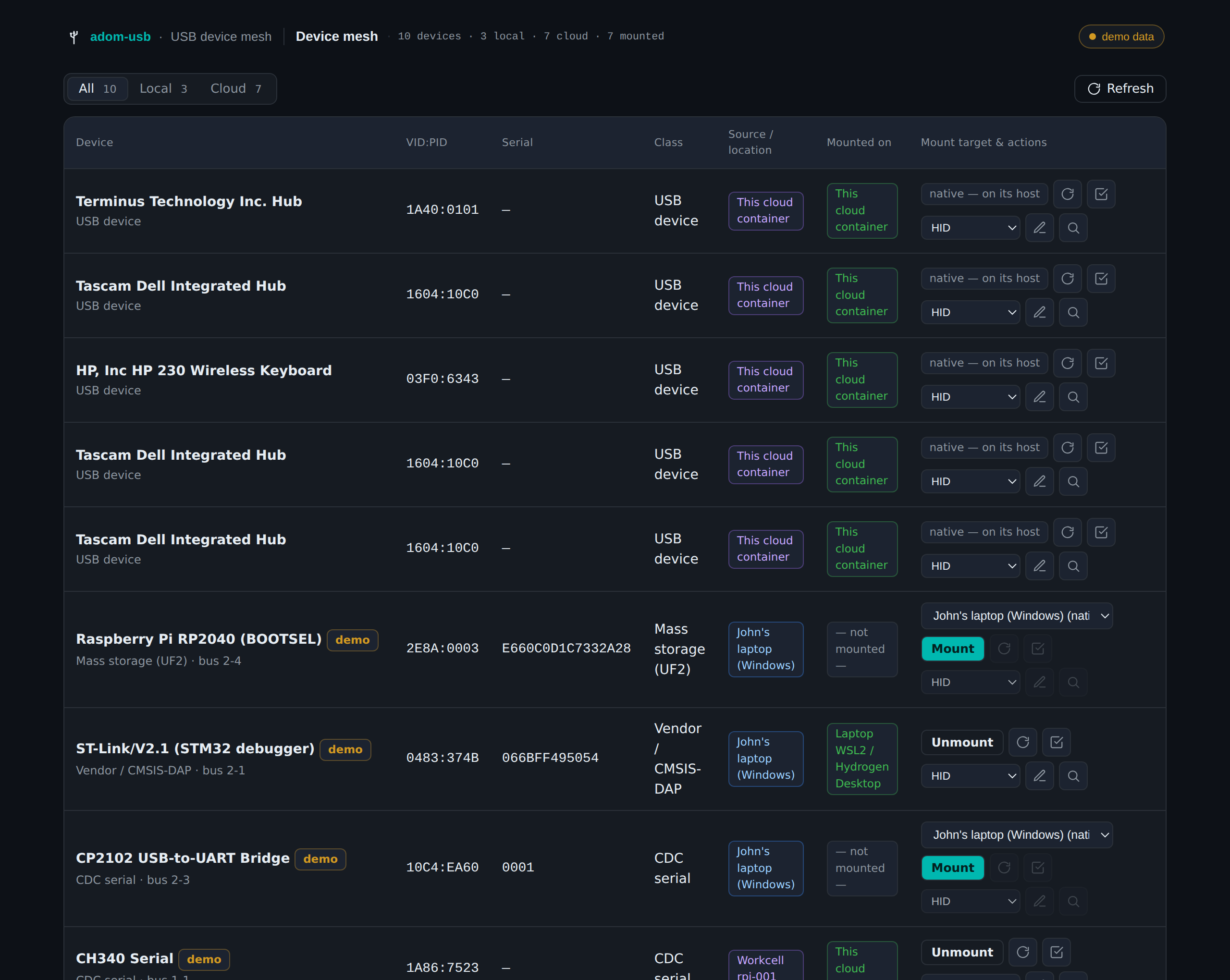
adom-usb is a Hydrogen webview app (+ CLI) that unifies USB across the whole mesh: your laptop, its WSL2 / Hydrogen Desktop, this cloud container, the Azure VM and its WSL2, and workcells. One table, Local/Cloud filters, and per-device mount / unmount / reset / test / force-class / sniff.

It extends the same Linux USB/IP "slingshot" that already moves workcell USB into cloud containers โ€” now with the user's own machines as first-class sources and targets.

Run

adom-usb app                 # live: real lsusb on this container + registered agents
adom-usb app --demo          # seed a representative cross-ecosystem set for a tour
adom-usb list --demo         # unified inventory as JSON (no server)
adom-usb health              # is a dashboard server up?

Opens a Hydrogen tab named USB Devices. Columns: device ยท VID:PID ยท serial ยท class ยท source/location ยท current mount ยท target picker + actions.

Drive it (every button is also an HTTP endpoint โ€” AI-drivable)

adom-usb mount   laptop:2e8a:0003 laptop-wsl2     # RP2040 โ†’ laptop WSL2 (usbipd attach --wsl)
adom-usb mount   laptop:2e8a:0003 this-container  # RP2040 โ†’ cloud container (reverse tunnel)
adom-usb unmount laptop:2e8a:0003
curl -s localhost:8896/state | jq                 # hosts, devices, targets, mount state, action log

Each mount/op records the exact agent command it runs, visible in the dashboard's action log.

Routing matrix (v1)

Windows is source + local-only: a Windows box can export its USB and natively use devices plugged into it, but a remote device cannot yet be mounted into a native Windows desktop (needs the test-signed usbip-win client driver โ€” those targets show blocked). Linux targets (cloud container, laptop WSL2/HD, Azure WSL2, workcells) accept remote mounts via usbipd attach --wsl (local) or the adom-desktop reverse tunnel (cross-machine).

reset / test / force-class / sniff operate on the virtual device in a Linux target โ€” greyed out until the device is mounted on one.

Status

M1 ships the unified inventory + mount overlay; each action emits the precise agent command and wires to the live agents (usbipd-win over the relay, usbip attach in the target, usbmon) as those land.

ADOM
adom-usb 1 month ago
adom-usb Linux x86_64 CLI + webview-app binary (v0.1.0)
v0.1.0 initial publishJohn Lauer ยท 1 month ago
3.1 MB
MD
SKILL.md 1 month ago
adom-usb skill (user-facing usage + triggers)
v0.1.0 initial publishJohn Lauer ยท 1 month ago
2.8 KB

Install notes

Adom Docker CLI install steps
curl -fsSL https://wiki-ufypy5dpx93o.adom.cloud/static/apps/adom-usb/adom-usb -o /tmp/adom-usb && chmod +x /tmp/adom-usb && sudo install -m 0755 /tmp/adom-usb /usr/local/bin/adom-usb && adom-usb install

Sub-Skills
?
What are Sub-Skills?

Sub-skills are community-contributed AI skill extensions for this component. They teach AI assistants about specific tools, configurators, or workflows.

Examples:

  • A manufacturer’s configuration tool for a motor controller
  • A community-written design guide for an amplifier circuit
  • An automated test/validation script for a sensor module

How to add one: Click Add Sub-Skill, provide the URL to your skill and a brief description. Submissions are reviewed by the Adom team before going live.

No sub-skills yet. Be the first to contribute one!

๐Ÿ”Ž How Claude finds this page (discovery snippet)

This page opts into Adom Wiki auto-discovery. When a user working in Claude Code mentions any of the trigger phrases below, Claude can proactively suggest this page. The pitch is exactly what Claude will say.

Pitch
"One dashboard for every USB device across your laptop, WSL2 / Hydrogen Desktop, cloud container, Azure VM, and workcells โ€” mount any device onto any host (usbipd attach --wsl locally, adom-desktop reverse tunnel across machines), then reset / test / force-class / sniff it."
Triggers
"usb devices", "usb dashboard", "list usb", "mount usb", "attach usb", "usbip", "slingshot usb", "mount my dev board", "rp2040 to wsl2", "mount device to container", "usb mesh", "where is my usb device", "force hid", "sniff usb", "usb passthrough"

Recent activity

6 commits