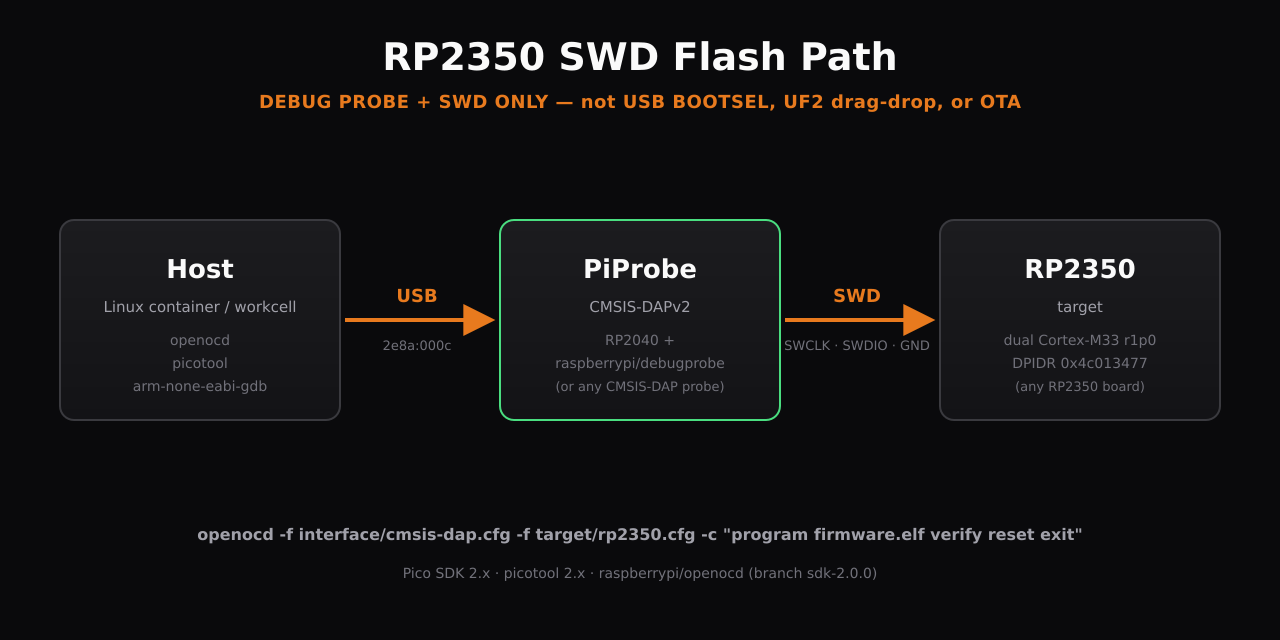
Flashing RP2350 via SWD Debug Probe (PiProbe / CMSIS-DAP)
⚠ Scope — SWD debug probe ONLY. This guide applies only when you have a CMSIS-DAP debug probe (PiProbe, Pico Debug Probe, J-Link in CMSIS-DAP mode, etc.) physically wired to the RP2350 target's SWD pins. It does NOT apply to:
- USB BOOTSEL drag-drop / UF2 file copy
- OTA / firmware-over-the-air updates
- Self-bootloader flashing from already-running firmware
- Any flash path that doesn't go through a CMSIS-DAP probe over SWD
If you don't have a debug probe wired to SWD, this guide is the wrong tool — close the page.
End-to-end guide for building, flashing, and debugging an RP2350 target using a PiProbe (RP2040 running the raspberrypi/debugprobe firmware) or any other CMSIS-DAP probe, over SWD.
Hardware path (scope of this guide)
host (Linux) ──USB──► PiProbe (CMSIS-DAPv2, 2e8a:000c)
                         │
                         │ SWD: SWCLK + SWDIO + GND (+ optional nRESET)
                         ▼
                      RP2350 target
This guide covers everything from the host down to the SWD signals at the probe's target connector — toolchain, probe firmware, OpenOCD config, flash command, debug session, USB BOOTSEL-via-SWD. It does NOT cover target-board-specific pinouts (which GPIO is the LED, where SWCLK lands on castellations, etc.) — that belongs in the target board's own documentation.
Required downloads at a glance
| # | What | Source | Install method |
|---|---|---|---|
| 1 | apt build deps | distro packages | apt-get install |
| 2 | arm-none-eabi-gcc 13.x | distro gcc-arm-none-eabi | apt-get install |
| 3 | cmake ≥ 3.13 | distro cmake | apt-get install |
| 4 | Pico SDK 2.x | https://github.com/raspberrypi/pico-sdk | git clone + submodule init |
| 5 | picotool 2.x | https://github.com/raspberrypi/picotool | git clone + cmake build |
| 6 | OpenOCD (raspberrypi fork) | https://github.com/raspberrypi/openocd, branch sdk-2.0.0 | git clone + autotools build |
All three RPi-hosted repos must be cloned and built from source. Distro openocd will NOT work — see the "Why this exact stack" section.
Why this exact stack
| Component | Why this version |
|---|---|
| Pico SDK 2.x | RP2350 support landed in SDK 2.0; SDK 1.x will not compile for PICO_PLATFORM=rp2350. |
| picotool 2.x | Required by SDK 2.x for binary post-processing (UF2 generation, OTP packing). |
| raspberrypi/openocd fork | Stock OpenOCD 0.12.0 predates RP2350 and ships no target/rp2350.cfg. Distro-installed OpenOCD will fail with no driver found for target rp2350. The raspberrypi fork (sdk-2.0.0 branch) is the canonical RP2350 OpenOCD. |
| arm-none-eabi-gcc 13.x | Toolchain. Older 10.x also compiles fine. |
| cmake ≥ 3.13 | Pico SDK CMake floor. |
Install steps — fresh container
Step 1: apt deps
sudo apt-get update -qq
sudo apt-get install -y --no-install-recommends \
  build-essential pkg-config git \
  libusb-1.0-0-dev libhidapi-dev libftdi1-dev \
  libtool autoconf automake texinfo \
  python3 python3-pip \
  gcc-arm-none-eabi cmake
gcc-arm-none-eabi and cmake may already be present from the base image — apt-get install is a no-op when satisfied.
Step 2: Pico SDK 2.x
cd ~
git clone --depth 1 https://github.com/raspberrypi/pico-sdk.git
cd pico-sdk
git submodule update --init --depth 1
echo 'export PICO_SDK_PATH=$HOME/pico-sdk' >> ~/.bashrc
export PICO_SDK_PATH=$HOME/pico-sdk
Verify ≥ 2.0.0:
grep 'set(PICO_SDK_VERSION_MAJOR' ~/pico-sdk/pico_sdk_version.cmake
# expect:  set(PICO_SDK_VERSION_MAJOR 2)
Step 3: picotool 2.x
cd ~
git clone --depth 1 https://github.com/raspberrypi/picotool.git
cd picotool && mkdir -p build && cd build
cmake ..
make -j"$(nproc)"
sudo make install
picotool version    # → picotool v2.2.x (Linux, ...)
Step 4: OpenOCD with RP2350 support (raspberrypi fork)
cd ~
git clone --depth 1 --branch sdk-2.0.0 https://github.com/raspberrypi/openocd.git openocd-rp
cd openocd-rp
./bootstrap
./configure --enable-cmsis-dap --disable-werror --prefix=/usr/local
make -j"$(nproc)"
sudo make install
hash -r
openocd --version 2>&1 | head -1   # → Open On-Chip Debugger 0.12.0+dev-...
ls /usr/local/share/openocd/scripts/target/ | grep rp2350
# expect: rp2350.cfg, rp2350-riscv.cfg, rp2350-rescue.cfg,
#         rp2350-dbgkey-secure.cfg, rp2350-dbgkey-nonsecure.cfg
Installs to /usr/local/bin/openocd, which takes precedence over any stock /usr/bin/openocd.
Building firmware for RP2350
Minimal project:
myapp/
├── CMakeLists.txt
└── myapp.c
CMakeLists.txt:
cmake_minimum_required(VERSION 3.13)
set(PICO_BOARD pico2 CACHE STRING "")
set(PICO_PLATFORM rp2350 CACHE STRING "")
include($ENV{PICO_SDK_PATH}/external/pico_sdk_import.cmake)
project(myapp C CXX ASM)
pico_sdk_init()
add_executable(myapp myapp.c)
target_link_libraries(myapp pico_stdlib)
pico_add_extra_outputs(myapp)
The two critical settings are:
PICO_BOARD=pico2— board headers for the RP2350A reference design (Pico 2). Override individual GPIO assignments in your code if your board differs.PICO_PLATFORM=rp2350— tells the SDK to target the RP2350 architecture (vsrp2040).
Build:
mkdir -p build && cd build && cmake .. && make -j"$(nproc)"
Produces myapp.elf (used for SWD flashing) and myapp.uf2 (used for USB BOOTSEL drag-drop, if applicable).
Flashing via SWD — the canonical command
openocd -f interface/cmsis-dap.cfg -f target/rp2350.cfg \
  -c "adapter speed 5000; program firmware.elf verify reset exit"
Successful output ends with:
** Programming Started **
** Programming Finished **
** Verify Started **
** Verified OK **
** Resetting Target **
5 MHz SWD is comfortable on clean wiring; the PiProbe + RP2350 can also run at 24 MHz reliably with short SWD leads.
The target executes the new firmware immediately after Resetting Target — no power cycle needed.
Debugging via gdb over the probe
Terminal 1 (leave running):
openocd -f interface/cmsis-dap.cfg -f target/rp2350.cfg
OpenOCD listens on :3333 for gdb.
Terminal 2:
arm-none-eabi-gdb firmware.elf \
  -ex 'target extended-remote :3333' \
  -ex 'monitor reset halt'
Then load, b main, c, etc. as normal.
Watching live printf output via ARM semihosting
Semihosting routes the target's printf (and other libc I/O) through the SWD probe back into OpenOCD's stdout — no UART, no USB-on-the-target needed. Useful when SWD is the only physical link to the target.
Firmware side
Link against semihosting stdio and disable the other stdio backends:
target_link_libraries(myapp pico_stdlib)
pico_enable_stdio_semihosting(myapp 1)
pico_enable_stdio_uart(myapp 0)
pico_enable_stdio_usb(myapp 0)
After stdio_init_all(), every printf() becomes a semihosting BKPT 0xAB call that OpenOCD intercepts.
Host side — the canonical "watch the target run" command
openocd -f interface/cmsis-dap.cfg -f target/rp2350.cfg \
  -c "adapter speed 5000" \
  -c "init" \
  -c "reset halt" \
  -c "arm semihosting enable" \
  -c "resume"
Leave it running. Every printf from the firmware streams to stdout. Ctrl-C to stop.
Order matters:
init— attach to the probe and examine cores.reset halt— reset the target and leave it halted. Plainresetruns after reset, which leaves the cores in an undefined state for the next step.arm semihosting enable— turn on the BKPT 0xAB intercept while the target is halted.resume— let the firmware run with semihosting now wired up.
Reordering or skipping halt produces the failure modes in the troubleshooting table below (not halted / context restore failed).
Forcing USB BOOTSEL via SWD (optional)
picotool reboot -u -f works only over USB — it cannot drive a CMSIS-DAP probe in the upstream picotool build. To force a target into BOOTSEL via SWD only, load a tiny SRAM stub that calls the bootrom's reset_usb_boot().
Stub source — ~/tools/force-bootsel/force_bootsel.c:
#include "pico/bootrom.h"
int main(void) {
    reset_usb_boot(0, 0);
    while (1) { __asm volatile("wfi"); }
}
CMakeLists.txt uses pico_set_binary_type(force_bootsel no_flash) so the binary runs entirely from SRAM and doesn't disturb flash.
Wrapper at /usr/local/bin/rp2350-bootsel:
#!/usr/bin/env bash
set -e
STUB=${RP2350_BOOTSEL_STUB:-/home/adom/tools/force-bootsel/build/force_bootsel.elf}
ENTRY=$(arm-none-eabi-readelf -h "$STUB" | awk '/Entry point/ {print $NF}')
exec openocd -f interface/cmsis-dap.cfg -f target/rp2350.cfg \
  -c "init; reset halt; load_image $STUB; reg sp 0x20040000; reg pc $ENTRY; resume; sleep 300; exit"
Caveat. BOOTSEL puts the chip into USB MSC mode, but a USB host must be connected to the target's USB D± lines to see the resulting drive. If the only physical link between host and target is the probe's SWD, BOOTSEL has nowhere to go — flash directly via SWD instead.
Pre-flight: confirm probe + target are alive
Before touching anything else, run:
openocd -f interface/cmsis-dap.cfg -f target/rp2350.cfg -c "init; targets; exit"
Expect, in order:
Info : CMSIS-DAP: FW Version = 2.0.0— PiProbe is talking.Info : SWD DPIDR 0x4c013477— SWD link is up and the DAP IDCODE matches RP2350.Info : [rp2350.dap.core0] Cortex-M33 r1p0 processor detectedInfo : [rp2350.dap.core1] Cortex-M33 r1p0 processor detected
If you see the probe (1) but no DPIDR (2): SWD wires are broken/swapped, target is unpowered, or there's no common ground between probe and target.
If you don't see the probe at all (1 missing): lsusb | grep 2e8a:000c — if absent, the probe isn't on USB. Check cables / hub.
Troubleshooting
| Symptom | Cause | Fix |
|---|---|---|
error: no driver found for target rp2350 | Stock OpenOCD 0.12.0 (predates RP2350) | Build raspberrypi/openocd fork (Step 4 above) |
Error: Could not find a USB device | Probe missing or /dev/bus/usb permissions | lsusb | grep 2e8a:000c; if device node exists but is root-only, fix udev or run with sudo |
Error: error submitting USB read: Input/Output Error (flooded repeatedly) | A previous openocd process is still holding the probe (often a wedged session from an earlier resume failure) | pgrep -af openocd to find the stale PID; kill <PID> that specific process. Do NOT pkill openocd if other openocd sessions are needed elsewhere. |
SWD DPIDR 0x00000000 | Bad SWD wiring, target unpowered, or no common GND | Verify continuity on SWCLK/SWDIO/GND, verify target's +3V3 rail |
Error: timed out while waiting for target halted | SWD clock too fast for the cable | Drop adapter speed 5000 to adapter speed 1000 |
Error: target was in unexpected state X | Target stuck in a bad loop / WFI | Add reset halt before program |
Error: [rp2350.dap.core0] not halted / context restore failed, aborting resume after arm semihosting enable | Used reset (which runs after reset) instead of reset halt before enabling semihosting and calling resume. The semihosting resume requires a defined halted start state. | Reorder commands to init; reset halt; arm semihosting enable; resume. Always halt before enabling semihosting. |
resume of a SMP target failed, trying to resume current one followed by both cores halting unexpectedly | Raspberry Pi OpenOCD fork's SMP resume path is fragile on RP2350 | Either use reset halt; resume (avoids the SMP race), or set USE_CORE 0 via -c "set USE_CORE 0" before the target config to debug only core 0 |
picotool: No accessible RP-series devices in BOOTSEL mode were found | Target's USB isn't on the host bus | Don't use picotool over USB — flash via OpenOCD/SWD instead |
| Verify fails after flash | Wrong PICO_BOARD / PICO_PLATFORM | Confirm CMake cache has PICO_BOARD=pico2 and PICO_PLATFORM=rp2350; nuke build/ and rebuild |
VECTRESET is not supported on this Cortex-M core, using SYSRESETREQ instead | Cosmetic | Ignore — RP2350 cores don't implement VECTRESET; SYSRESETREQ is the correct path |
File map (after a full install)
| Path | Purpose |
|---|---|
~/pico-sdk/ | Pico SDK 2.x source (download #4) |
~/picotool/ | picotool source (download #5) |
~/openocd-rp/ | OpenOCD raspberrypi fork source (download #6) |
~/tools/force-bootsel/ | BOOTSEL-trigger SRAM stub source |
/usr/local/bin/picotool | Installed binary, picotool 2.x |
/usr/local/bin/openocd | Installed binary, raspberrypi fork (overlays any stock) |
/usr/local/bin/rp2350-bootsel | SWD → BOOTSEL wrapper |
/usr/local/share/openocd/scripts/target/rp2350.cfg | OpenOCD target config |
/usr/local/share/openocd/scripts/interface/cmsis-dap.cfg | OpenOCD interface config |
Quick command reference
# Pre-flight
openocd -f interface/cmsis-dap.cfg -f target/rp2350.cfg -c "init; targets; exit"

# Flash an .elf via SWD
openocd -f interface/cmsis-dap.cfg -f target/rp2350.cfg \
  -c "adapter speed 5000; program firmware.elf verify reset exit"

# Halt + reset only (no flash)
openocd -f interface/cmsis-dap.cfg -f target/rp2350.cfg \
  -c "init; reset halt; exit"

# Start gdb-server (terminal 1)
openocd -f interface/cmsis-dap.cfg -f target/rp2350.cfg

# Attach gdb (terminal 2)
arm-none-eabi-gdb firmware.elf -ex 'target extended-remote :3333'

# Stream printf via ARM semihosting through the probe (no UART/USB needed)
openocd -f interface/cmsis-dap.cfg -f target/rp2350.cfg \
  -c "adapter speed 5000" -c "init" -c "reset halt" \
  -c "arm semihosting enable" -c "resume"

# Probe stuck after a wedged session? Kill the SPECIFIC stale openocd PID
pgrep -af openocd            # find the PID
kill <PID>                   # only that PID — never `pkill openocd`

# Force BOOTSEL via SWD (only if target USB is wired to a host)
rp2350-bootsel

# Build a Pico SDK project for RP2350
cd myapp && mkdir -p build && cd build && cmake .. && make -j$(nproc)