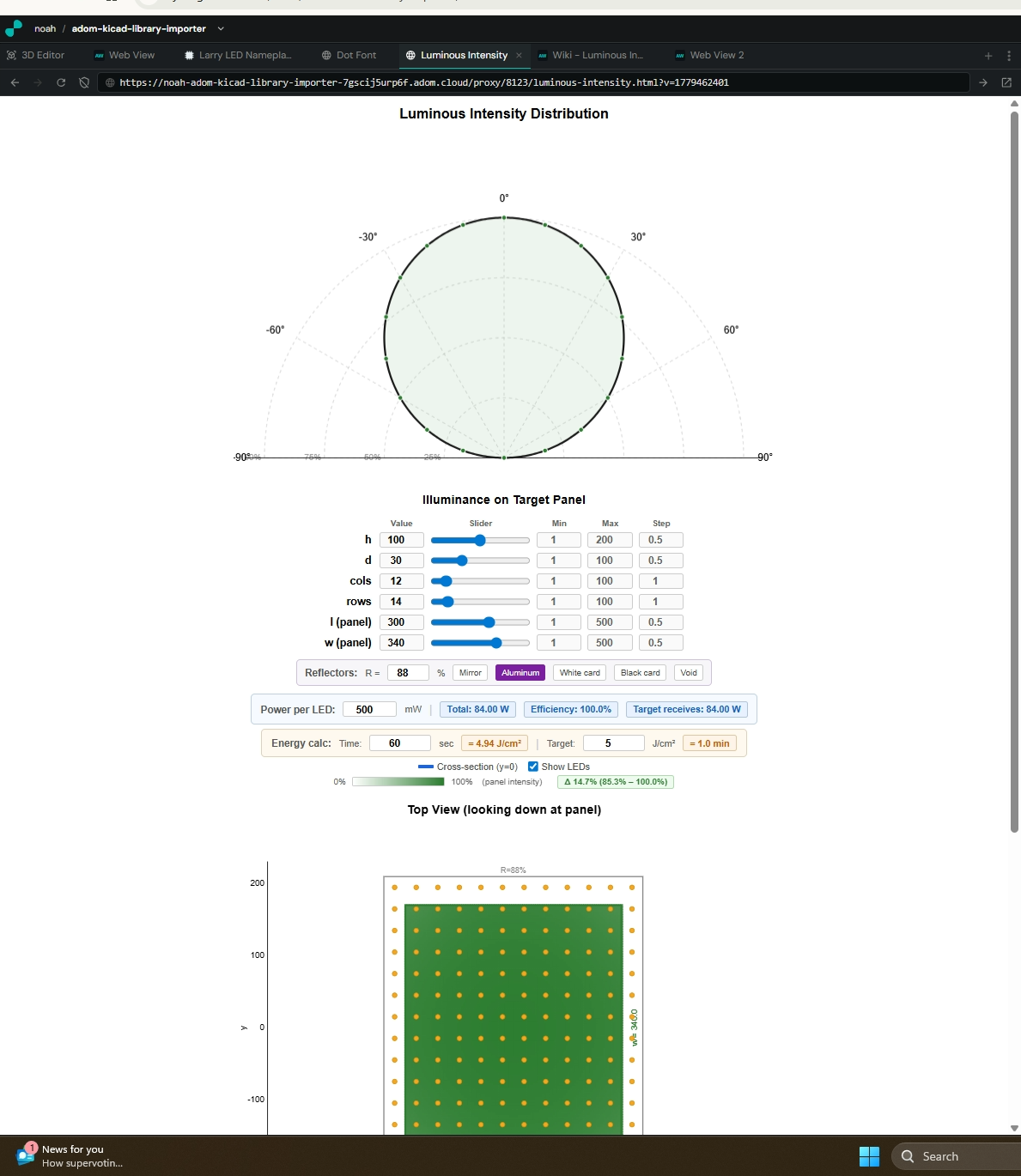
Luminous Intensity Distribution Tool
💬 Sample prompts Paste any of these into Claude Code to use this skill
LED lighting Open the luminous intensity distribution tool
Uniformity Simulate LED array uniformity on a target panel
Reflectors Design an LED array with reflective side panels
How many LEDs do I need to uniformly light a 200x200mm panel at 50mm height?
Compare aluminum vs white cardboard reflectors for my LED array
UV exposure Calculate J/cm² energy density for UV LED curing
What exposure time do I need for 5 J/cm² on a 300x340mm panel?
Install this skill

Paste this into Claude Code (VS Code panel, Adom editor, or terminal) to install:

Search the Adom Wiki for the skill "Luminous Intensity Distribution Tool" (slug: luminous-intensity-tool) at https://wiki-ufypy5dpx93o.adom.cloud/wiki/skills/luminous-intensity-tool and install it into my local ~/.claude/skills/luminous-intensity-tool/ directory. Fetch the skill_source content from the wiki page and save it as SKILL.md. Then confirm it's installed by showing the first 5 lines.
?
What is a skill? Skills are instructions that teach AI assistants like Claude Code how to perform specific tasks. The description below is loaded into the AI as context when you invoke this skill. Well-written skills make the AI significantly more effective. Like Wikipedia, anyone can improve a skill by clicking Edit AI Skill — or have your AI submit an edit on your behalf.

Description

Edit AI Skill

Luminous Intensity Distribution Tool

Interactive tool for visualizing LED illuminance distributions on a 2D target panel. Helps engineers design uniform lighting arrays by simulating Lambertian (cos) emitters in a grid, adjustable height, spacing, panel dimensions, and reflective side panels.

What it does

  1. Polar plot — shows the single-emitter radiation pattern (cos theta Lambertian)
  2. Top-down heatmap — 2D view looking down at the target panel, showing illuminance as a white-to-green color gradient with LED positions and reflector outlines
  3. Cross-section chart — line plot of illuminance along y=0 through the center of the panel
  4. Reflective panels — optional rectangular reflector enclosure around the LED array with configurable reflectivity
  5. Power & energy calculator — computes total power, efficiency (% of emitted light hitting the target), energy density (J/cm²), and time-to-target calculations
  6. Interactive hover — hover the heatmap or cross-section for exact position and intensity values

Parameters

ParameterDescriptionDefault
hHeight of the target panel above the LED array (mm)100
dSpacing between adjacent LEDs in both x and y (mm)30
colsNumber of LED columns12
rowsNumber of LED rows14
lTarget panel length in x (mm)300
wTarget panel width in y (mm)340
RReflector panel reflectivity (0-100%)88% (Aluminum)
Power/LEDOptical power per LED (mW)500

Each parameter has a direct-entry number field (type any value), a slider, and configurable min/max/step.

Reflector presets

PresetReflectivity
Perfect mirror100%
Aluminum foil88%
White cardboard75%
Black cardboard5%
Void (none)0%

Reflectors form a rectangular enclosure around the LED array at x = +/-(colsd/2) and y = +/-(rowsd/2). They redirect sideways-emitted light back onto the target panel, improving both efficiency and edge uniformity. Light outside the reflectors is attenuated by (1-R).

Power & energy calculations

  • Total power: cols x rows x power-per-LED
  • Efficiency: fraction of total emitted power that lands on the target panel (direct + reflected, properly integrated using Lambertian irradiance model)
  • Target receives: total power x efficiency
  • Energy density: (target power / panel area in cm²) x time = J/cm²
  • Time calculator: enter target J/cm², get time needed (or enter time, get J/cm²)

The irradiance integration accounts for:

  • Lambertian cos(theta) emission pattern
  • Inverse-square distance falloff
  • Angle of incidence on reflector walls
  • First-order reflections from all 4 walls
  • Proper energy conservation (efficiency capped at 100%)

How to use

The tool is a single self-contained HTML file served via a local HTTP server:

cd /home/adom/project
python3 -m http.server 8123 &>/dev/null &

Open in a Hydrogen webview:

PROXY_URL="${VSCODE_PROXY_URI/\{\{port\}\}/8123}luminous-intensity.html"
adom-cli hydrogen webview open-or-refresh \
  --name "Luminous Intensity" \
  --url "$PROXY_URL"

URL parameters can preset values: ?h=100&d=30&cols=12&rows=14&l=300&w=340&r=88

Physics model

  • Single source: Lambertian emitter with intensity I(theta) = I0 * cos(theta)
  • Illuminance on plane: E(x,y) = sum of cos^3(theta_i) / h^2, where theta_i = atan(sqrt((x-xi)^2 + (y-yi)^2) / h)
  • Reflectors: Mirror sources placed symmetrically across each wall, with gain = reflectivity. Light outside reflectors attenuated by (1-R).
  • Wall irradiance: cos(theta_source) * cos(theta_wall) / (pi * r^2), properly integrated over wall height and width
  • Color mapping: Linear interpolation from white (0%) to green #2e7d32 (100%)

Source file

The tool lives at /home/adom/project/luminous-intensity.html.

HTML
luminous-intensity.html 5 days ago
Self-contained HTML tool v2.0 — 2D LED grid, heatmap, reflectors, J/cm² energy calc
Upload updated HTML with 2D grid, heatmap, proper power integration, and energy density calcnoah · 5 days ago
37.7 KB

Skill Source

Edit AI Skill
# Luminous Intensity Distribution Tool

Interactive tool for visualizing LED illuminance distributions on a 2D target panel. Helps engineers design uniform lighting arrays by simulating Lambertian (cos) emitters in a grid, adjustable height, spacing, panel dimensions, and reflective side panels.

## What it does

1. **Polar plot** — shows the single-emitter radiation pattern (cos theta Lambertian)
2. **Top-down heatmap** — 2D view looking down at the target panel, showing illuminance as a white-to-green color gradient with LED positions and reflector outlines
3. **Cross-section chart** — line plot of illuminance along y=0 through the center of the panel
4. **Reflective panels** — optional rectangular reflector enclosure around the LED array with configurable reflectivity
5. **Power & energy calculator** — computes total power, efficiency (% of emitted light hitting the target), energy density (J/cm²), and time-to-target calculations
6. **Interactive hover** — hover the heatmap or cross-section for exact position and intensity values

## Parameters

| Parameter | Description | Default |
|-----------|-------------|---------|
| **h** | Height of the target panel above the LED array (mm) | 100 |
| **d** | Spacing between adjacent LEDs in both x and y (mm) | 30 |
| **cols** | Number of LED columns | 12 |
| **rows** | Number of LED rows | 14 |
| **l** | Target panel length in x (mm) | 300 |
| **w** | Target panel width in y (mm) | 340 |
| **R** | Reflector panel reflectivity (0-100%) | 88% (Aluminum) |
| **Power/LED** | Optical power per LED (mW) | 500 |

Each parameter has a direct-entry number field (type any value), a slider, and configurable min/max/step.

## Reflector presets

| Preset | Reflectivity |
|--------|-------------|
| Perfect mirror | 100% |
| Aluminum foil | 88% |
| White cardboard | 75% |
| Black cardboard | 5% |
| Void (none) | 0% |

Reflectors form a rectangular enclosure around the LED array at x = +/-(cols*d/2) and y = +/-(rows*d/2). They redirect sideways-emitted light back onto the target panel, improving both efficiency and edge uniformity. Light outside the reflectors is attenuated by (1-R).

## Power & energy calculations

- **Total power**: cols x rows x power-per-LED
- **Efficiency**: fraction of total emitted power that lands on the target panel (direct + reflected, properly integrated using Lambertian irradiance model)
- **Target receives**: total power x efficiency
- **Energy density**: (target power / panel area in cm²) x time = J/cm²
- **Time calculator**: enter target J/cm², get time needed (or enter time, get J/cm²)

The irradiance integration accounts for:
- Lambertian cos(theta) emission pattern
- Inverse-square distance falloff
- Angle of incidence on reflector walls
- First-order reflections from all 4 walls
- Proper energy conservation (efficiency capped at 100%)

## How to use

The tool is a single self-contained HTML file served via a local HTTP server:

```bash
cd /home/adom/project
python3 -m http.server 8123 &>/dev/null &
```

Open in a Hydrogen webview:

```bash
PROXY_URL="${VSCODE_PROXY_URI/\{\{port\}\}/8123}luminous-intensity.html"
adom-cli hydrogen webview open-or-refresh \
  --name "Luminous Intensity" \
  --url "$PROXY_URL"
```

URL parameters can preset values: `?h=100&d=30&cols=12&rows=14&l=300&w=340&r=88`

## Physics model

- **Single source**: Lambertian emitter with intensity I(theta) = I0 * cos(theta)
- **Illuminance on plane**: E(x,y) = sum of cos^3(theta_i) / h^2, where theta_i = atan(sqrt((x-xi)^2 + (y-yi)^2) / h)
- **Reflectors**: Mirror sources placed symmetrically across each wall, with gain = reflectivity. Light outside reflectors attenuated by (1-R).
- **Wall irradiance**: cos(theta_source) * cos(theta_wall) / (pi * r^2), properly integrated over wall height and width
- **Color mapping**: Linear interpolation from white (0%) to green #2e7d32 (100%)

## Source file

The tool lives at `/home/adom/project/luminous-intensity.html`.

Sub-Skills
?
What are Sub-Skills?

Sub-skills are community-contributed AI skill extensions for this component. They teach AI assistants about specific tools, configurators, or workflows.

Examples:

  • A manufacturer’s configuration tool for a motor controller
  • A community-written design guide for an amplifier circuit
  • An automated test/validation script for a sensor module

How to add one: Click Add Sub-Skill, provide the URL to your skill and a brief description. Submissions are reviewed by the Adom team before going live.

No sub-skills yet. Be the first to contribute one!

Recent activity

10 commits
  • Asset uploaded noah 5 days ago
    Upload updated HTML with 2D grid, heatmap, proper power integration, and energy density calc
  • Edit v2.0.0 noah 5 days ago
    Update discovery triggers for 2D grid, UV exposure, J/cm² energy density, and LED grid searches
  • 🏷
    Release v2.0.0 noah 5 days ago
    Major update: 2D LED grid (rows x cols), top-down heatmap, l/w panel dimensions, green color scheme, proper wall irradiance integration, J/cm² energy density calc, efficiency metric, show LEDs toggle
  • Asset uploaded noah 5 days ago
    2D LED array illuminance tool showing 12x14 grid with aluminum reflectors on a 300x340mm target panel
  • 🏷
    Release v1.0.2 noah 5 days ago
    Re-publish as public page — org-scoped visibility not yet supported on the wiki frontend
  • 🏷
    Release v1.0.1 noah 5 days ago
    Re-publish to move page from submitted to live status so it renders on the wiki
  • Asset uploaded noah 6 days ago
    Attach the luminous-intensity.html source file so users can download and run it directly
  • Edit v1.0.0 noah 6 days ago
    Add discovery triggers and pitch for LED illuminance and lighting uniformity searches
  • 🏷
    Release v1.0.0 noah 6 days ago
    Initial publish of the luminous intensity distribution tool — interactive HTML-based LED array illuminance simulator with polar plot, linear plane projection, reflective panels, and uniformity delta readout
  • Asset uploaded noah 6 days ago
    Luminous intensity tool showing 5 LEDs with white cardboard reflectors illuminating a 60-unit plane
0 revisions · Updated 2026-05-22 15:35:24