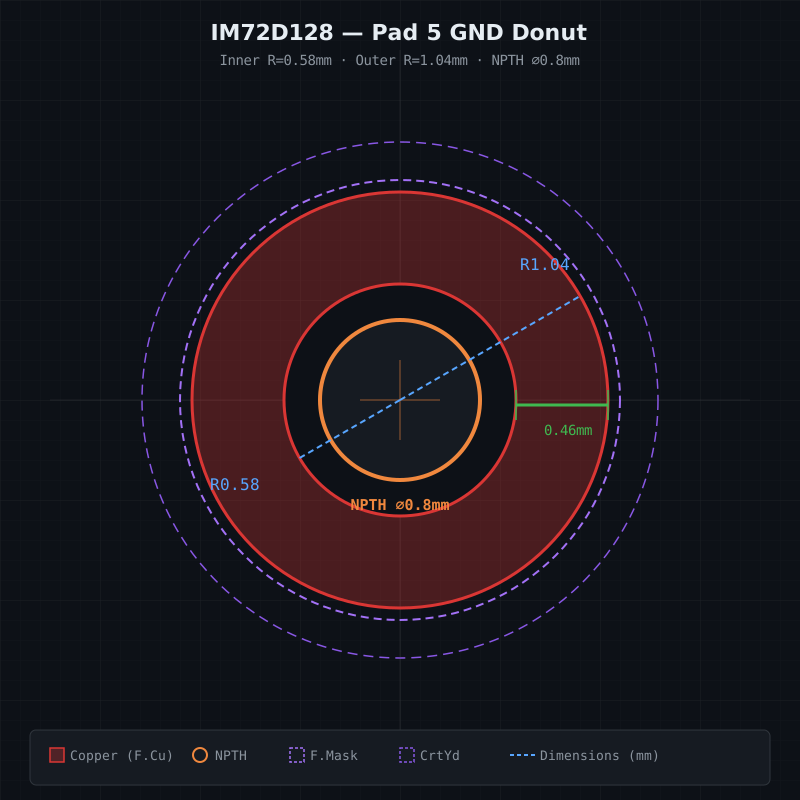
KiCad Donut Pad Designer
Generate annular-ring (donut) copper pads for KiCad footprints. These appear on components like MEMS microphones where a GND pad surrounds a central acoustic port hole (NPTH).
What it does
- Interactive Hydrogen webview app with live SVG preview
- Adjustable parameters: outer/inner radius, drill diameter, segments, paste aperture config, mask margin
- Presets for common MEMS microphones: IM72D128, IM69D130, SPH0645
- Exports valid
.kicad_mod files directly to your project directory
- Python CLI generator (
donut_pad.py) for scripted/batch use
How the donut pad works
KiCad has no native ring pad shape. The workaround uses a custom SMD pad with a gr_poly primitive whose outline traces the outer circle CCW, then bridges to the inner circle and traces it CW. This creates a filled polygon with a hole.
Outer copper (R_outer) ──┐
                         │  copper annulus
Inner clearance (R_inner)┘
         NPTH drill ─── acoustic port / vent hole
The generator also produces:
- NPTH hole at the center
- Segmented paste apertures (quarter-arc stencil openings with gaps)
- Solder mask opening circle
- Courtyard rectangle
Installation
The skill is installed via gallia. It lives at ~/.claude/skills/kicad-donut-pad/.
To launch the interactive designer:
# Start the server (if not already running)
cd ~/.claude/skills/kicad-donut-pad && python3 server.py &

# Open in Hydrogen webview
adom-cli hydrogen webview open-or-refresh --name "Donut Pad Designer" \
  --url "$(echo $VSCODE_PROXY_URI | sed 's/{{port}}/8847/')"
Or use the Python CLI directly:
python3 ~/.claude/skills/kicad-donut-pad/donut_pad.py \
  --outer 1.04 --inner 0.58 --drill 0.8 \
  --center-x 0 --center-y 0.68 \
  --pad-number 5 --segments 36
Common use cases
| Component type | Typical R_outer | R_inner | NPTH | Notes |
|---|
| MEMS microphone (3x4mm) | 0.9-1.1 mm | 0.5-0.6 mm | 0.8 mm | Acoustic port |
| MEMS microphone (2.5x3.5mm) | 0.7-0.9 mm | 0.4-0.5 mm | 0.6 mm | Smaller package |
| Pressure sensor | 0.8-1.2 mm | 0.4-0.6 mm | 0.5-0.8 mm | Vent hole |
Source
- Gallia repo:
skills/kicad-donut-pad/ in adom-inc/gallia
- Files:
SKILL.md, index.html (webview app), server.py (HTTP + save API), donut_pad.py (CLI generator)
---
name: kicad-donut-pad
user-invocable: true
description: >
  Generate KiCad donut / annular-ring pads for footprints that need a copper ring
  around a non-plated through-hole (NPTH), such as bottom-port MEMS microphones.
  Trigger words: donut pad, annular ring pad, ring pad, NPTH ring, copper ring pad,
  acoustic port pad, sound port pad, MEMS microphone footprint, custom pad ring,
  kicad custom pad polygon, kicad annular ring, donut footprint, ring-shaped pad,
  hollow pad, pad with hole, pad around NPTH.
  Use when the user wants to create a KiCad footprint pad shaped like a ring/donut
  (copper annulus around a central hole), typically seen on MEMS microphone GND pads
  where the acoustic port passes through the center.
---

# KiCad Donut Pad Generator

Create annular-ring (donut) copper pads for KiCad footprints. These appear on
components like MEMS microphones where a GND pad surrounds a central acoustic
port hole.

## What the user asked

$ARGUMENTS

## Anatomy of a donut pad

A donut pad has three concentric zones:

```
  ┌─────────── Solder mask opening (R_outer + margin) ──────────┐
  │  ┌─────── Outer copper edge (R_outer) ───────┐              │
  │  │  ┌─── Inner copper edge (R_inner) ───┐    │              │
  │  │  │  ┌─ NPTH drill (R_drill) ─┐       │    │              │
  │  │  │  │                        │       │    │              │
  │  │  │  │      (air/hole)        │ copper│    │  mask margin │
  │  │  │  │                        │       │    │              │
  │  │  │  └────────────────────────┘       │    │              │
  │  │  └───────────────────────────────────┘    │              │
  │  └───────────────────────────────────────────┘              │
  └─────────────────────────────────────────────────────────────┘
```

| Parameter | Meaning | IM72D128 example |
|-----------|---------|-----------------|
| `R_outer` | Outer radius of copper annulus | 1.04 mm |
| `R_inner` | Inner radius of copper annulus (clearance around hole) | 0.58 mm |
| `R_drill` | NPTH drill radius | 0.40 mm |
| `mask_margin` | Solder mask expansion beyond outer copper | 0.06 mm |
| `N` | Number of polygon vertices per circle | 36 |

## How it works in KiCad

KiCad has no native "ring" pad shape. The workaround uses a **custom pad** with
a single `gr_poly` primitive whose outline traces the outer circle in one
direction, then bridges to the inner circle and traces it in the opposite
direction. This creates a filled polygon with a hole — the donut.

### Winding rule

1. **Outer circle** — N points, counter-clockwise (standard math convention):
   `(R_outer * cos(i * 2pi/N), R_outer * sin(i * 2pi/N))` for i = 0..N-1

2. **Bridge** — a single edge from the last outer point back to the first inner
   point at the same angle, connecting the two contours.

3. **Inner circle** — N points, **clockwise** (reversed winding):
   `(R_inner * cos(i * 2pi/N), R_inner * sin(i * 2pi/N))` for i = N-1..0

The polygon auto-closes back to the first outer point.

### Additional elements

- **NPTH pad** — `np_thru_hole circle` at the same location, drill = 2 * R_drill.
  Layers: `"*.Cu" "*.Mask"`.
- **Solder mask** — either set `solder_mask_margin` on the custom pad, or draw
  an explicit `fp_circle` on `F.Mask` with radius = R_outer + mask_margin.
- **Paste apertures** — the stencil layer gets segmented arcs (typically 4
  quarter-ring segments with small gaps) so solder paste coverage is even
  without bridging across the hole. These are `fp_poly` shapes on `F.Paste`.

## Python generator

Use this script to produce the S-expression fragments. Run it, then paste the
output into your `.kicad_mod` file.

```python
#!/usr/bin/env python3
"""Generate KiCad donut-pad S-expression fragments.

Usage:
    python3 donut_pad.py --outer 1.04 --inner 0.58 --drill 0.8 \
        --center-x 0 --center-y 0.68 --pad-number 5 --segments 36 \
        --mask-margin 0.06 --paste-segments 4 --paste-gap-deg 10
"""
import argparse, math, sys

def circle_pts(radius, n, cw=False):
    """Return n points around a circle. CW reverses winding."""
    pts = []
    for i in range(n):
        angle = 2 * math.pi * i / n
        x = round(radius * math.cos(angle), 4)
        y = round(radius * math.sin(angle), 4)
        pts.append((x, y))
    if cw:
        pts.reverse()
    return pts

def arc_pts(r_outer, r_inner, start_deg, end_deg, n_per_arc):
    """Return polygon points for one arc segment of the donut (paste aperture).
    Outer arc from start→end, then inner arc from end→start (reversed)."""
    pts = []
    for i in range(n_per_arc + 1):
        a = math.radians(start_deg + (end_deg - start_deg) * i / n_per_arc)
        pts.append((round(r_outer * math.cos(a), 4),
                     round(r_outer * math.sin(a), 4)))
    for i in range(n_per_arc, -1, -1):
        a = math.radians(start_deg + (end_deg - start_deg) * i / n_per_arc)
        pts.append((round(r_inner * math.cos(a), 4),
                     round(r_inner * math.sin(a), 4)))
    return pts

def fmt_pts(pts, indent=10):
    sp = " " * indent
    return "\n".join(f"{sp}(xy {x} {y})" for x, y in pts)

def main():
    p = argparse.ArgumentParser(description="KiCad donut pad generator")
    p.add_argument("--outer", type=float, required=True, help="Outer copper radius (mm)")
    p.add_argument("--inner", type=float, required=True, help="Inner copper radius (mm)")
    p.add_argument("--drill", type=float, required=True, help="NPTH drill diameter (mm)")
    p.add_argument("--center-x", type=float, default=0.0, help="Pad center X (mm)")
    p.add_argument("--center-y", type=float, default=0.0, help="Pad center Y (mm)")
    p.add_argument("--pad-number", type=str, default="5", help="Pad number/name")
    p.add_argument("--segments", type=int, default=36, help="Vertices per circle")
    p.add_argument("--mask-margin", type=float, default=0.06, help="Solder mask expansion (mm)")
    p.add_argument("--paste-segments", type=int, default=4, help="Number of paste aperture arcs")
    p.add_argument("--paste-gap-deg", type=float, default=10, help="Gap between paste arcs (degrees)")
    p.add_argument("--paste-ratio", type=float, default=0.9, help="Paste aperture radial shrink (0-1)")
    args = p.parse_args()

    R_o = args.outer
    R_i = args.inner
    N = args.segments
    cx, cy = args.center_x, args.center_y

    # --- Donut copper polygon (custom pad primitive) ---
    outer = circle_pts(R_o, N, cw=False)
    inner = circle_pts(R_i, N, cw=True)
    donut = outer + inner  # bridge is the edge from outer[-1] to inner[0]

    print(f'  (pad "{args.pad_number}" smd custom (at {cx} {cy}) (size 0.1 0.1) '
          f'(layers "F.Cu" "F.Mask") (solder_mask_margin {args.mask_margin}) '
          f'(options (clearance outline) (anchor circle))')
    print( '    (primitives')
    print( '      (gr_poly')
    print( '        (pts')
    print(fmt_pts(donut, 10))
    print( '        ) (width 0.001)')
    print( '      )')
    print( '    )')
    print( '  )')

    # --- NPTH hole ---
    drill = args.drill
    print(f'  (pad "" np_thru_hole circle (at {cx} {cy}) '
          f'(size {drill} {drill}) (drill {drill}) (layers "*.Cu" "*.Mask"))')

    # --- Paste apertures (segmented arcs) ---
    n_seg = args.paste_segments
    gap = args.paste_gap_deg
    arc_span = 360.0 / n_seg - gap
    # Shrink paste radii slightly inward from copper edges
    shrink = (R_o - R_i) * (1 - args.paste_ratio) / 2
    pr_o = R_o - shrink
    pr_i = R_i + shrink
    pts_per_arc = max(8, N // n_seg)

    print(f'\n  ;; Paste apertures ({n_seg} segments, {gap}deg gaps)')
    for s in range(n_seg):
        start = s * (360.0 / n_seg) + gap / 2
        end = start + arc_span
        pts = arc_pts(pr_o, pr_i, start, end, pts_per_arc)
        # Offset points by pad center for fp_poly (absolute coords)
        abs_pts = [(round(x + cx, 4), round(y + cy, 4)) for x, y in pts]
        print( '  (fp_poly')
        print( '    (pts')
        print(fmt_pts(abs_pts, 6))
        print( '    ) (layer "F.Paste") (width 0.001)')
        print( '  )')

    # --- Solder mask circle (optional, if not relying on margin) ---
    mask_r = round(R_o + args.mask_margin, 4)
    end_x = round(cx + mask_r, 4)
    print(f'\n  ;; Explicit solder mask opening')
    print(f'  (fp_circle (center {cx} {cy}) (end {end_x} {cy}) '
          f'(layer "F.Mask") (width 0.001) (fill none))')

if __name__ == "__main__":
    main()
```

### Example: IM72D128 GND pad

From the datasheet (Figure 13, page 12):

```bash
python3 donut_pad.py \
  --outer 1.04 --inner 0.58 --drill 0.8 \
  --center-x 0 --center-y 0.68 \
  --pad-number 5 --segments 36 \
  --mask-margin 0.06 \
  --paste-segments 4 --paste-gap-deg 10
```

This produces pad 5 centered at (0, 0.68) with:
- Copper ring: R_inner=0.58mm to R_outer=1.04mm (0.46mm annulus width)
- NPTH: 0.8mm diameter acoustic port
- 4 quarter-arc paste apertures with 10-degree gaps
- Solder mask opening at R=1.10mm

## Reading dimensions from a datasheet

When the user provides a PDF datasheet, look for the **footprint recommendation**
figure (usually titled "Footprint and stencil recommendation" or "Land pattern").
Extract these dimensions:

| What to find | Where it appears | Maps to |
|--------------|-----------------|---------|
| Outer ring radius or diameter | Labeled as copper pad outer boundary | `--outer` |
| Inner ring radius or diameter | Clearance around center hole | `--inner` |
| Drill / hole diameter | NPTH or acoustic port | `--drill` |
| Pad center coordinates | Relative to package center | `--center-x`, `--center-y` |
| Stencil aperture pattern | Usually shown as hatched/shaded arcs | `--paste-segments`, `--paste-gap-deg` |

Common convention: if the datasheet shows "R0.58" and "R1.04" on the ring, those
are the inner and outer **radii** (not diameters).

## Integration into a footprint

1. Generate the fragments with the Python script
2. Open your `.kicad_mod` file
3. Paste the custom pad, NPTH, paste polys, and mask circle inside the
   `(footprint ...)` block, after the other pads
4. Verify in KiCad's footprint editor — the donut should appear as a filled
   copper ring with a hole. Check all layers: F.Cu, F.Mask, F.Paste

## Checklist

- [ ] Outer and inner radii match the datasheet
- [ ] NPTH drill diameter matches the acoustic port spec
- [ ] Polygon winding: outer CCW, inner CW (creates the hole)
- [ ] Paste apertures don't bridge across the center hole
- [ ] Solder mask opening clears the outer copper by the specified margin
- [ ] Pad is assigned the correct net (usually GND)
- [ ] Courtyard clears the solder mask opening

## Common variations

| Component type | Typical R_outer | Typical R_inner | NPTH | Notes |
|---------------|----------------|----------------|------|-------|
| MEMS microphone (3x4mm) | 0.9–1.1 mm | 0.5–0.6 mm | 0.8 mm | Acoustic port |
| MEMS microphone (2.5x3.5mm) | 0.7–0.9 mm | 0.4–0.5 mm | 0.6 mm | Smaller package |
| Pressure sensor | 0.8–1.2 mm | 0.4–0.6 mm | 0.5–0.8 mm | Vent hole |
| Shielded connector | 1.5–3.0 mm | 0.8–1.5 mm | 1.0–2.0 mm | Grounding ring |