●Community Submission — This content is pending review by the Adom team.v1.0.0
Skill
Fp3dView — Footprint Pad 3D Viewer
Interactive 3D viewer that displays KiCad .kicad_mod footprint pad geometry as extruded copper pads with outlines, labels, measurements, and a datasheet-style land pattern overlay in the Gallia Viewer.
⚡Install this skill
Paste this into Claude Code (VS Code panel, Adom editor, or terminal) to install:
Search the Adom Wiki for the skill "Fp3dView — Footprint Pad 3D Viewer" (slug: fp3d-viewer) at https://wiki-ufypy5dpx93o.adom.cloud/wiki/skills/fp3d-viewer and install it into my local ~/.claude/skills/fp3d-viewer/ directory. Fetch the skill_source content from the wiki page and save it as SKILL.md. Then confirm it's installed by showing the first 5 lines.
What is a skill? Skills are instructions that teach AI assistants like Claude Code how to perform specific tasks.
The description below is loaded into the AI as context when you invoke this skill. Well-written skills make the AI significantly more effective.
Like Wikipedia, anyone can improve a skill by clicking Edit AI Skill — or have your AI submit an edit on your behalf.
Screenshots
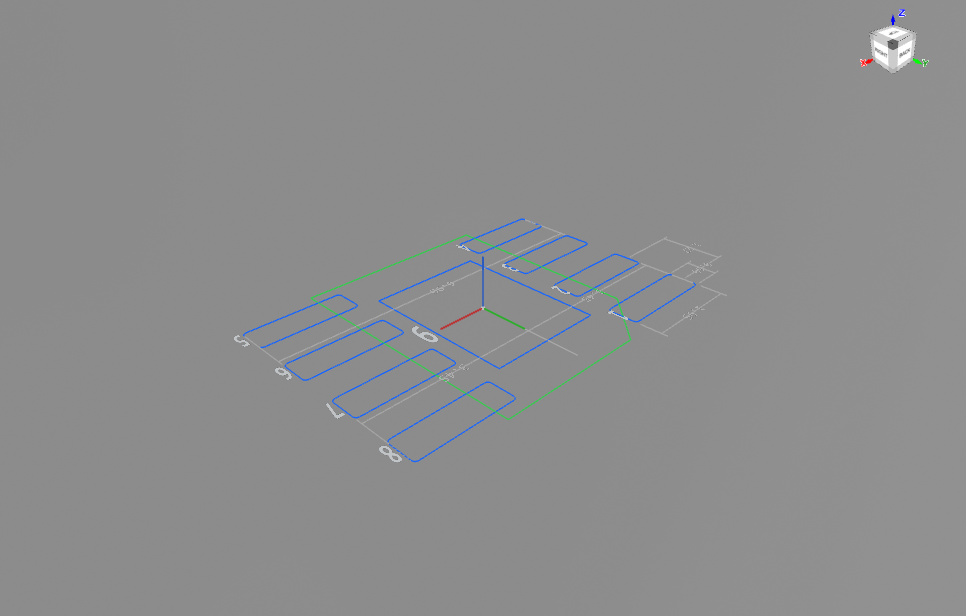
Land pattern wireframe — blue pad outlines, green F.Fab body outline, gray dimension annotations
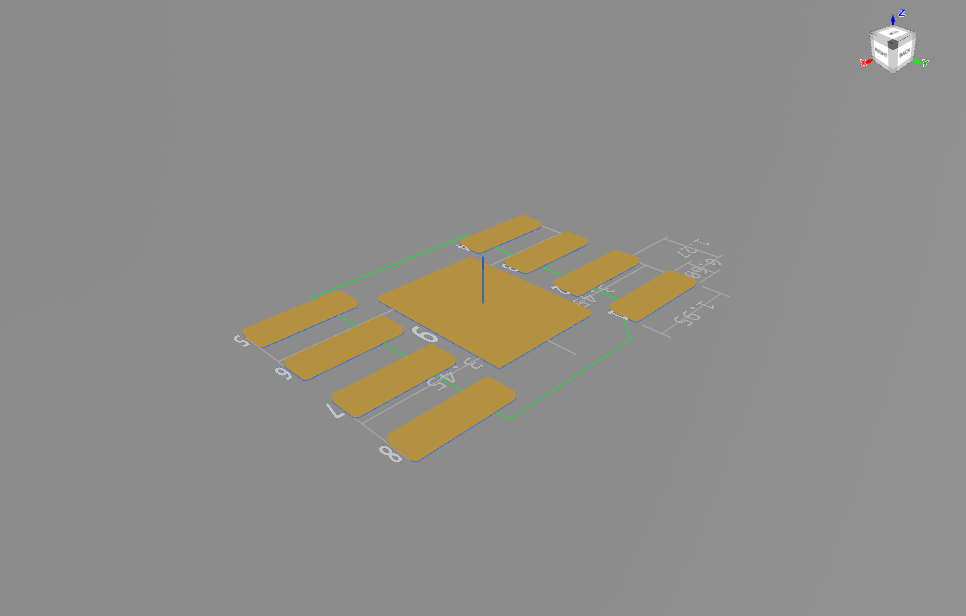
Land pattern with copper — dimension lines showing pad width (1.95mm), pad height (0.60mm), pitch (1.27mm)
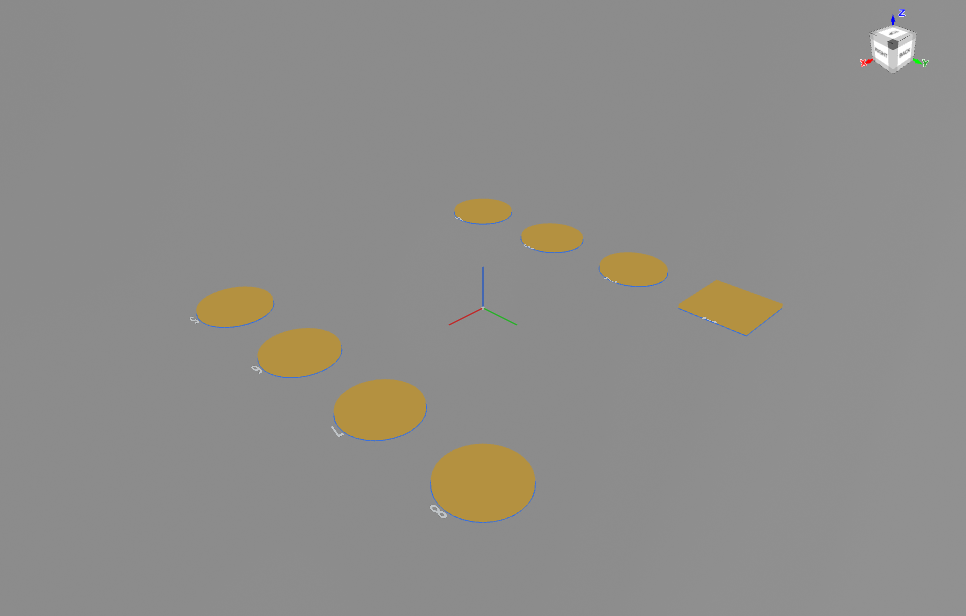
DIP-8 through-hole package — oval and rect pads with F.Fab line chain parsing
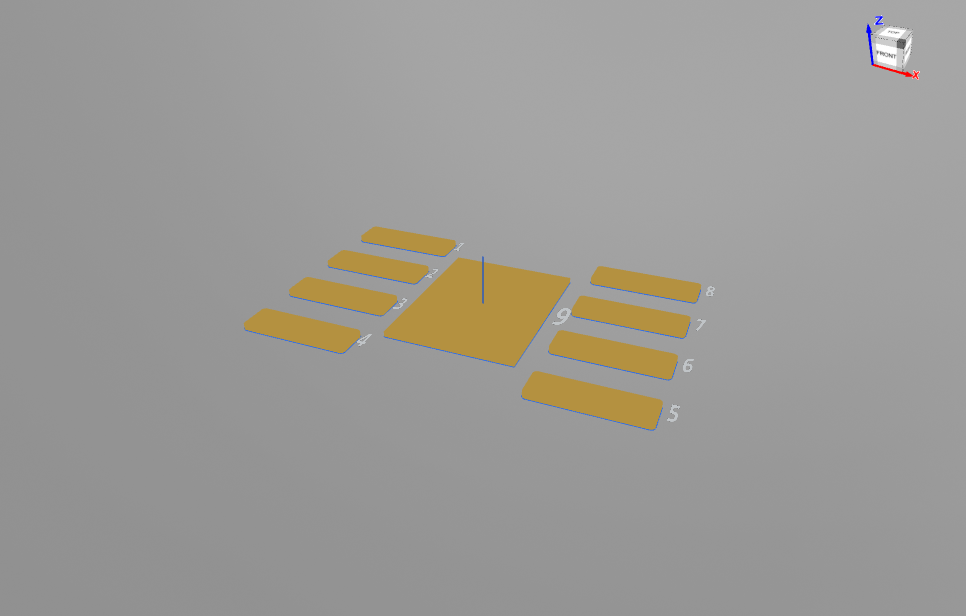
SOIC-8 default view — extruded copper pads with pad number labels and blue outlines
Fp3dView reads a KiCad .kicad_mod footprint file and renders the pad geometry as interactive 3D copper pads in the Gallia Viewer (Hydrogen) using Babylon.js.
Key Features
Extruded copper pads with accurate shapes (rect, roundrect, oval, circle)
Blue pad outlines at z=0 for clear 2D reference
Pad number and name labels — auto-generated positional names (L1–L4, R1–R4, EP) or custom
Measurements overlay — per-pad table with dimensions, pitch, and overall extents
Land pattern overlay — green F.Fab body outline + dimension annotations (overall width, pad width/height, pitch, center-to-center span)
10 toolbar toggles for every visual layer
Self-test mode for automated verification
Supported Package Formats
Format
Typical Packages
F.Fab Body Outline
SMD gull-wing
SOIC, TSSOP, QFP
fp_poly
SMD passives
0805, 0603, 0402
fp_rect
Through-hole
DIP, SIP
fp_line chain
Toolbar Toggles
Button
Feature
Default
Zoom-to-fit
Reset camera
—
Outlines
Blue pad outlines
ON
#
Pad number labels
ON
N
Pad name labels (cyan)
OFF
2D mesh
Earcut triangulation
OFF
Copper
Extruded 3D copper
ON
Ground
Ground plane
OFF
Axes
XYZ axis indicator
ON
mm
Measurements panel
OFF
IC icon
Land pattern overlay
OFF
When to Use This vs Other Viewers
Viewer
Best For
Fp3dView (this)
Pad geometry inspection, copper shapes, dimensions, land pattern
FpView
Full footprint preview with silk, courtyard, fab layer
---
name: fp3d-viewer
description: Use when the user asks to "show footprint pads in 3D", "show me the pad geometry", "visualize footprint pads", "show Fp3dView", "3D pad view", "show land pattern", "show pad dimensions in 3D", or wants an interactive 3D view of a KiCad footprint's pad copper geometry with outlines, labels, measurements, and land pattern overlay in the Gallia Viewer.
---

# Fp3dView — Footprint Pad 3D Viewer

Display KiCad `.kicad_mod` footprint pad geometry as interactive 3D copper pads in the Gallia Viewer (Hydrogen) using Babylon.js. Includes outlines, pad number/name labels, measurements panel, and a datasheet-style land pattern overlay with dimension annotations.

**Input**: A `.kicad_mod` footprint file (from the **footprint-creator** skill or KiCad library)
**Output**: Interactive 3D view in Gallia Viewer with toolbar toggles

## Quick Start — CLI

```bash
node /home/adom/gallia/viewer/fp-to-3d.js <path-to-.kicad_mod>
```

Self-test mode (auto-cycles all toggles every 3s):
```bash
node /home/adom/gallia/viewer/fp-to-3d.js <path> --test
```

## Pad Data Structure

Each pad extracted from `.kicad_mod` has:

```javascript
{
  number: "1",
  name:   "L1",
  mountType: "smd",
  shape: "roundrect",
  x: -2.475, y: -1.905,
  w: 1.95, h: 0.6,
  rotation: 0,
  rratio: 0.25,
  property: "pad_prop_heatsink"
}
```

## Auto-Naming Convention

| Group | Naming | Sort Order |
|-------|--------|------------|
| Left side | L1, L2, L3, L4 | Top to bottom |
| Right side | R1, R2, R3, R4 | Bottom to top (IC convention) |
| Top row | T1, T2, ... | Left to right |
| Bottom row | B1, B2, ... | Right to left |
| Exposed pad | EP | By pad_prop_heatsink |
| Center pads | C, C1, C2 | By position |

## Message API

```javascript
iframe.contentWindow.postMessage({ type: 'fp3d_toggle', name: 'landpattern' }, '*');
// names: 'outlines', 'numbers', 'names', 'mesh2d', 'copper', 'ground', 'axes', 'dims', 'landpattern'
```

## File Location

```
/home/adom/gallia/viewer/fp-to-3d.js
```
Sub-Skills
?
What are Sub-Skills?
Sub-skills are community-contributed AI skill extensions for this component.
They teach AI assistants about specific tools, configurators, or workflows.
Examples:
A manufacturer’s configuration tool for a motor controller
A community-written design guide for an amplifier circuit
An automated test/validation script for a sensor module
How to add one: Click Add Sub-Skill, provide the URL
to your skill and a brief description. Submissions are reviewed by the Adom team
before going live.
No sub-skills yet. Be the first to contribute one!