Install this skill

Paste this into Claude Code (VS Code panel, Adom editor, or terminal) to install:

Search the Adom Wiki for the skill "Claude Squad" (slug: claude-squad) at https://wiki-ufypy5dpx93o.adom.cloud/wiki/skills/claude-squad and install it into my local ~/.claude/skills/claude-squad/ directory. Fetch the skill_source content from the wiki page and save it as SKILL.md. Then confirm it's installed by showing the first 5 lines.
?
What is a skill? Skills are instructions that teach AI assistants like Claude Code how to perform specific tasks. The description below is loaded into the AI as context when you invoke this skill. Well-written skills make the AI significantly more effective. Like Wikipedia, anyone can improve a skill by clicking Edit AI Skill — or have your AI submit an edit on your behalf.

Screenshots

Description

Edit AI Skill

Claude Squad launches 4 concurrent Claude Code remote control sessions in named tmux sessions (alpha, beta, gamma, delta). Each session runs claude --dangerously-skip-permissions rc, generating a session URL controllable from the Claude phone app.

Why tmux?

tmux provides persistent terminal sessions that survive disconnects. Each Claude RC session runs inside its own tmux session, which means:

  • Sessions persist even if you close your browser or lose connection
  • Output can be captured programmatically (tmux capture-pane) for monitoring
  • Sessions can be controlled by sending keystrokes (tmux send-keys)
  • Multiple sessions coexist independently without interfering with each other

Architecture

┌─────────────────────────────────────────────────┐
│  Adom Container                                  │
│                                                  │
│  ┌──────────┐  ┌──────────┐  ┌──────────┐  ┌──────────┐
│  │  tmux    │  │  tmux    │  │  tmux    │  │  tmux    │
│  │  alpha   │  │  beta    │  │  gamma   │  │  delta   │
│  │          │  │          │  │          │  │          │
│  │ claude   │  │ claude   │  │ claude   │  │ claude   │
│  │ --skip   │  │ --skip   │  │ --skip   │  │ --skip   │
│  │ rc       │  │ rc       │  │ rc       │  │ rc       │
│  └────┬─────┘  └────┬─────┘  └────┬─────┘  └────┬─────┘
│       │              │              │              │
│       └──────────────┴──────┬───────┴──────────────┘
│                             │
│  ┌──────────────────────────┴───────────────────┐
│  │  Gallia Viewer (GV)                           │
│  │  - Live status dashboard                      │
│  │  - Start / Restart / Stop controls            │
│  │  - Watchdog auto-restart (15s interval)       │
│  │  - Per-session chat output viewer             │
│  │  - Auto-start on boot                         │
│  └───────────────────────────────────────────────┘
│                             │
└─────────────────────────────┼───────────────────┘
                              │
                    ┌─────────┴─────────┐
                    │  Claude Phone App  │
                    │  (Remote Control)  │
                    └───────────────────┘

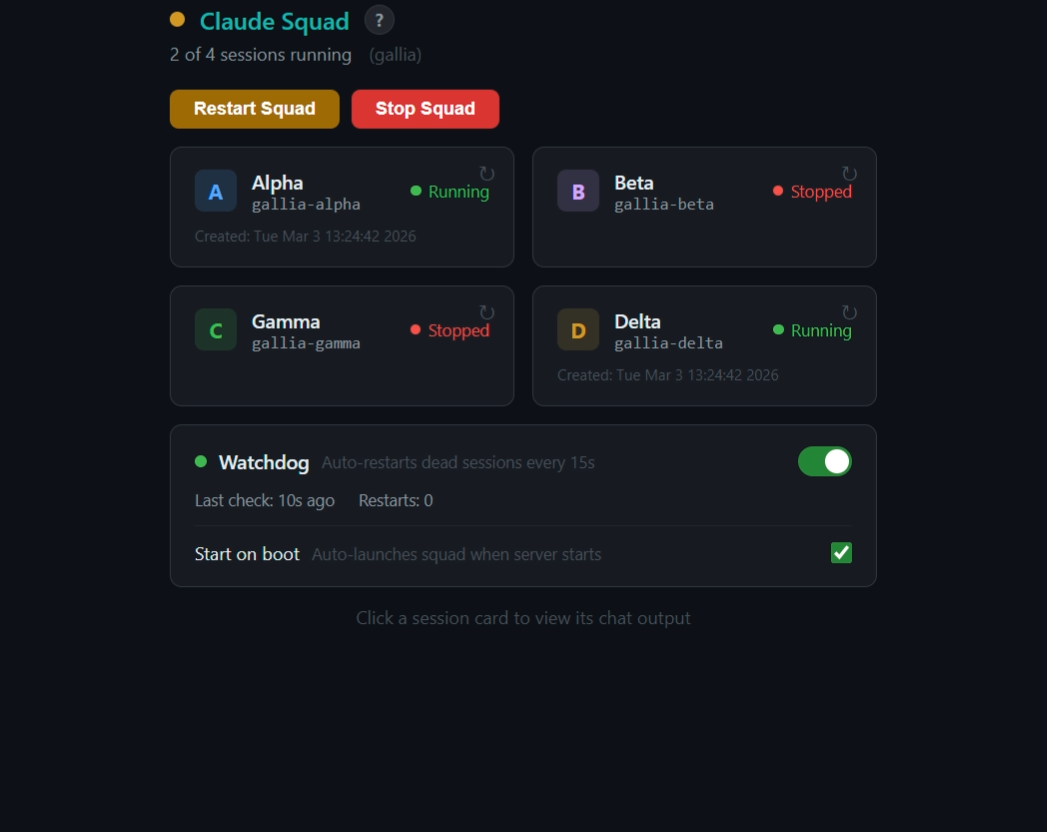
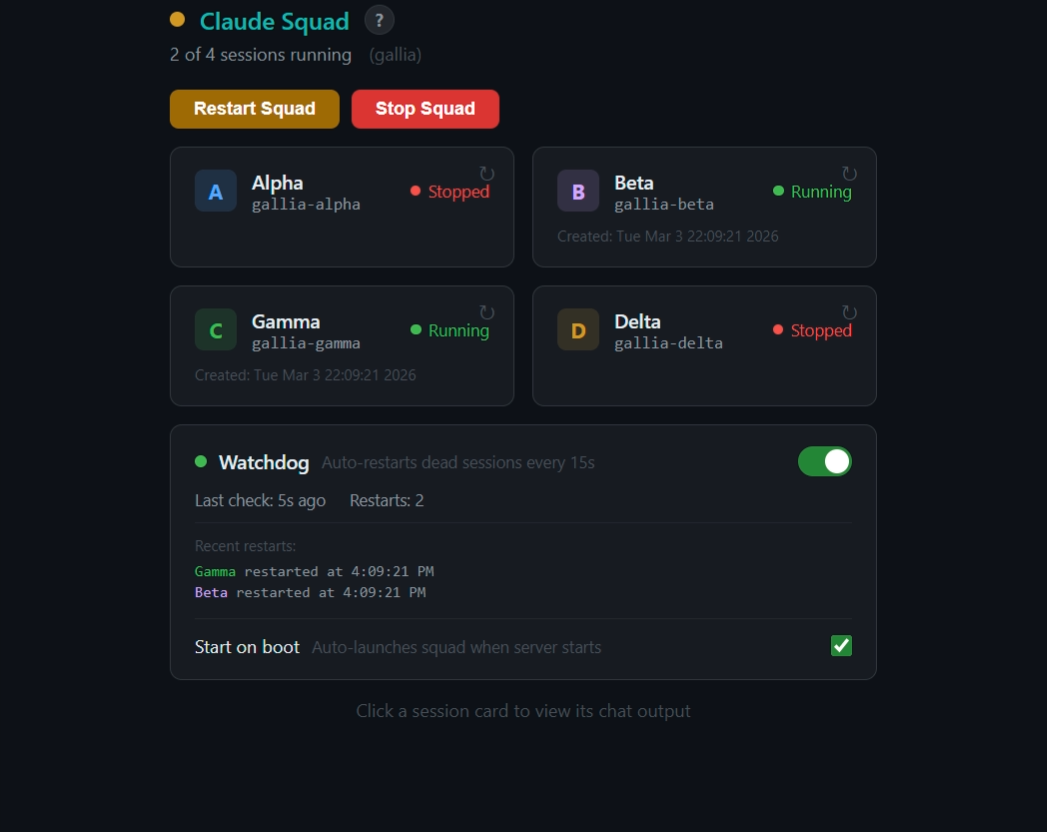
Gallia Viewer Dashboard

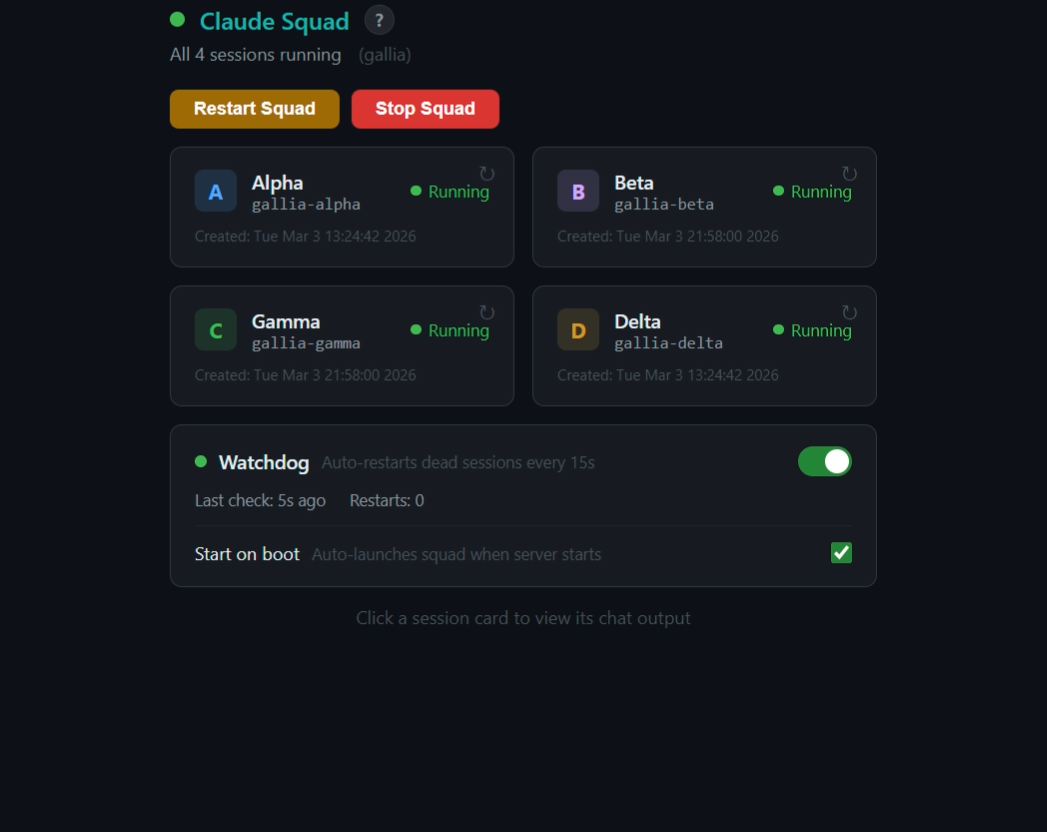
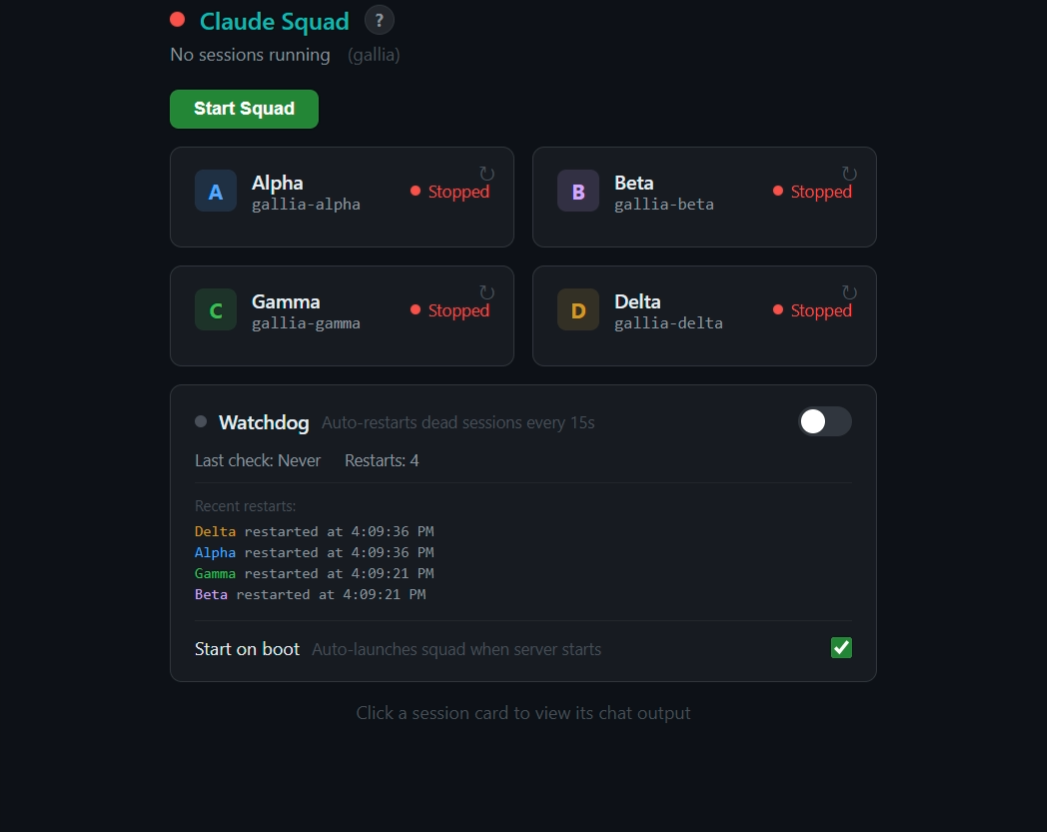
The squad has a full management UI built into Gallia Viewer. Features include:

  • Live status — green/yellow/red indicator showing how many sessions are running, auto-refreshes every 5 seconds
  • Start / Restart / Stop — buttons to launch all 4 sessions, restart the entire squad, or stop everything
  • Per-session restart — click the restart icon on any card to restart just that session
  • Chat output — click a session card to view its full tmux pane output (last 1000 lines), auto-scrolls to bottom
  • Watchdog — toggle to auto-restart any dead sessions every 15 seconds; shows restart count and recent restart log
  • Start on boot — checkbox (default ON) that auto-launches the squad when the GV server starts
  • Explainer tooltip — hover the ? icon for a quick overview of why tmux is used

Phone App Experience

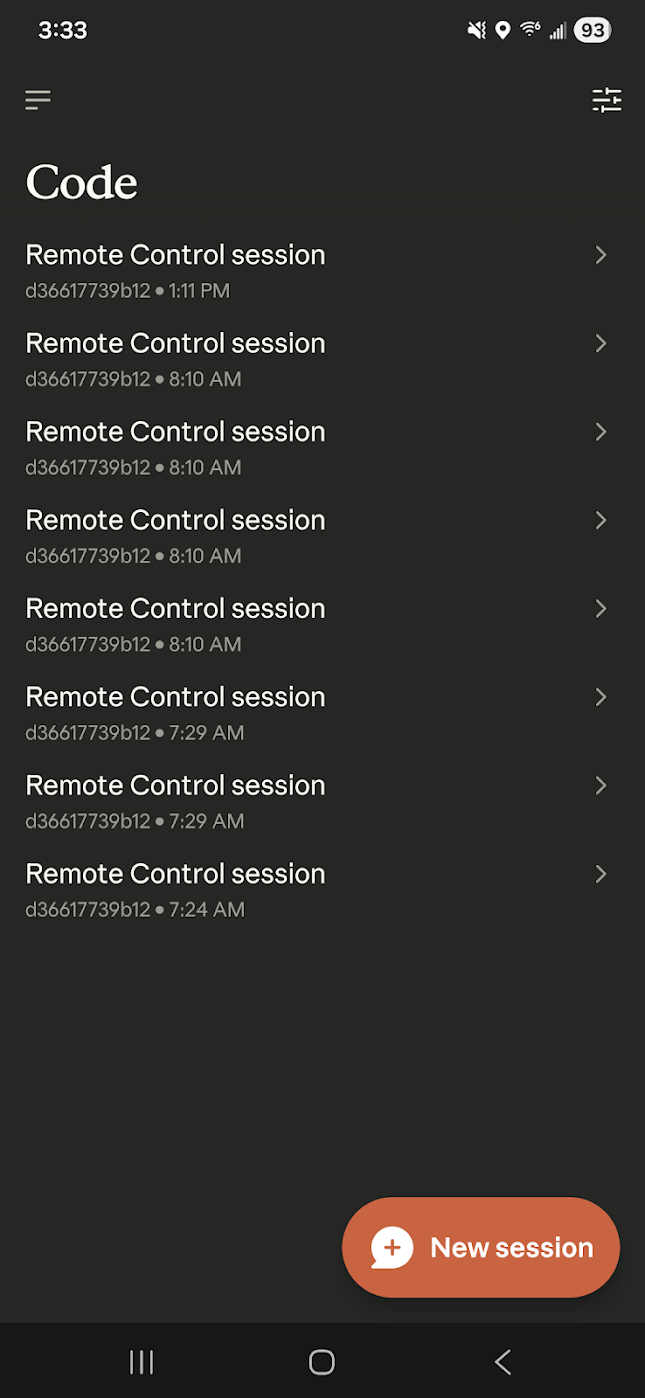
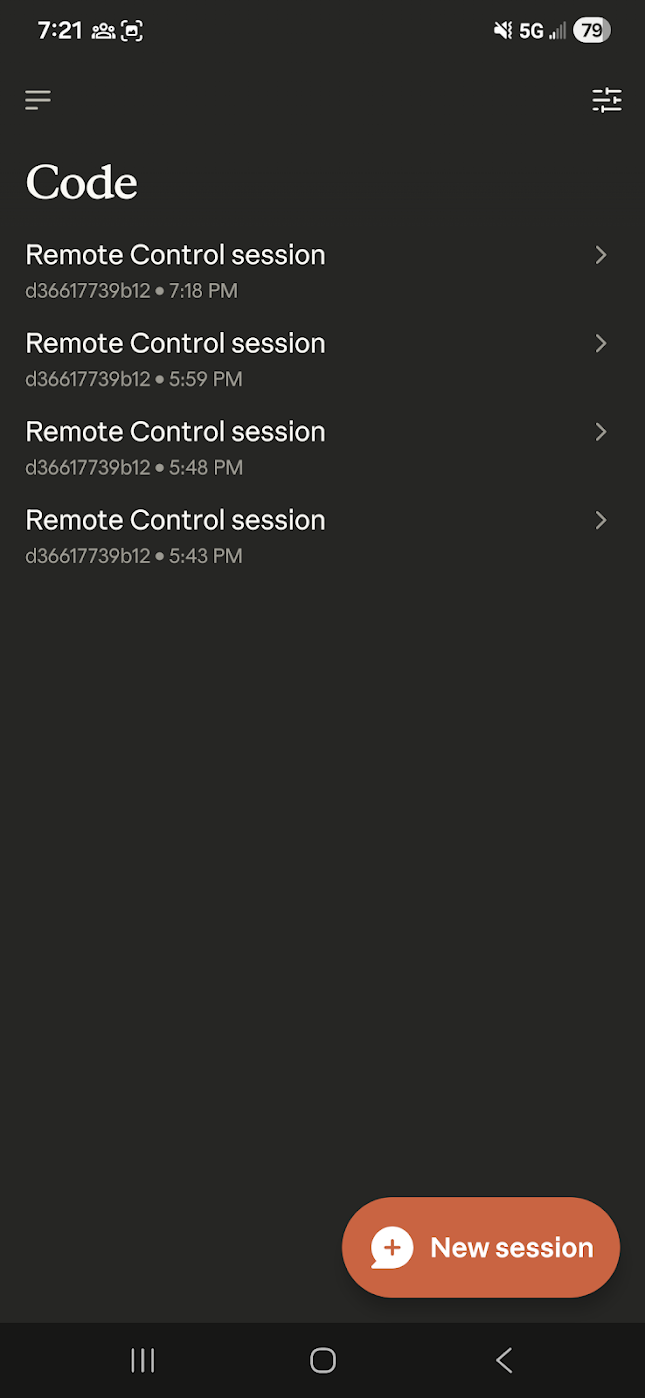
On the Claude phone app, each RC session appears as "Remote Control session" with the container ID. Currently the Claude CLI rc subcommand doesn't support custom session naming, so all 4 sessions look identical on the phone — differentiated only by their start timestamp. The GV dashboard compensates by clearly labeling each channel (Alpha, Beta, Gamma, Delta) with color-coded badges.

Session Naming

Sessions use the pattern {repo}-{greek}:

SessionExample tmux name
Alphagallia-alpha
Betagallia-beta
Gammagallia-gamma
Deltagallia-delta

The repo name is derived from the container's VSCODE_PROXY_URI environment variable.

Commands

ActionHow
Launch squad/claude-squad or click "Start Squad" in GV
Check statusGV dashboard (auto-refreshes) or tmux list-sessions
Stop allClick "Stop Squad" in GV
Restart oneClick restart icon on individual card in GV
Send prompttmux send-keys -t {repo}-alpha "your prompt" Enter
View outputClick a session card in GV, or tmux capture-pane -t {repo}-alpha -p -S -500
Enable watchdogToggle switch in GV dashboard

Capabilities

  • Launch 4 concurrent Claude Code RC sessions in one click
  • Monitor session status with color-coded cards (green = running, red = dead)
  • View live chat output from any session
  • Auto-restart dead sessions with built-in watchdog (15-second check interval)
  • Auto-launch squad on container boot (configurable)
  • Restart individual sessions without affecting others
  • Send prompts to sessions via tmux
  • Full programmatic API via WebSocket and HTTP

Skill Source

Edit AI Skill
---
name: claude-squad
description: Use when the user wants to launch multiple Claude Code remote control sessions, run a "claude squad", start parallel claude RC instances, manage background claude sessions, or asks about multi-session claude workflows. Covers launching, listing, stopping, and managing named tmux-based Claude Code remote control sessions controllable from the phone app.
user-invokable: true
---

# Claude Squad

Launch 4 concurrent Claude Code **remote control** sessions in named tmux sessions. Each session runs `claude --dangerously-skip-permissions rc`, which starts remote control mode — generating a session URL that can be controlled from the Claude phone app.

## Session Names

Sessions are named `{repo}-{greek}` so they're identifiable across multiple containers on the phone app. The repo name is derived from the container hostname.

| Session | tmux name (example for `service-jlcpcb`) |
|---------|-----------|
| **Alpha** | `service-jlcpcb-alpha` |
| **Beta** | `service-jlcpcb-beta` |
| **Gamma** | `service-jlcpcb-gamma` |
| **Delta** | `service-jlcpcb-delta` |

## Gallia Viewer Management Dashboard

The squad has a full management UI in Gallia Viewer (GV). Navigate to it from the About page ("Claude Squad" card) or the view dropdown.

### Features

- **Live status** — green/yellow/red indicator showing how many sessions are running, auto-refreshes every 5s
- **Start / Restart / Stop** — buttons to launch all 4 sessions, restart the entire squad, or stop everything
- **Per-session restart** — click the restart icon on any card to restart just that session
- **Chat output** — click a session card to view its full tmux pane output (last 1000 lines), auto-scrolls
- **Watchdog** — toggle to auto-restart any dead sessions every 15s; shows restart count and recent restart log
- **Start on boot** — checkbox (default ON) that auto-launches the squad when the GV server starts; persisted across server restarts via `/tmp/squad-watchdog.json`
- **Explainer tooltip** — hover the `?` icon to learn why tmux is used and how to connect from the phone app

### Programmatic Access

Switch any connected viewer to the squad dashboard:
```bash
curl -X POST http://127.0.0.1:8771 -H 'Content-Type: application/json' -d '{"action":"show_squad"}'
```

## Troubleshooting

| Symptom | Fix |
|---------|-----|
| "no server running" from tmux | tmux server not started. The first `new-session` creates it. Run the launch commands again. |
| Session exits immediately | Claude binary not found or crashed. Check `CLAUDE_BIN` path exists. Try running it manually first. |
| "duplicate session" error | Old sessions still running. Kill them first with the stop commands. |
| RC URL not showing | Session may still be initializing. Wait longer and re-capture pane output. |
| "unknown option" error | Make sure the command is `rc` (not `--rc`). The full command is `claude --dangerously-skip-permissions rc`. |
| "Workspace not trusted" | Run `node ~/gallia/install.mjs` to auto-configure trust in `~/.claude.json`, then retry. |
| "Cannot be launched inside another Claude Code session" | The `CLAUDECODE` env var is set. All launch commands use `unset CLAUDECODE;` prefix — make sure it's included. |
| Phone prompts allow/deny for every action | Run `node ~/gallia/install.mjs` to set full bypass permissions in `~/.claude/settings.json`. |

Sub-Skills
?
What are Sub-Skills?

Sub-skills are community-contributed AI skill extensions for this component. They teach AI assistants about specific tools, configurators, or workflows.

Examples:

  • A manufacturer’s configuration tool for a motor controller
  • A community-written design guide for an amplifier circuit
  • An automated test/validation script for a sensor module

How to add one: Click Add Sub-Skill, provide the URL to your skill and a brief description. Submissions are reviewed by the Adom team before going live.

No sub-skills yet. Be the first to contribute one!

0 revisions · Updated 2026-03-03 21:40:41