💬 Sample prompts Paste any of these into Claude Code to use this skill
Convert EAGLE Convert this EAGLE .lbr to a KiCad symbol and footprint
Convert Altium Turn this Altium .SchLib/.PcbLib into KiCad files
Native thumbnail Render this foreign library's own geometry, not a KiCad version
Compare sources Show the EAGLE, Altium and KiCad symbols side by side
Fusion library Convert this Fusion 360 .lbr to KiCad
Install this skill

Paste this into Claude Code (VS Code panel, Adom editor, or terminal) to install:

Search the Adom Wiki for the skill "adom-sfconvert" (slug: adom-sfconvert) at https://wiki-ufypy5dpx93o.adom.cloud/wiki/skills/adom-sfconvert and install it into my local ~/.claude/skills/adom-sfconvert/ directory. Fetch the skill_source content from the wiki page and save it as SKILL.md. Then confirm it's installed by showing the first 5 lines.
?
What is a skill? Skills are instructions that teach AI assistants like Claude Code how to perform specific tasks. The description below is loaded into the AI as context when you invoke this skill. Well-written skills make the AI significantly more effective. Like Wikipedia, anyone can improve a skill by clicking Edit AI Skill — or have your AI submit an edit on your behalf.

Screenshots

Description

Edit AI Skill

What this is

adom-sfconvert converts foreign EDA libraries — EAGLE / Fusion 360 .lbr and Altium .SchLib / .PcbLib / .IntLib — into standard KiCad symbol + footprint, and renders each format's own geometry as a native SVG. The name echoes adom-ds2sf: sf = symbol + footprint.

It is fully native — pure Rust, runs in your container, no KiCad install and no service round-trip. Each format is read by the right native reader:

InputRead byNative?
EAGLE / Fusion .lbr (XML)built-in eagle.rs
Altium .PcbLib (footprints)altium-pcblib
Altium .SchLib (symbols)altium-schlib

Why native matters

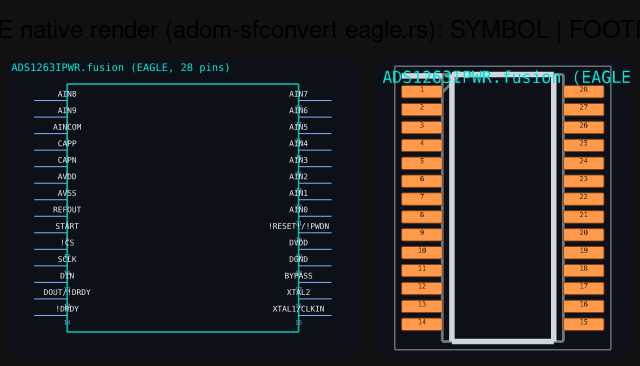
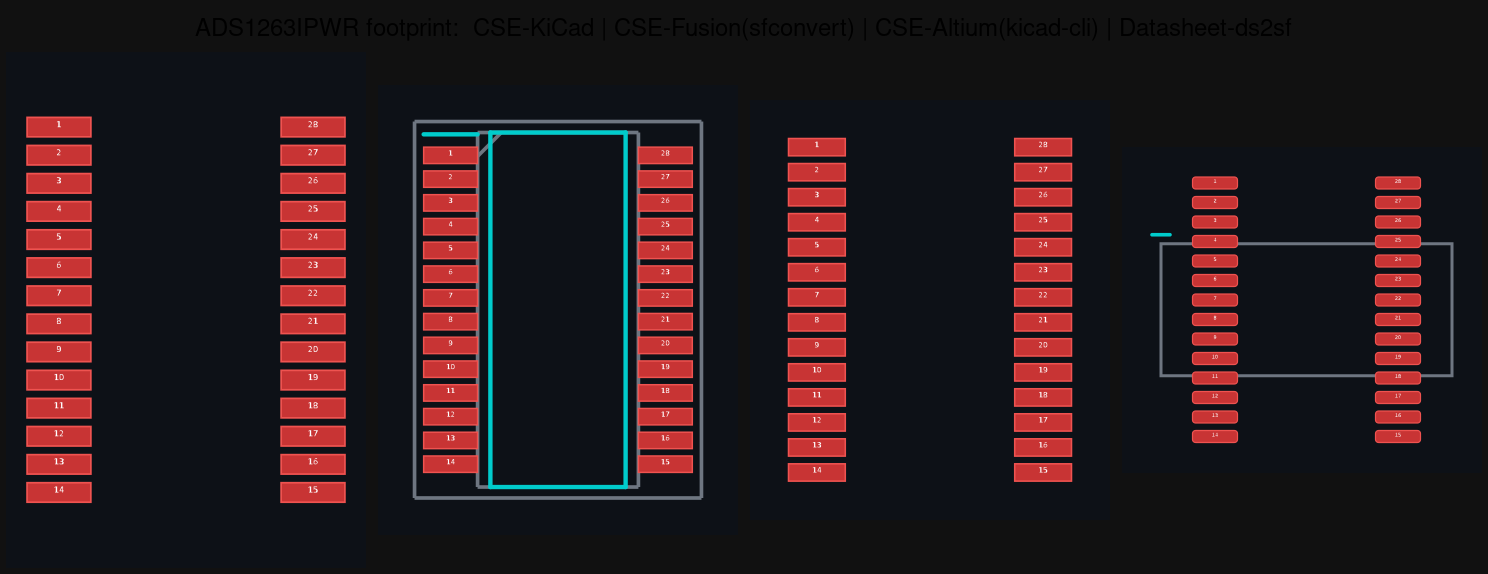
The point of pulling a part's CAD from many sources is to compare what's right and what's wrong. If every format is normalised through KiCad's importer first, the sources converge — they all become "KiCad's interpretation," and the disagreements you wanted to catch are erased. adom-sfconvert renders each library from its own bytes, so EAGLE looks like EAGLE and Altium looks like Altium. Conversion to .kicad_sym / .kicad_mod happens only on export.

Usage

adom-sfconvert convert part.lbr     --out-dir ./out --name part   # EAGLE/Fusion
adom-sfconvert convert part.SchLib  --out-dir ./out --name part   # Altium symbol
adom-sfconvert convert part.PcbLib  --out-dir ./out --name part   # Altium footprint
adom-sfconvert version

Each convert emits, into --out-dir:

  • <name>.kicad_sym / <name>.kicad_mod — the export files.
  • <name>-symbol.svg / <name>-footprint.svg — the native thumbnails, drawn straight from the source geometry.

Where it's used

chip-fetcher calls adom-sfconvert to turn every downloaded EAGLE/Fusion and Altium library into a per-source thumbnail, shown side-by-side with the KiCad and datasheet renders so you can pick what to export to your preferred EDA app. After this tool went native, nothing foreign touches the KiCad service — only KiCad's own format is rendered remotely.

Companions

  • adom-ds2sf — extract symbol + footprint from a datasheet PDF.
  • altium-pcblib / altium-schlib — the native Altium readers this builds on.
  • chip-fetcher — the consumer that shows every source for comparison.

Skill Source

Edit AI Skill
---
name: adom-sfconvert
description: >
  Native Rust CLI that converts foreign EDA libraries — EAGLE/Fusion 360 .lbr and
  Altium .SchLib/.PcbLib/.IntLib — into KiCad symbol + footprint, and renders each
  format's OWN geometry as a native SVG thumbnail. Pure Rust, no KiCad install, no
  service round-trip: EAGLE/Fusion via built-in eagle.rs, Altium footprints via
  altium-pcblib, Altium symbols via altium-schlib. "sf" = symbol + footprint (like
  ds2sf). Conversion to .kicad_sym/.kicad_mod is export-only; rendering stays native
  so cross-source comparison shows each format's truth instead of one normalised
  KiCad interpretation. Used by chip-fetcher for per-source thumbnails.
---

# adom-sfconvert

Convert + natively render EAGLE/Fusion `.lbr` and Altium `.SchLib`/`.PcbLib`.

## When to reach for this

- You have a non-KiCad library (EAGLE/Fusion or Altium) and want a **KiCad
  symbol/footprint** out of it — without installing KiCad.
- You want a **native thumbnail** of a foreign library that shows its own
  geometry (for side-by-side source comparison), not a KiCad-normalised version.

## Command

```bash
adom-sfconvert convert <file> [--out-dir <dir>] [--name <stem>]
```

Recognised inputs: `.lbr` (EAGLE/Fusion XML), `.SchLib` / `.PcbLib` / `.IntLib`
(Altium OLE2 binary, auto-detected by the `D0CF11E0` magic).

Outputs per run: `<stem>.kicad_sym` / `<stem>.kicad_mod` (export) and
`<stem>-symbol.svg` / `<stem>-footprint.svg` (native thumbnails).

## Architecture (all native, all local)

```
.lbr     →  eagle.rs       →  KiCad sym/mod  +  native SVG
.PcbLib  →  altium-pcblib  →  KiCad mod      +  native SVG
.SchLib  →  altium-schlib  →  KiCad sym      +  native SVG
```

No `kicad-cli`, no service POST. The only thing in the wider pipeline that still
calls the shared KiCad service is rendering KiCad's *own* format — correct, since
that isn't a foreign conversion.

## Design rule

**Render native, convert on export.** Converting a foreign format to KiCad just
to draw it throws away exactly the differences a comparison tool exists to find.
Keep originals; emit `.kicad_*` only when the user picks KiCad as the target.

## Companions

- `adom-ds2sf` — datasheet PDF → symbol + footprint.
- `altium-pcblib` / `altium-schlib` — the native Altium readers.
- `chip-fetcher` — shows every source's render for compare-and-contrast.

Sub-Skills
?
What are Sub-Skills?

Sub-skills are community-contributed AI skill extensions for this component. They teach AI assistants about specific tools, configurators, or workflows.

Examples:

  • A manufacturer’s configuration tool for a motor controller
  • A community-written design guide for an amplifier circuit
  • An automated test/validation script for a sensor module

How to add one: Click Add Sub-Skill, provide the URL to your skill and a brief description. Submissions are reviewed by the Adom team before going live.

No sub-skills yet. Be the first to contribute one!

Recent activity

3 commits
  • Asset uploaded John Lauer 27 days ago
    Same footprint from 4 sources, each rendering its own geometry: KiCad, Fusion, Altium (native), datasheet
  • Asset uploaded John Lauer 27 days ago
    EAGLE/Fusion .lbr rendered natively by eagle.rs — symbol + footprint, no KiCad round-trip
  • 🏷
    Release v1.0.0 John Lauer 27 days ago
    Initial publish: fully-native sf converter (EAGLE via eagle.rs, Altium via altium-pcblib/altium-schlib)
0 revisions · Updated 2026-06-24 12:44:55