APP

LCS Dancing Robot

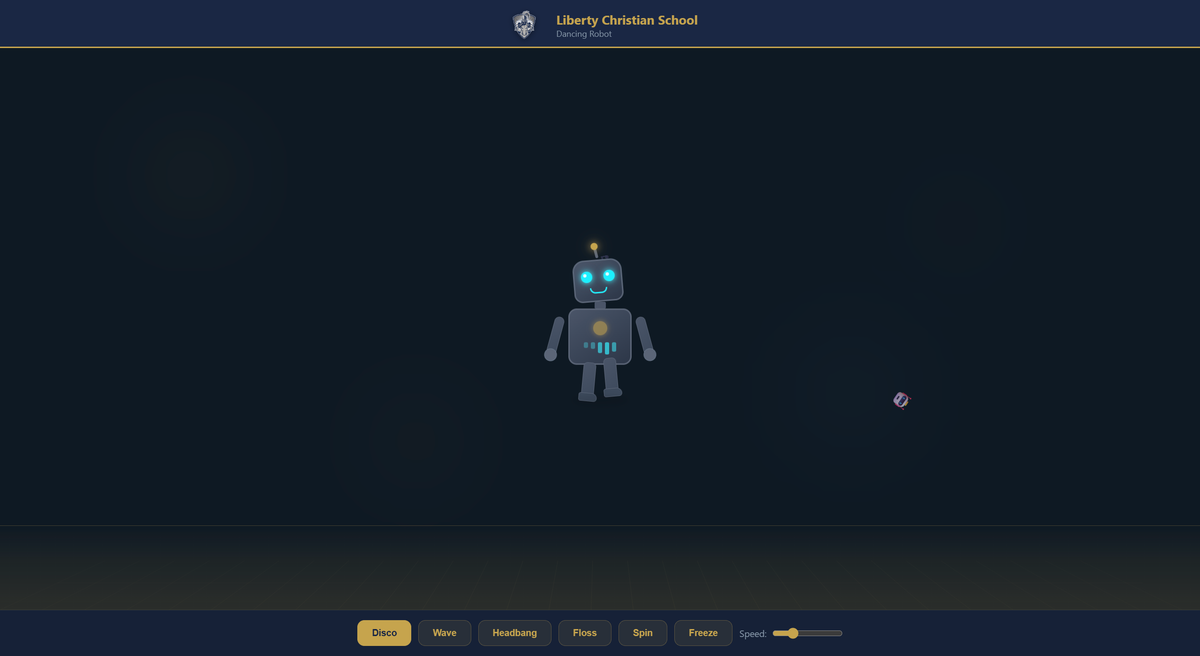
Animated dancing robot with 6 moves, disco lights, and LCS Warriors branding

LCS Dancing Robot
💬 Sample prompts Paste any of these into Claude Code to use this app
Dancing robot Open the LCS dancing robot app
Make it dance Show me the dancing robot with different moves
Robot app Open the animated robot web page
Open this app

Paste this into Claude Code (VS Code panel, Adom editor, or terminal) to install:

Open the Adom Wiki page for the "LCS Dancing Robot" app at https://wiki-ufypy5dpx93o.adom.cloud/wiki/apps/lcs-dancing-robot and tell me how to use it.

LCS Dancing Robot

An animated dancing robot web app built for Liberty Christian School.

Try It Now

Dance Moves

  • Disco — full body groove with bouncing torso and swinging arms
  • Wave — arms swaying side to side with body sway
  • Headbang — head and torso pumping fast
  • Floss — the classic move with alternating arms and hips
  • Spin — full 360-degree rotation
  • Freeze — stops all animation instantly

Features

  • 6 dance modes with one-click switching
  • Speed slider (0.3x to 3x)
  • Animated disco floor with perspective tiles
  • Pulsing disco lights in the background
  • Emoji particle effects (stars, music notes, fire)
  • Glowing antenna and cyan LED eyes
  • Gold chest light with animated equalizer bars
  • LCS Warriors branding with navy/gold theme
  • Pure CSS animation with no dependencies

Sub-Skills
?
What are Sub-Skills?

Sub-skills are community-contributed AI skill extensions for this component. They teach AI assistants about specific tools, configurators, or workflows.

Examples:

  • A manufacturer’s configuration tool for a motor controller
  • A community-written design guide for an amplifier circuit
  • An automated test/validation script for a sensor module

How to add one: Click Add Sub-Skill, provide the URL to your skill and a brief description. Submissions are reviewed by the Adom team before going live.

No sub-skills yet. Be the first to contribute one!

Recent activity

3 commits