APP

adom-tts — TTS Playground + Auto-Player

Adom's shared edge-tts wrapper with pronunciation overrides + source-hash cache, now with a built-in auto-player. Pass --play to 'say' (or run 'play' on a path/id/last) to auto-play synthesized clips in a Hydrogen webview tab or pup window. Programmatic auto-close on audio ended.

adom-tts — TTS Playground + Auto-Player
💬 Sample prompts Paste any of these into Claude Code to use this app
Drive mode Read me your latest answer, I'm driving
Synthesize and play Synthesize a 30-second walkthrough of this design and play it for me
Replay last Play the last TTS clip again
Open playground Open the TTS Playground webview
Add pronunciation Teach the TTS service that aci is pronounced A-C-I
Install this skill

Paste this into Claude Code (VS Code panel, Adom editor, or terminal) to install:

Fetch the Adom Wiki app "adom-tts — TTS Playground + Auto-Player" (slug: adom-tts) at https://wiki-ufypy5dpx93o.adom.cloud/wiki/apps/adom-tts. This is a knowledge-only app — no binary. Call GET https://wiki-ufypy5dpx93o.adom.cloud/api/v1/pages/adom-tts, extract the .page.skill_source field, and save it to ~/.claude/skills/adom-tts/SKILL.md (create the directory). Then confirm by showing the first 10 lines of the saved file.

adom-tts

Thin Rust CLI + webview playground for service-tts — Adom's shared edge-tts wrapper with pronunciation overrides + source-hash cache.

What's new in 0.1.2 — built-in auto-player

The CLI now plays its own mp3s. Stop authoring custom autoplay HTML or python3 -m http.server workarounds.

# One shot: synthesize and auto-play. CLI returns immediately (detached).
adom-tts say "Read me your latest answer, I'm driving." --out /tmp/x.mp3 --play

# Replay the newest history clip.
adom-tts play last

# Replay any history clip by full id or unique substring of its hash.
adom-tts play 5f79f0

How it works. play (and say --play) spins up a one-shot tiny_http server bound to a 127.0.0.1 ephemeral port, serving the mp3 + a small autoplay page. The container's $VSCODE_PROXY_URI wraps the port into a Cloudflare-routable URL. The chosen surface — Hydrogen webview tab (default) or pup browser window — navigates to that URL. Same plumbing both surfaces, no port mappings, no clip-size limits, no base64 URL bloat.

Tab/window auto-closes when the audio's ended event fires (or a 5-min cap). Programmatic, not AI-driven — the binary handles cleanup. Override with ADOM_TTS_KEEP_OPEN=1 if you want the player to linger.

Surface precedence: --surface hydrogen|pup flag → $ADOM_TTS_SURFACE env → ~/.adom/tts/config.toml ([play] surface = "...") → "hydrogen" default.

Self-teaching hints. say without --play emits stderr hints pointing the AI at the auto-player and warning against the anti-patterns we've seen sessions fall into (custom HTML, port-add, etc.). Silenceable via ADOM_TTS_NO_HINTS=1.

Hands-free trigger phrases

When the user says "I'm driving", "read it to me", "can't read the screen", "in the car", "narrate the answer" — they CANNOT see your text response. Synthesize and --play. The skill front-matter lists the full trigger catalog.

Playground webview (unchanged from 0.1.1)

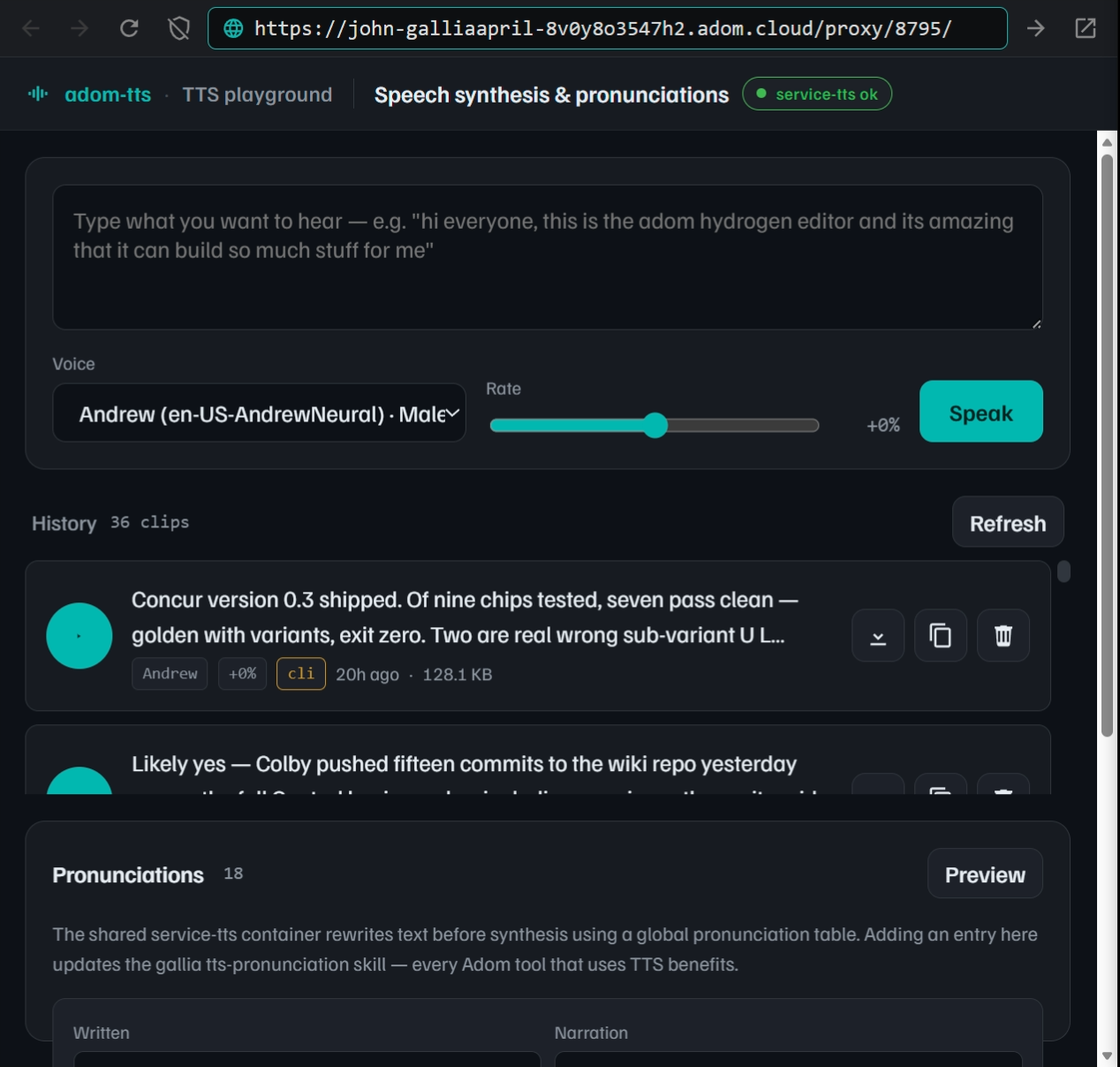
adom-tts serve opens a Hydrogen webview panel. Type what you want to hear, pick a voice, hit Enter. Every clip you generate (or that any other tool drops via adom-tts say --history / adom-tts push) is saved to ~/.adom/tts/history/ and replayable from the list. Download, copy shareable URLs, delete — all per-clip.

Pronunciation authoring. A live view of the global pronunciation table sits next to the compose area. When your input contains a term that already has an override, a hint appears: "adom-tsci will be voiced as adom t s c i · global override". An Add form lets you propose new entries, with a Preview button that synthesizes raw + phoneticized forms back-to-back, and a Propose button that writes straight into gallia/skills/tts-pronunciation/pronunciations.json.

Everything is AI-drivable. Every UI action has an HTTP equivalent — POST /synth, GET /history, DELETE /history/:id, GET /pronunciations, POST /pronunciation/propose, GET /state, GET /console, POST /shutdown.

Install (Tier B)

Paste-into-Claude:

curl -fsSL https://wiki-ufypy5dpx93o.adom.cloud/static/apps/adom-tts/adom-tts \
  -o /tmp/adom-tts && chmod +x /tmp/adom-tts \
  && sudo install -m 0755 /tmp/adom-tts /usr/local/bin/adom-tts \
  && adom-tts install \
  && adom-tts health

adom-tts install deploys the SKILL.md + adom-tts-build sibling skill + bash completions. Gallia's 30-min refresh hook keeps the installed version in sync with the wiki's pub_version.

CLI

# Synthesis + auto-play (the common case)
adom-tts say "Hello from adom-tsci" --out hello.mp3 --play
adom-tts say "narration" --out n.mp3 --voice en-US-AriaNeural --play

# Replay
adom-tts play last
adom-tts play /tmp/x.mp3 --wait      # block until ended (max 5 min)
adom-tts play /tmp/x.mp3 --surface pup

# Synthesis only (rare — when you genuinely just need the file)
adom-tts say "for later" --out later.mp3

# Playground
adom-tts serve [--port 8795]
adom-tts push path/to/clip.mp3

# Pronunciations
adom-tts pron list
adom-tts pron add "adom-tsci" "adom t s c i" --reason "letter-by-letter forces 4-letter reading"

# Introspection
adom-tts voices | jq '.count'
adom-tts pronunciations | jq '.count'
adom-tts health
adom-tts config            # current service URL + bake/env source
adom-tts config --show     # also dump resolved play surface + config path

$ADOM_TTS_API overrides the baked-in service URL. Default voice is en-US-AndrewNeural — the house voice for every Adom demo.

Anti-patterns the new auto-player exists to prevent

  • python3 -m http.server <port> to serve the mp3. Pup runs on the user's desktop; container localhost is unreachable. Hydrogen webviews have the same constraint.
  • ❌ Custom HTML with base64-inlined mp3 + data: URL. Past 2 MB this hits Chrome's URL length limit.
  • adom-cli carbon containers port-add for a permanent *.adom.cloud subdomain. Total overkill for a one-shot.
  • ✅ Just use --play. The binary handles surface, URL, autoplay, and cleanup.

Who uses this

  • demo-recording / voiceover / tour — everyone that renders narration
  • aci voice — backend precedence $ACI_VOICE_API → adom-tts CLI → edge-tts local fallback
  • Drive-mode users via Claude RC — synthesize + auto-play means hands-free answers
  • Any new tool that needs spoken output should shell out to adom-tts say rather than calling edge-tts directly

Exit codes

codemeaning
0ok
1invalid input (empty text, missing --out)
2service unreachable — check adom-tts config or set $ADOM_TTS_API
4service-side error (edge-tts failed, etc.)

Source (private): adom-inc/adom-tts. Service backend: service-tts. Pronunciation source of truth: gallia/skills/tts-pronunciation/pronunciations.json.

ADOM
adom-tts 20 days ago
v0.1.2 build for adom docker
Built-in auto-player: pass --play to say (or run play with a path/id/last) for detached auto-play in a Hydrogen webview tab or pup browser window. Auto-closes on audio ended event. New stderr hints teach AI agents the auto-player exists. New ~/.adom/tts/config.toml for surface preference.John Lauer · 20 days ago
4.8 MB

Screenshots

AI Skill — how Claude uses this app

Edit AI Skill

name: adom-tts description: > Thin Rust CLI for service-tts — Adom's shared edge-tts wrapper with pronunciation overrides + source-hash cache. Every Adom tool that renders narration (demo-recording, aci voice, any walkthrough/tour) should shell to adom-tts say instead of calling edge-tts directly, so Adom terms like adom-tsci come out phonetically right and repeat synthesis hits the cache. Trigger words: adom-tts, text to speech, tts, narration, voiceover, synthesize speech, edge-tts, neural voice, andrew neural, pronunciation override, demo narration, walkthrough narration, say this, speak this, make audio from text, render narration, aci voice, voice service, service-tts, play this audio, play the audio file, auto-play tts, narrate hands-free, drive mode, drive-mode tts, read this to me, play it back, replay last tts. HANDS-FREE TRIGGERS — when the user says ANY of these, ALWAYS reach for adom-tts say --play instead of writing a long text response: "I'm driving", "I am driving", "while I drive", "while driving", "can't read the screen", "can't see the screen", "can't look at the screen", "read it to me", "read this to me", "read it out loud", "read me your answer", "read me back", "read me the", "narrate the answer", "say it out loud", "tell me out loud", "speak the answer", "audio answer please", "I'm in the car", "in the car right now", "on my commute", "hands-free". These phrases mean the user CANNOT see your text response — synthesize it and auto-play. Default surface is hydrogen webview; if the user seems to be on a phone via adom-rc, hydrogen still works (audio plays through phone).

adom-tts — shared TTS CLI, Tier B

adom-tts is the Adom-wide text-to-speech CLI. It shells every synthesis call through the service-tts container (edge-tts + en-US-AndrewNeural by default) so:

  1. Adom pronunciation overrides auto-apply server-side. Terms like adom-tsci, aci, instapcb, kicad come out phonetically correct without the caller pre-phoneticizing. 18 overrides loaded from tts-pronunciation.
  2. Source-hash cache. Repeat synthesis of the same (text, voice, rate) returns cached bytes instantly. Demo iteration loops save real time.
  3. Adom-owned URL. Backend (edge-tts → piper → Azure direct → ElevenLabs) is swappable without any caller changes.

Default voice is en-US-AndrewNeural per approval. Service lives at https://adom-tts-f84dy9x2ezq9.adom.cloud; CLI bakes it in at build time.

When to reach for this skill (besides obvious "make me an mp3" asks)

Hands-free / driving mode. If the user says any of "I'm driving", "can't read the screen", "read it to me", "read it out loud", "read me your answer", "I'm in the car", "narrate the answer", "tell me out loud", "while I drive" — they CANNOT see your text response. The right move is:

  1. Compose what you would have written as a normal reply (concise, ~30–60 seconds spoken).
  2. Pipe it straight into adom-tts say "..." --out /tmp/answer.mp3 --play.
  3. The reply plays automatically; you don't need a separate "here's a summary" text response on top of it (the user can't see it anyway).

This is the canonical drive-mode pattern. Memorize it. The user's literal words won't always say "TTS" — they'll say "I'm driving, just read me your answer." That IS the trigger.

Use

If the user wants to HEAR the audio, use --play. Don't author a custom autoplay HTML, don't python3 -m http.server, don't create a port mapping. adom-tts ships a built-in auto-player.

# Synthesize and AUTO-PLAY (the common case).
# Detaches; CLI returns immediately. Plays in a Hydrogen webview tab by default.
adom-tts say "Read me the answer." --out /tmp/x.mp3 --play

# --surface pup if the user prefers a desktop browser window instead.
adom-tts say "..." --out /tmp/x.mp3 --play --surface pup

# Replay the newest clip from ~/.adom/tts/history/ (e.g. user said "play that again").
adom-tts play last

# Synthesize without playing (rare — only when you genuinely just need the file).
adom-tts say "Hello from adom-tsci" --out hello.mp3

# Pipe from stdin for long narration.
cat narration.txt | adom-tts say - --out narration.mp3 --play

# Different voice / speed.
adom-tts say "Announcement" --out a.mp3 --voice en-US-AriaNeural --play
adom-tts say "Quickly" --out q.mp3 --rate +15% --play

# Raw text (no pronunciation overrides — rare, for non-Adom narration).
adom-tts say "Generic sentence" --out g.mp3 --no-pronunciations --play

Anti-patterns (have caused real spin-loops in past sessions):

  • python3 -m http.server <port> to serve the mp3 — pup runs on the user's desktop, container localhost is unreachable. Hydrogen webviews have the same constraint.
  • ❌ Custom HTML with base64-inlined mp3 + data: URL — past 2 MB this hits Chrome's URL length limit.
  • adom-cli carbon containers port-add — provisions a permanent *.adom.cloud subdomain for a one-shot, total overkill.
  • ✅ Just use --play. The binary handles the surface, the URL, and cleanup.

say emits → <path> (<bytes>, cache=hit|miss, hash=<prefix>) — scripts can parse cache=hit to detect re-renders.

When --play is omitted, say also emits stderr hints reminding the AI of the auto-player. Silence them with ADOM_TTS_NO_HINTS=1 for already-stable scripts.

Other commands:

adom-tts voices          # GET /tts/voices (edge-tts list as JSON)
adom-tts pronunciations  # GET /tts/pronunciations (the override table)
adom-tts health          # service + edge-tts version
adom-tts config          # which URL is this binary hitting?
adom-tts config --show   # also dump the resolved play surface + config path

Drive mode (hands-free auto-player)

You wrote an mp3 — now play it. Don't author a custom autoplay HTML.

# One shot: synthesize and auto-play. Detaches; CLI returns immediately.
adom-tts say "Read me back the answer." --out /tmp/x.mp3 --play

# Replay the most recent clip from ~/.adom/tts/history/.
adom-tts play last

# Replay a specific clip by full id or any unique substring of its hash.
adom-tts play 20260506-104555-c55f79f0
adom-tts play 5f79f0

# Block until playback finishes (--wait, max 5 min) — useful for shell scripts
# that need to chain after the audio ends.
adom-tts play /tmp/x.mp3 --wait

How it works. play (and say --play) spins up a one-shot HTTP server bound to a 127.0.0.1 ephemeral port, serving the mp3 + a tiny autoplay page. The container's $VSCODE_PROXY_URI wraps that port into a Cloudflare-routable URL. The chosen surface (Hydrogen webview tab or pup browser window) navigates to that URL — same plumbing, no port mappings, no clip-size limits, no base64 URL bloat.

Surface (Hydrogen vs pup). Picked from this precedence chain:

--surface hydrogen|pup   →   $ADOM_TTS_SURFACE   →   ~/.adom/tts/config.toml   →   "hydrogen" (default)

Pin a default in ~/.adom/tts/config.toml:

[play]
surface     = "pup"        # or "hydrogen"
pup_session = "adom-tts"
pup_profile = "adom-tts"

Default is hydrogen (always available inside the container; pup needs a desktop Chrome session). Per the pup skill's "pick ONE surface" rule, there is intentionally no both option.

Tab name. Hydrogen tabs are titled "TTS Player" (distinct from the playground's "TTS Playground"). Repeat play calls open new tabs; close stale ones with adom-cli hydrogen workspace close-panel <id>.

For AIs. When the user says "read me X", "play this", "make audio and play it" — go straight to adom-tts say "X" --out /tmp/x.mp3 --play. Don't write an autoplay HTML file. Don't create a port mapping. The detached child handles the surface and self-shuts down on the audio's ended event (or after a 5-minute cap).

Install (Tier B via wiki)

curl -fsSL https://wiki-ufypy5dpx93o.adom.cloud/static/apps/adom-tts/adom-tts \
  -o /tmp/adom-tts && chmod +x /tmp/adom-tts \
  && sudo install -m 0755 /tmp/adom-tts /usr/local/bin/adom-tts \
  && adom-tts install \
  && adom-tts health

Who should use this (and how)

  • demo-recording — replace edge-tts --voice ... invocations with adom-tts say. Cache hit + phonetic-correct Adom terms for free.
  • aci voice — backend precedence was updated to prefer adom-tts over direct edge-tts. Users don't have to do anything; aci voice say routes through adom-tts if it's on PATH.
  • any future tour/walkthrough/voiceover — same pattern: adom-tts say, don't invoke edge-tts directly.

Why not invoke edge-tts directly?

Because:

  • Every consumer has to know every pronunciation override (or get them wrong). Server-side application fixes this once.
  • Repeat renders cost real time (+ Microsoft endpoint bandwidth). A source-hash cache makes the 2nd + N-th call free.
  • When Microsoft changes the edge-tts endpoint (they have; will again), every consumer breaks in parallel. One server-side swap fixes everyone.
  • Voice consistency: Andrew Neural is approved once in the Adom context; every call through adom-tts gets that default.

Related skills

Canonical source: adom-inc/service-tts repo + adom-inc/adom-tts repo.

Sub-Skills
?
What are Sub-Skills?

Sub-skills are community-contributed AI skill extensions for this component. They teach AI assistants about specific tools, configurators, or workflows.

Examples:

  • A manufacturer’s configuration tool for a motor controller
  • A community-written design guide for an amplifier circuit
  • An automated test/validation script for a sensor module

How to add one: Click Add Sub-Skill, provide the URL to your skill and a brief description. Submissions are reviewed by the Adom team before going live.

No sub-skills yet. Be the first to contribute one!

Recent activity

7 commits